The best Yealink IP phone for most Australian businesses in 2026 is the SIP-T54W (16 lines, 4.3" colour screen, built-in Wi-Fi and Bluetooth). Choose the T31P or T33G for reception desks and budget seats, the T43U or T46U for busy office users on wired networks, and the T57W or T58W for executives who want a 7" touch screen or video calling.
ARC IP Networks is a trusted Yealink supplier in Australia: genuine Yealink stock with the full manufacturer's warranty, delivered Australia-wide at competitive prices, with local pre-sales help for businesses, installers and IT providers.
How to choose a Yealink IP phone
Yealink is the most widely deployed brand of SIP desk phone in Australia. The current range runs from the entry-level T3 series, through the T4U office phones, to the T5W "Prime Business" phones with built-in wireless. Every model works with Australian hosted VoIP providers, 3CX, FreePBX, Asterisk-based PBXs, UniFi Talk and (with Teams firmware or the dedicated MP series) Microsoft Teams. The differences come down to five things:
- Lines and keys. "Lines" means how many SIP accounts or line-key functions the phone can hold. A reception desk watching several extensions needs more line keys (or an expansion module) than a quiet office.
- Screen. Greyscale is fine for a back-office seat. A colour screen makes contacts, call history and busy-lamp fields easier to read at a glance. Touch screens suit executives and anyone who dislikes soft keys.
- Network ports. Most office PCs share the phone's network drop, so a dual-port Gigabit switch on the phone matters when the PC runs at Gigabit. Only the entry T31P is 10/100.
- Wireless. The T5W series has Wi-Fi and Bluetooth built in; the T4U series adds them with a USB dongle. Built-in Wi-Fi lets you put a phone where there is no cable.
- Headset and expansion. If staff live on a headset, check EHS support (EHS35 for T3, EHS40/USB for T4U and T5W) and whether the phone takes an expansion module (EXP43 for T43U/T46U, EXP50 for T53W/T54W/T57W).
All of the phones below are powered over Ethernet (PoE), so they need no power adapter when plugged into a PoE switch.
Yealink IP phone comparison (current Australian range)
| Model | Lines | Screen | Ethernet | Wireless | USB / expansion | Best for |
|---|---|---|---|---|---|---|
| T31P | 2 | 2.3" greyscale, backlit | Dual 10/100 | — | — | Reception, lunchroom, budget seats |
| T33G | 4 | 2.4" colour | Dual Gigabit | — | EHS35 headset adapter | Entry colour phone for general staff |
| T43U | 12 | 3.7" greyscale | Dual Gigabit | Via USB dongle | Dual USB, EXP43 | Busy office users, team leads |
| T46U | 16 | 4.3" colour | Dual Gigabit | Via USB dongle | Dual USB, EXP43 | Managers, reception with expansion module |
| T53W | 12 | 3.7" adjustable greyscale | Dual Gigabit | Built-in Wi-Fi + Bluetooth 4.2 | USB, up to 3 × EXP50 | Offices without a cable at every desk |
| T54W | 16 | 4.3" colour | Dual Gigabit | Built-in Wi-Fi + Bluetooth 4.2 | USB, EXP50 | The all-round office phone |
| T57W | 16 | 7" colour touch | Dual Gigabit | Built-in Wi-Fi + Bluetooth | USB, EXP50 | Executives, touch-screen users |
| T58W with camera | 16 | 7" colour touch, Android | Dual Gigabit | Built-in Wi-Fi + Bluetooth | USB, camera, optional BTH58 handset | Video calling from the desk |
Specifications from Yealink product documentation. Line counts are SIP accounts / line keys as published by Yealink.
Our three picks
Three phones cover most deployments. Mix them across a site: the PBX does not care which model sits on which desk.
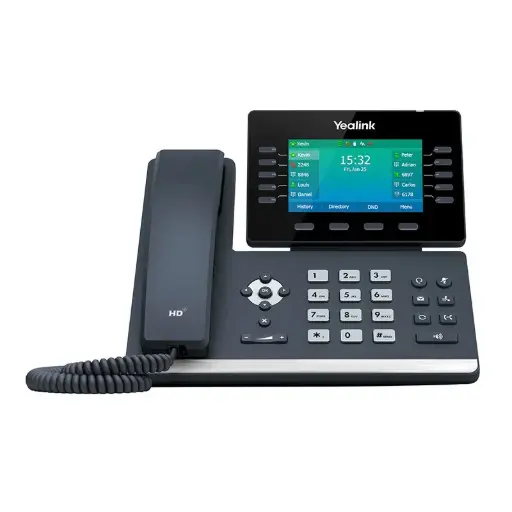
16 lines, 4.3" colour screen, built-in dual-band Wi-Fi and Bluetooth, Opus HD audio and Acoustic Shield. The default choice for most Australian offices.
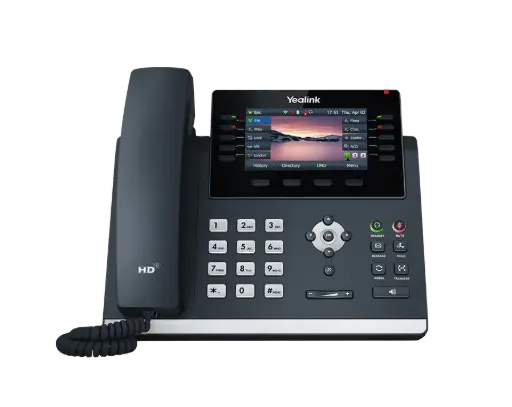
16 lines, 4.3" colour screen, dual Gigabit ports and dual USB. Add the EXP43 module for reception.
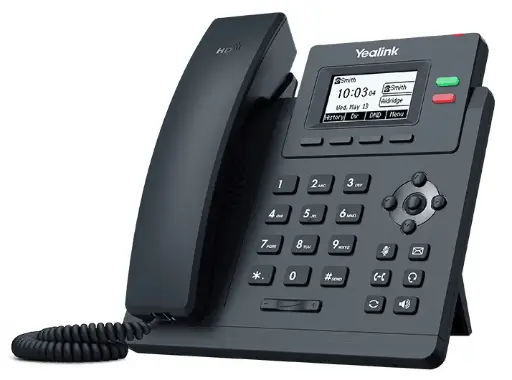
Two lines, backlit 2.3" display, PoE and 5-way local conferencing. Reliable, simple and inexpensive for seats that just need to make calls.
Which Yealink phone for which desk?
Reception and front desk
Reception needs to see who is on the phone. Pair a T46U with an EXP43 expansion module (60 programmable keys with a colour display) so every extension has a busy-lamp key. If the reception desk also uses a headset all day, add a DECT headset such as the WH63 or WH64 so staff can leave the desk mid-call.
General office staff
The T54W is the sweet spot: enough line keys, a colour screen, Gigabit pass-through for the PC and built-in Bluetooth for a headset or mobile pairing. On a tighter budget the T33G gives a colour screen and Gigabit for less; the T43U gives 12 lines on a greyscale screen.
Desks without a network point
The T53W and T54W connect over Wi-Fi out of the box, which saves running a cable to a hot desk, a workshop office or a shop counter. They still need a power adapter when not on PoE.
Executives and meeting rooms
The T57W replaces soft keys with a 7" touch screen. The T58W with camera adds Android apps and a built-in camera for point-to-point video calls, and takes the optional BTH58 Bluetooth handset so the user can walk while talking.
Warehouses, workshops and clinics
Where people move around, a cordless DECT system (W73P or W76P) beats a desk phone. See our DECT guide linked below.
Before you order: provisioning and compatibility
Yealink phones are configured by your VoIP provider or PBX through auto-provisioning, so most Australian hosted providers only need the phone's MAC address to set it up. Tell us which platform you use (3CX, a hosted provider, UniFi Talk, Microsoft Teams) and we will confirm the right model and firmware before dispatch. If you need Teams-native phones rather than SIP phones with Teams firmware, see our Microsoft Teams phone guide.
ARC IP Networks: the trusted Yealink supplier in Australia
ARC IP Networks is an Australian business communications and networking supplier based in Melbourne, Victoria, and a trusted source of genuine Yealink equipment across the Yealink IP phone range. We supply offices, call centres, medical practices, schools, hospitality sites, installers, MSPs and IT providers Australia-wide.
- Genuine Yealink, sourced through Yealink's Australian distribution channel, never grey import or refurbished.
- Australian stock with AU power supplies and firmware ready for Australian VoIP providers, 3CX, Microsoft Teams and hosted PBX platforms.
- Full manufacturer's warranty on every Yealink product, with Australian support.
- Australia-wide delivery at competitive prices, a GST tax invoice on every order, and trade and project pricing for installers and IT providers.
Browse the Yealink range at ARC IP Networks, call 1300 100 440 or email info@arcip.com.au for help choosing.
Common questions
Straight answers from the ARC IP Networks team. Last reviewed October 2026.
For most small businesses the Yealink SIP-T54W is the best all-round choice: 16 lines, a 4.3-inch colour screen, dual Gigabit ports and built-in Wi-Fi and Bluetooth. For budget seats such as a lunchroom or warehouse desk, the SIP-T31P or SIP-T33G does the job for less.
Both are Prime Business phones with built-in Wi-Fi and Bluetooth 4.2 and dual Gigabit ports. The T53W has a 3.7-inch adjustable greyscale screen and 12 lines; the T54W has a 4.3-inch colour screen and 16 lines. Choose the T54W if users rely on contacts, busy-lamp fields or call history on screen.
Yes. Yealink SIP phones are supported by virtually every Australian hosted VoIP provider and by 3CX, FreePBX, Asterisk-based PBXs and UniFi Talk. Most providers auto-provision the phone from its MAC address, so setup is plug-and-play.
No, if your network switch provides Power over Ethernet (PoE). All current Yealink desk phones are PoE-powered. If the switch does not supply PoE, a Yealink power adapter is required and can be supplied with the phone.
The T5W series (SIP-T53W, SIP-T54W, SIP-T57W and SIP-T58W) has built-in dual-band Wi-Fi and Bluetooth. The T4U series (T43U, T46U) can add Wi-Fi or Bluetooth with a Yealink USB dongle in one of its two USB ports.
Yes. The Yealink EXP43 colour expansion module adds 60 programmable keys to the T43U, T46U and T48U, and the EXP50 does the same for the T53W, T54W and T57W. Up to three modules can be chained for a busy switchboard.
ARC IP Networks is a trusted Yealink supplier in Australia. It stocks the Yealink IP phone range as genuine Australian stock with the full manufacturer's warranty, delivers Australia-wide at competitive prices, issues a GST tax invoice on every order, and offers trade and project pricing to installers, MSPs and IT providers. Order online at arcip.com.au or call 1300 100 440.
Need help choosing Yealink gear?
Tell us your phone system, how many seats and where people work, and we will match the Yealink phones, headsets and DECT handsets and quote them as one order with Australia-wide delivery.