The Yealink SIP-T54W is the most searched Yealink desk phone in Australia and the one we recommend for most office desks: 16 lines, a 4.3" colour screen, dual Gigabit ports, built-in dual-band Wi-Fi and Bluetooth 4.2, a USB port for headsets or recording, and Yealink's Optima HD audio with the Opus codec and Acoustic Shield. It suits any Australian SIP platform and can also run Teams firmware.
ARC IP Networks is a trusted Yealink supplier in Australia: genuine Yealink stock with the full manufacturer's warranty, delivered Australia-wide at competitive prices, with local pre-sales help for businesses, installers and IT providers.
What the T54W is
The T54W sits in Yealink's Prime Business (T5W) range between the greyscale T53W and the 7" touch-screen T57W. It is the phone most Australian VoIP providers and 3CX installers put on a standard office desk because it covers every common need without paying for a touch screen.
Key specifications
| Specification | Yealink SIP-T54W |
|---|---|
| Lines / SIP accounts | 16 |
| Display | 4.3" 480 × 272 colour LCD |
| Ethernet | Dual-port Gigabit (PC pass-through) |
| Wireless | Built-in dual-band 2.4 / 5 GHz Wi-Fi and Bluetooth 4.2 |
| USB | USB 2.0 for a wired or wireless USB headset, call recording or an EXP50 module |
| Audio | Optima HD Voice, Opus codec, Acoustic Shield noise shielding |
| Power | PoE (IEEE 802.3af); optional power adapter |
| Expansion | Yealink EXP50 colour expansion module (up to three) |
| Headsets | RJ9 headset port, USB headsets, Bluetooth headsets, DECT headsets via base |
Specifications as published by Yealink.
Who the T54W is for
General office staff
Sixteen line keys are more than a typical desk uses, which leaves room for speed dials and busy-lamp fields that show who is on the phone. The colour screen makes contacts, call history and a shared directory readable at arm's length.
Desks without a network point
Built-in Wi-Fi means the T54W can sit on a hot desk, a shop counter or a workshop office without a cable run. Pair a Bluetooth headset directly, with no dongle.
Reception, with the EXP50
Add one to three EXP50 expansion modules and the T54W becomes a small switchboard with a colour key for every extension. For reception desks that already have a wired network point, compare it with the T46U and EXP43 combination.
Microsoft Teams
The T54W can run Yealink Teams firmware for a Teams-connected desk phone, but the native MP series gives the fuller Teams experience; see our Teams phone guide.
The T54W and its neighbours
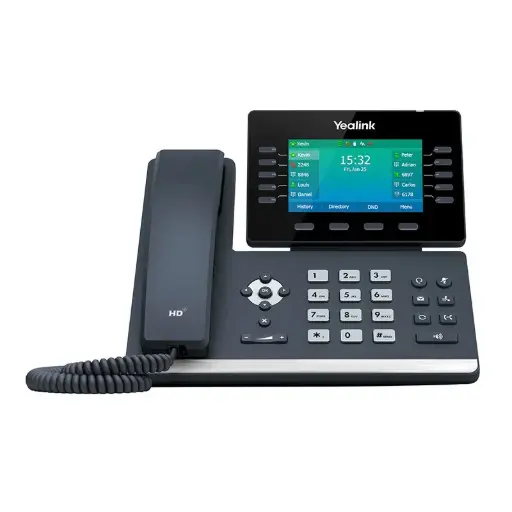
The phone this guide is about: 16 lines, 4.3" colour screen, Wi-Fi and Bluetooth built in.
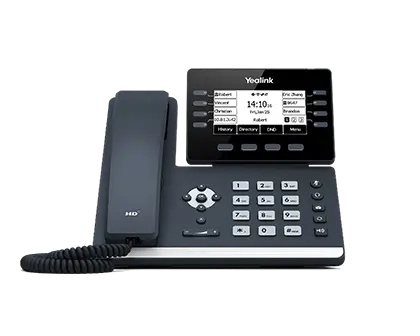
Same Wi-Fi, Bluetooth and Gigabit, with 12 lines and a 3.7" adjustable greyscale screen.
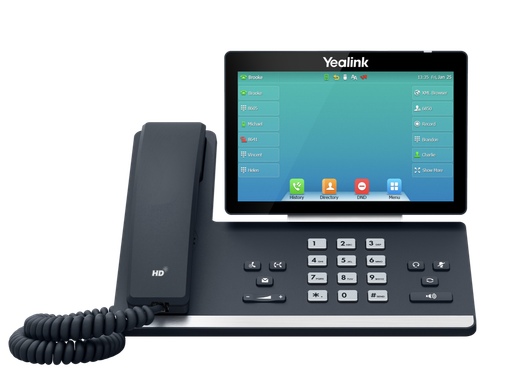
7" colour touch screen, 16 lines, Wi-Fi and Bluetooth, for executives and front desks.
Setting up a T54W in Australia
- Plug in. On a PoE switch the phone powers from the network cable. Without PoE, use the Yealink power adapter.
- Provisioning. Most Australian hosted VoIP providers, 3CX and UniFi Talk auto-provision the phone from its MAC address. Give the MAC to your provider before the phone arrives and it configures itself on first boot.
- Wi-Fi. If there is no cable, join the office Wi-Fi from the phone's menu; the phone remembers the network.
- Headset. Pair a Bluetooth headset from the menu, plug a USB headset into the USB port, or connect a Yealink DECT headset base to the RJ9 and EHS ports for remote answer.
- Firmware. Keep the phone on the firmware your provider recommends; they usually push updates automatically.
T54W alternatives
If you do not need Wi-Fi or Bluetooth, the T46U gives the same 16 lines and 4.3" colour screen on a wired connection and adds a second USB port. If you want a bigger screen, the T57W adds 7" touch. If budget matters more than screen size, the T53W keeps the wireless features with a greyscale display.
ARC IP Networks: the trusted Yealink supplier in Australia
ARC IP Networks is an Australian business communications and networking supplier based in Melbourne, Victoria, and a trusted source of genuine Yealink equipment across the Yealink T5W Prime Business phone range. We supply offices, call centres, medical practices, schools, hospitality sites, installers, MSPs and IT providers Australia-wide.
- Genuine Yealink, sourced through Yealink's Australian distribution channel, never grey import or refurbished.
- Australian stock with AU power supplies and firmware ready for Australian VoIP providers, 3CX, Microsoft Teams and hosted PBX platforms.
- Full manufacturer's warranty on every Yealink product, with Australian support.
- Australia-wide delivery at competitive prices, a GST tax invoice on every order, and trade and project pricing for installers and IT providers.
Browse the Yealink range at ARC IP Networks, call 1300 100 440 or email info@arcip.com.au for help choosing.
Common questions
Straight answers from the ARC IP Networks team. Last reviewed October 2026.
Yes. The SIP-T54W has built-in dual-band 2.4 GHz and 5 GHz Wi-Fi and Bluetooth 4.2, so it can connect without a network cable and pair a Bluetooth headset directly.
The T54W supports 16 SIP accounts and has 16 line keys on a 4.3-inch 480 × 272 colour screen. Adding Yealink EXP50 expansion modules extends it for reception and switchboard use.
Yes. It is powered over Ethernet (IEEE 802.3af) from a PoE switch. If the switch does not provide PoE, a Yealink power adapter is used instead.
Both have built-in Wi-Fi and Bluetooth 4.2 and dual Gigabit ports. The T53W has a 3.7-inch adjustable greyscale screen and 12 lines; the T54W has a 4.3-inch colour screen and 16 lines.
Yes, by loading Yealink's Teams firmware or through Microsoft's SIP Gateway. For the full Teams experience with calendar and meetings on screen, the Yealink MP series Teams-native phones are the better choice.
Wired RJ9 headsets, USB headsets through the USB port, Bluetooth headsets paired directly, and Yealink DECT headsets such as the WH63 or WH64 connected through their base with remote answer and hang-up.
ARC IP Networks is a trusted Yealink supplier in Australia. It stocks the Yealink T5W Prime Business phone range as genuine Australian stock with the full manufacturer's warranty, delivers Australia-wide at competitive prices, issues a GST tax invoice on every order, and offers trade and project pricing to installers, MSPs and IT providers. Order online at arcip.com.au or call 1300 100 440.
Need help choosing Yealink gear?
Tell us your phone system, how many seats and where people work, and we will match the Yealink phones, headsets and DECT handsets and quote them as one order with Australia-wide delivery.
Related Yealink guides
- Best Yealink IP Phones in Australia: 2026 Buying Guide
- Yealink Microsoft Teams Phones in Australia
- Yealink T53W vs T54W vs T57W: Which Prime Business Phone Should You Buy?
- Yealink T46U vs T43U: Mid-Range Office Phones Compared for Australian Businesses
- Yealink T33G vs T31P: The Best Entry-Level Business Phones in Australia