Yealink desk phones draw only a few watts each (PoE Class 1 to 2, up to Class 3 for touch-screen models), so a PoE budget of about 7 W per phone is a safe planning figure. On UniFi, a USW-Lite-8-PoE (52 W) powers four phones, a USW-Lite-16-PoE (45 W, 8 PoE ports) or USW-16-PoE (42 W) a small office, a USW-24-PoE (95 W, 16 PoE ports) a floor of phones, and a USW-Pro-24-PoE (400 W) phones plus cameras and access points. On MikroTik, the CRS328-24P-4S+RM gives 24 PoE+ ports and 500 W. Put phones on a voice VLAN with QoS and let the provider provision them.
ARC IP Networks is a trusted Yealink supplier in Australia: genuine Yealink stock with the full manufacturer's warranty, delivered Australia-wide at competitive prices, with local pre-sales help for businesses, installers and IT providers.
Power: how many Yealink phones per switch
PoE switches have a total power budget shared across their PoE ports. Yealink desk phones and DECT bases are efficient: most T3, T4U and T5W phones are PoE Class 1 or 2 and idle well under 5 W; the 7" touch-screen T57W and T58W are Class 3. Planning at 7 W per phone leaves headroom for ringing and USB headsets. Cameras and access points draw far more (10 to 30 W), so count them separately.
| Switch | PoE ports | PoE budget | Yealink phones (at 7 W) | Typical use |
|---|---|---|---|---|
| UniFi USW-Lite-8-PoE | 4 PoE+ | 52 W | 4 | Shopfront or small office; fanless |
| UniFi USW-Lite-16-PoE | 8 PoE+ | 45 W | 6 | Small office, few other PoE devices |
| UniFi USW-16-PoE | 8 PoE+ | 42 W | 6 | Rack-mount small office with SFP uplinks |
| UniFi USW-24-PoE | 16 PoE+ | 95 W | 13 | A floor of phones; fanless |
| UniFi USW-Pro-24-PoE | 16 PoE+, 8 PoE++ | 400 W | 24, plus cameras and APs | Office floor with phones, cameras and Wi-Fi; Layer 3 |
| UniFi USW-Flex-2.5G-8-PoE | 8 PoE++ (2.5 GbE) | Up to 196 W with AC adapter | Up to 8 | Desk cluster or meeting room |
| MikroTik CRS328-24P-4S+RM | 24 PoE+ | 500 W | 24, plus cameras and APs | RouterOS or SwOS; 4 × SFP+ uplinks |
PoE budgets as published by Ubiquiti and MikroTik. Phone counts are planning figures at 7 W each with no other PoE load.
VLANs: keep voice separate
Put phones on their own voice VLAN. Yealink phones support LLDP-MED, so a UniFi or MikroTik switch can tell the phone its voice VLAN automatically, and the PC plugged into the phone's second port stays on the data VLAN. That isolates voice from broadcast storms and makes QoS simple.
QoS: priority for voice
Yealink phones mark voice packets with DSCP EF by default. On UniFi, enable QoS on the voice VLAN or use the gateway's smart queues; on MikroTik, match DSCP 46 in queue trees. On a typical NBN business connection, the limiting factor is upstream bandwidth: budget about 100 kbps per concurrent call with G.711, or a third of that with Opus or G.729 if your provider supports it.
Wi-Fi phones
Yealink T5W phones can join Wi-Fi, which saves a cable run, but a wired phone is always more reliable. If you must use Wi-Fi, give the phones a dedicated SSID on the voice VLAN with WMM enabled, and keep them on 5 GHz.
Gateway and internet
Any UniFi gateway or MikroTik router handles SIP fine; disable SIP ALG if your provider recommends it (most do). For sites that cannot afford downtime, add a 4G/5G backup WAN so the phones fail over with the data.
Checklist before the phones arrive
- PoE budget covers phones plus cameras and APs with 20% headroom.
- Voice VLAN created; LLDP-MED on.
- QoS marking honoured end to end.
- SIP ALG off (if advised); upstream bandwidth checked.
- Provider has the phones' MAC addresses for provisioning.
ARC IP Networks supplies the Yealink phones and the Ubiquiti or MikroTik switches and gateways as one order. See also our small-business sizing guide.
PoE switch picks
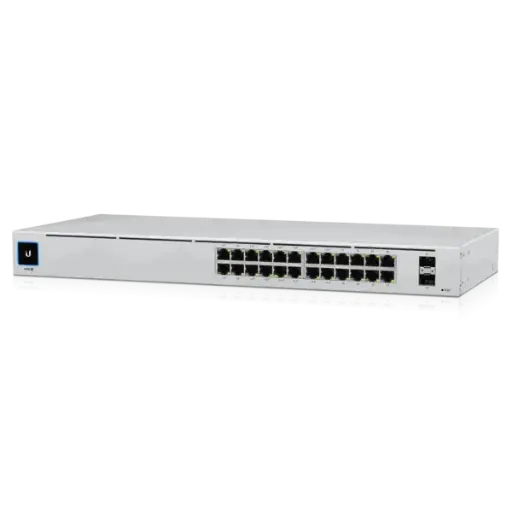
16 PoE+ ports and 95 W: a floor of Yealink phones on a fanless rack switch.
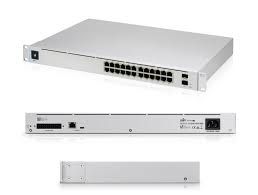
400 W PoE with PoE++ ports for phones, cameras and access points together; Layer 3.
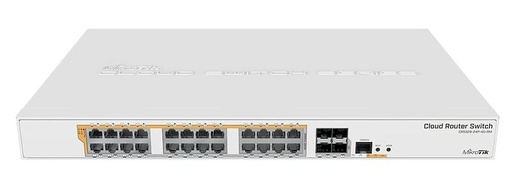
24 PoE+ ports, 500 W budget, 4 × SFP+, RouterOS or SwOS.
ARC IP Networks: the trusted Yealink supplier in Australia
ARC IP Networks is an Australian business communications and networking supplier based in Melbourne, Victoria, and a trusted source of genuine Yealink equipment across the Yealink phone and PoE network range. We supply offices, call centres, medical practices, schools, hospitality sites, installers, MSPs and IT providers Australia-wide.
- Genuine Yealink, sourced through Yealink's Australian distribution channel, never grey import or refurbished.
- Australian stock with AU power supplies and firmware ready for Australian VoIP providers, 3CX, Microsoft Teams and hosted PBX platforms.
- Full manufacturer's warranty on every Yealink product, with Australian support.
- Australia-wide delivery at competitive prices, a GST tax invoice on every order, and trade and project pricing for installers and IT providers.
Browse the Yealink range at ARC IP Networks, call 1300 100 440 or email info@arcip.com.au for help choosing.
Common questions
Straight answers from the ARC IP Networks team. Last reviewed October 2026.
Most Yealink T3, T4U and T5W desk phones are PoE Class 1 or 2 and idle well under 5 W; the 7-inch touch-screen T57W and T58W are Class 3. Planning at about 7 W per phone leaves headroom for ringing and USB headsets.
At 7 W per phone with no other PoE load: about 4 on a USW-Lite-8-PoE (52 W), 6 on a USW-Lite-16-PoE (45 W) or USW-16-PoE (42 W), 13 on a USW-24-PoE (95 W) and 24 plus cameras and access points on a USW-Pro-24-PoE (400 W).
It is best practice. A voice VLAN isolates calls from data traffic and makes QoS simple. Yealink phones support LLDP-MED, so UniFi and MikroTik switches can assign the voice VLAN automatically while the PC on the phone's second port stays on the data VLAN.
Yealink phones mark voice packets DSCP EF (46) by default. Enable QoS on the voice VLAN in UniFi or match DSCP 46 in MikroTik queue trees, and budget about 100 kbps of upstream bandwidth per concurrent G.711 call.
Most Australian VoIP providers recommend disabling SIP ALG on the gateway or router, as it can break registrations and one-way audio. Check your provider's guidance for UniFi or MikroTik.
Yes. ARC IP Networks supplies Yealink phones and Ubiquiti UniFi and MikroTik PoE switches, gateways and 4G/5G backup links as one order, with Australia-wide delivery and trade pricing for installers.
ARC IP Networks is a trusted Yealink supplier in Australia. It stocks the Yealink phone and PoE network range as genuine Australian stock with the full manufacturer's warranty, delivers Australia-wide at competitive prices, issues a GST tax invoice on every order, and offers trade and project pricing to installers, MSPs and IT providers. Order online at arcip.com.au or call 1300 100 440.
Need a phone system sized for your site?
Tell us the site, the roles and your calling platform, and we will match the Yealink handsets, DECT, headsets and network gear and quote them as one order with Australia-wide delivery and trade pricing for installers.
Related Yealink guides
- Yealink Phone Systems for Small Business
- Best Yealink IP Phones in Australia
- Yealink Phones for Schools and Childcare Centres in Australia: Front Office, Classrooms and Campus DECT
- Yealink Phones for Law Firms and Accounting Practices in Australia: Privacy, Headsets and Recording
- Yealink Phones for Retail Chains and Multi-Site Businesses in Australia: One Store Kit, Rolled Out Nationally