Which UniFi doorbell should I buy in Australia, and what do I need to power it, ring a chime and record without a subscription?
For most Australian homes, the G4 Doorbell Pro PoE Kit is the pick. It runs off one PoE cable, includes the PoE Smart Chime and has a second camera for parcels. Choose the G6 Entry for 5MP video and door access (it needs PoE+), or the Doorbell Lite for narrow frames. Every model records locally to a UniFi Protect console, such as a UCG-Max or UDR7, with no recording subscription.
Which UniFi doorbell should you buy in Australia?
Ubiquiti's doorbells all record to UniFi Protect, which runs on your own UniFi console. There are four models worth knowing about (a selection: Ubiquiti also sells a Wi-Fi G4 Doorbell Pro and the G6 Pro Entry, and the original G4 Doorbell is an older model), and the biggest difference between them is not the camera, it is how they are powered. Three are powered by Ethernet (PoE). The original G4 Doorbell runs off a doorbell transformer and connects over Wi-Fi.
| Model | Power (official spec) | Network | Video | Weather rating | Chime options |
|---|---|---|---|---|---|
| G4 Doorbell Pro PoE Kit | PoE, 37–57 V DC, 7 W max | GbE RJ45 (wired) | Main and package cameras, each 2MP 1600 x 1200 | IPX4 | PoE Smart Chime included in the kit |
| G6 Entry | PoE+, 42–57 V DC, 16 W max | GbE RJ45 (wired) | 5MP main camera (1920 x 2560) plus 8MP package camera (3264 x 2448) | IP55, IK07 | Chime as a doorbell receiver in UniFi Access |
| Doorbell Lite | PoE, 37–57 V DC, 8 W max | 10/100 RJ45 (wired) | 5MP 1920 x 2560 (3:4) | IPX5 | Not listed on the spec sheet |
| G4 Doorbell | 16–24 V AC, 1.25 A max, 50/60 Hz, 12 W max | Wi-Fi 802.11a/b/g/n/ac | 2MP 1600 x 1200 | IPX4 | Listed mechanical and digital wired chimes |
Here's the short version:
- Most homes running new Ethernet cable to the front door: the G4 Doorbell Pro PoE Kit. One cable powers the doorbell, it has a second camera pointing down at parcels, and the PoE Smart Chime is in the box.
- The best picture, door access, or a business entrance: the G6 Entry. It has a 5MP main camera, an 8MP package camera, face recognition, NFC and mobile unlock. It needs PoE+ and, for door unlocking, a UniFi Access hub.
- A narrow door frame, or simply the lowest-cost UniFi doorbell: the Doorbell Lite. It is a compact PoE doorbell with a 5MP portrait image and two-way audio.
- You already have doorbell wiring and a compatible wired chime, and can't run Ethernet: the G4 Doorbell, which uses a 16–24 V AC transformer and Wi-Fi.
PoE or a low-voltage transformer: how is each doorbell powered?
PoE (Power over Ethernet) sends data and power down one network cable from a PoE switch, a PoE port on your console or a PoE injector. Ubiquiti's PoE guide sets out the standards: 802.3af PoE delivers up to 12.95 W to the device and 802.3at PoE+ delivers up to 25.5 W.
- G4 Doorbell Pro PoE Kit: PoE, 7 W maximum, so a standard 802.3af port is enough. The included PoE Smart Chime is also powered by PoE (44–57 V DC, 3 W max) and has its own 10/100 RJ45 port, so it needs its own network cable.
- Doorbell Lite: PoE, 8 W maximum, also within 802.3af.
- G6 Entry: Ubiquiti lists the power method as PoE+, with 16 W maximum draw. That is more than an 802.3af port can supply, so you need a PoE+ port. Ubiquiti recommends Cat 5e as the minimum cable category for it.
- G4 Doorbell: no PoE. It needs a 16–24 V AC, 1.25 A max, 50/60 Hz supply. Ubiquiti's G4 Doorbell Pro setup guide asks for a transformer rated 16–24 V AC, 20 VA or greater, and a transformer output that matches your chime's rating. Two doorbells, or two internal relay chimes, call for 30 VA or higher.
The Wi-Fi G4 Doorbell Pro, a different model from the PoE Kit, can run from a 16–24 V AC transformer or a 5 V DC USB-C supply. Its spec sheet notes gigabit Ethernet support with a separate doorbell PoE adapter.
Australian electrical rules: a doorbell transformer connects to 230 V mains on its primary side. In Australia, installing or replacing a hard-wired transformer, or any work on a mains-powered chime, must be done by a licensed electrician. A plug-in AC power adapter avoids fixed mains wiring. The low-voltage side and the Ethernet cabling are a separate job. If you are running new data cable through walls that connects to the telecommunications network, use a registered cabler (registered under ACMA's cabling rules). A PoE doorbell avoids the mains side completely: the only power source is the PoE switch, which plugs into a normal power point.
How to install a UniFi PoE doorbell (G4 Doorbell Pro PoE Kit)
- Set up UniFi Protect on a console that supports it (for example UDR7, UCG-Max or UDM-Pro) with storage installed.
- Have a registered cabler run a Cat 5e or better cable from your PoE switch to the door, and a second cable to where the PoE Smart Chime will go.
- Mount the doorbell with the included flat mount or 20° wedge, or on a single-gang box using the G4 Doorbell Pro PoE Gang Box Mount.
- Connect the doorbell and the chime to PoE ports. Both are standard PoE devices (7 W and 3 W max).
- Make sure your UniFi console is set up and running UniFi Protect.
- Adopt the doorbell and the PoE Smart Chime in UniFi Protect (they appear as devices ready for adoption once powered and connected).
- In Protect, set the recording mode and retention, and configure ring notifications for your household.
Can a UniFi doorbell ring my existing doorbell chime?
That depends on the model, and on whether your chime is on Ubiquiti's compatibility list.
- G4 Doorbell (transformer-powered): Ubiquiti lists compatible mechanical internal relay chimes (Broan-NuTone LA126WH, LA11WH and LA39WH, Heath Zenith SL-2735, Craftmade CTPW-RG, Newhouse Hardware CHM3D) and digital chimes (Broan-NuTone LA600WH, IQ AMERICA DW-2850 and DW-2840). Ubiquiti doesn't confirm any chime that isn't on the list.
- G4 Doorbell Pro PoE Kit and Doorbell Lite: these are PoE-only, and their spec sheets list no wired mechanical or digital chimes. With the PoE Kit, the bell you hear inside is the included PoE Smart Chime.
- G6 Entry: it can trigger a third-party wired chime through a UniFi Access Control Hub: the chime is wired to the hub and the hub's AUX terminal is set to Chime mode.
Ubiquiti's setup guide for wired chimes has some important warnings:
- In the doorbell's Protect settings, set Internal Relay Chime to Mechanical or Digital only after the doorbell is wired to that chime. Ubiquiti warns that enabling it first "may cause permanent damage" to the doorbell.
- If there is no internal chime on the circuit, leave the setting on None.
- Don't add components that aren't in Ubiquiti's wiring diagrams, including any diode that came with your chime. If a chime buzzes or dings repeatedly, Ubiquiti says a diode on the circuit is the likely cause, or the chime power kit may be missing or damaged.
- If the chime only moves or sounds faintly, the transformer's VA rating is probably too low.
- If a digital chime doesn't play its full tune, check that Digital mode is selected and increase the chime trigger time.
If you're unsure about an existing Australian chime, a UniFi chime is the simpler route. In its doorbell setup guide, Ubiquiti lists the UniFi WiFi Smart Chime as the recommended option, because it needs no doorbell-circuit wiring.
What is the UniFi PoE Chime (UACC-Chime-PoE) and do you need one?
The UniFi PoE Smart Chime (UACC-Chime-PoE) is Ubiquiti's indoor chime for wired installs. Ubiquiti describes it as a "PoE plug-and-play notification device, designed to pair with a UniFi doorbell or door access hub", with a speaker of up to 80 dB.
- Power and network: PoE, 44–57 V DC, 3 W max, over a 10/100 RJ45 port.
- Apps: UniFi Protect and UniFi Access.
- Mounting: both in-wall and on-wall mounts are provided (in-wall mount ⌀89 x 63.1 mm).
- Environment: indoor operating range of 0 to 40 °C. It also has R/G/B/W LEDs, a speaker and a buzzer.
Do you need one? The G4 Doorbell Pro PoE Kit already includes it. Buy a separate chime if you want a second one in another part of the house, or if your doorbell doesn't come with one. In UniFi Access, a chime can be added as a doorbell call receiver alongside the Intercom Viewer, the mobile app and phone or SIP numbers. That's how a G6 Entry or another Access reader can ring a chime.
Ubiquiti also makes a Wi-Fi Smart Chime that plugs into a power point. Check that it is available for Australian power points before you plan around it.
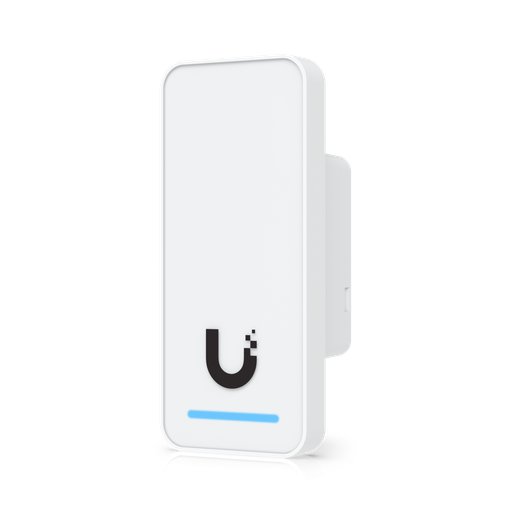
Shopping for UniFi Access?
Authorised Ubiquiti reseller: genuine Australian stock, full warranty, competitive prices and price match available.
What else do you need? Console, storage and PoE
A UniFi doorbell doesn't work by itself. It needs a UniFi console running UniFi Protect to adopt it and store its footage, plus a PoE source for the PoE models.
1. A console that runs Protect. Ubiquiti's camera-limit guide gives the recommended number of cameras for each console:
| Console | Protect | Recommended cameras (HD / 2K / 4K) | Recording storage | PoE out |
|---|---|---|---|---|
| UniFi Dream Router 7 (UDR7) | Yes | 5 / 2 / 1 | Pre-installed 64GB microSD (Ubiquiti recommends 128GB or larger for Dream Routers) | 1 port, 15.4 W budget |
| Cloud Gateway Max (UCG-Max) | Yes | 15 / 8 / 5 | NVMe SSD up to 2 TB | None |
| Dream Machine Pro (UDM-Pro) | Yes | 24 / 14 / 8 | One 3.5" HDD bay | None |
| Cloud Gateway Ultra (UCG-Ultra) | No (UniFi Network only) | n/a | 16 GB on-board, not used for NVR recording | None |
The UCG-Ultra can't record a doorbell. Its spec sheet lists only the UniFi Network application. If you already own one, add a separate Protect recorder, or choose a UCG-Max, UDR7 or UDM-Pro instead.
2. Storage. Ubiquiti's storage guide recommends a minimum 128GB microSD for the Dream Router, an NVMe SSD with DRAM cache and at least 0.3 DWPD endurance in the UCG-Max, and a CMR drive of 1TB or larger for 3.5" bays such as the UDM-Pro's. Retention is set in Protect's Storage Manager. Enhanced Retention (Protect 5.1 or later) keeps recent footage at full quality and downgrades older footage to save space.
3. PoE. The UDM-Pro and UCG-Max have no PoE output. The UDR7 has a single PoE port with a 15.4 W budget. That is enough for a Doorbell Lite or the G4 Doorbell Pro on its own, but not for the doorbell and the PoE chime together, and not for a G6 Entry, which needs PoE+. A small PoE switch fixes this. For example, the USW-Lite-8-PoE has 4 PoE+ ports (30 W max per port) and 52 W of total PoE. Add up every PoE device's maximum draw: Ubiquiti says your PoE availability must be greater than the total.
4. A G6 Entry used for door access also needs a UniFi Access hub. Ubiquiti states that NFC, Face ID and Interface Designer features need an Access Hub, with both UniFi Protect and UniFi Access installed.
Is there a subscription? How local recording works on UniFi Protect
Many popular video doorbells save clips to the cloud and charge a monthly plan to keep video history. UniFi Protect works differently. Ubiquiti says Protect "stores your videos and AI events locally", that "all video recordings are stored locally on your UniFi OS Console", and that "there's no cloud backup of your video by default."
- No recurring fees: asked "Are there any fees?", Ubiquiti answers "Absolutely not", with no hidden or recurring fees, and says Protect eliminates "cloud fees, subscriptions, and paid AI add-ons."
- Local AI: person and vehicle detection runs on the camera or the console, not in the cloud. The PoE Kit, Doorbell Lite and G6 Entry all list smart detections for people, vehicles and animals.
- Remote viewing: your phone connects to the console over an end-to-end encrypted channel. Ubiquiti says it "cannot view, store, or access your video streams."
- Your retention, your rules: how long footage is kept depends on your storage size and your settings in Storage Manager. Important clips can be flagged, exported or archived.
The one-off costs are the doorbell, the console and its storage. Once installed, the doorbell keeps recording to your own hardware with no recording plan to renew.
Mounting: gang boxes, wedges and Australian door frames
Every UniFi doorbell includes a flat wall mount and a 20° wedge, which angles the camera towards the path. Gang box or junction box mounting is optional.
- G4 Doorbell Pro PoE Kit: 160.6 x 51.7 x 35.1 mm. The G4 Doorbell Pro PoE Gang Box Mount (also in white) is a "flat or angled mounting plate for installing the G4 Doorbell Pro PoE over a standard single-gang box", for old-work or new-work boxes, with flat and 25° wedge options.
- Doorbell Lite: the narrowest model at 137 x 40 x 26.4 mm. The Doorbell Lite Gang Box Mounting Plate fits it "over a standard single-gang box".
- G6 Entry: 176 x 45 x 29.6 mm, with a wall mount, gang box mount plate and 20° wedge in the box. A junction box is optional.
- G4 Doorbell: 118.3 x 46.8 x 25.8 mm, with flat and 20° wedge mounts included.
Ubiquiti's gang box accessories are described for a "standard single-gang box". Before you buy one, check the mounting holes against the wall box you plan to use in Australia, or surface-mount with the included bracket. Measure your door frame or architrave too: the Doorbell Lite (40 mm wide) and G6 Entry (45 mm) suit narrow frames better than the 51.7 mm G4 Doorbell Pro.
Weather: the Doorbell Lite is rated IPX5 and works from −30 to 50 °C. The G6 Entry is IP55 and IK07, rated −30 to 50 °C. The G4 Doorbell Pro PoE Kit is IPX4, rated −30 to 40 °C. The G4 Doorbell is IPX4, rated −10 to 40 °C. On a west-facing wall in hot parts of Australia, the 50 °C ceiling of the Lite and G6 Entry is worth considering, and a porch or awning helps every model.
G6 Entry vs G4 Doorbell Pro: doorbell or door access reader?
The G6 Entry sits in Ubiquiti's reader range. It works with both UniFi Protect and UniFi Access, so it is more than a doorbell.
- Unlock methods: NFC card and keyfob, Apple/Google Wallet, mobile unlock, face unlock and face recognition, plus licence plate unlock according to Ubiquiti's reader comparison.
- Door access setup: to unlock doors, the G6 Entry must be adopted in Protect and connected directly to a UniFi Access Control Hub.
- Doorbell ring: it has a physical ring button. In UniFi Access, a ring can go to an Intercom Viewer, the mobile apps, a phone number, a SIP number or a chime, with up to three call groups that are called in sequence.
- Touch Passes: phone-wallet Touch Passes come with a free first-year allocation; additional passes after that are a paid add-on from Ubiquiti.
If you only want to see who's at the door, talk to them and record it, the G4 Doorbell Pro PoE Kit or Doorbell Lite is the simpler and more affordable choice. If you want the front door to unlock for family, staff or tenants, the G6 Entry with an Access hub is the right tool.
Australian buying checklist
- Power: can you run Ethernet to the door? If yes, choose a PoE model. If not, the G4 Doorbell needs a 16–24 V AC, 20 VA or higher transformer, with any hard-wired transformer fitted by a licensed electrician.
- Console: check that it runs UniFi Protect (UDR7, UCG-Max or UDM-Pro do, the UCG-Ultra doesn't), and fit suitable storage.
- PoE budget: standard PoE covers the PoE Kit and Doorbell Lite. The G6 Entry needs PoE+, and the PoE chime needs its own PoE port.
- Chime: a UniFi PoE Smart Chime, or a wired chime from Ubiquiti's compatibility list for the G4 Doorbell.
- Mounting: door frame width, the 20° wedge, and the gang box plate if you are using a wall box.
- Cabling: use a registered cabler for new data cabling inside the walls.
- Warranty: buy genuine Australian stock from an authorised Ubiquiti reseller so you get the full manufacturer's warranty. UI Care extended replacement is available for some models, such as the G6 Entry.
ARC IP Networks is an authorised Ubiquiti reseller selling genuine Australian stock at competitive prices, with price match available.
Our picks
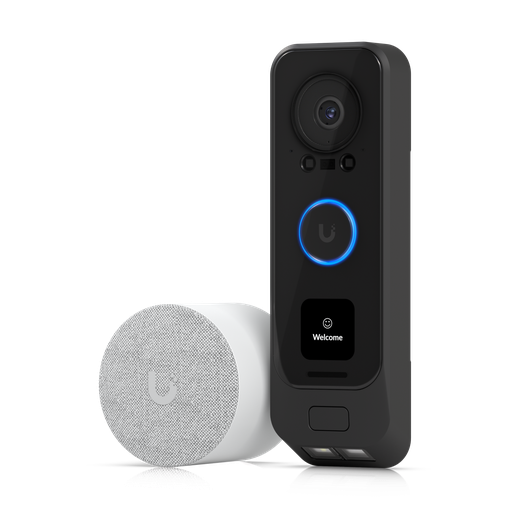
Ubiquiti UVC-G4-DoorBell Pro PoE Kit UniFi G4 Doorbell Pro with PoE Kit
PoE-powered (7 W max) with a 2MP main camera, a second 2MP package camera, and the PoE Smart Chime in the box. Also available in white (UVC-G4 Doorbell Pro PoE Kit-White).
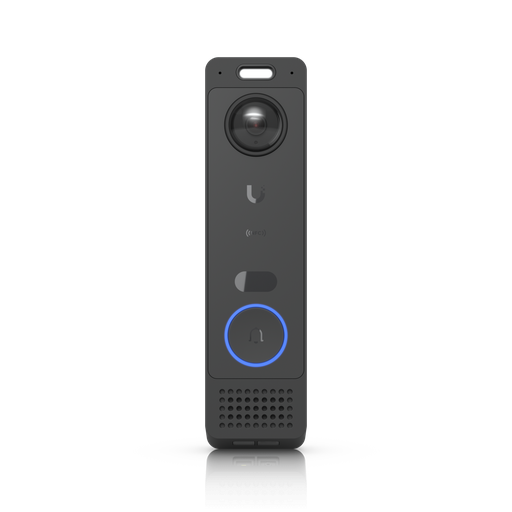
Ubiquiti UVC-G6-Entry Reader G6 Entry
5MP main and 8MP package cameras, IP55/IK07, face, NFC and mobile unlock with UniFi Access. Needs PoE+ (16 W max).
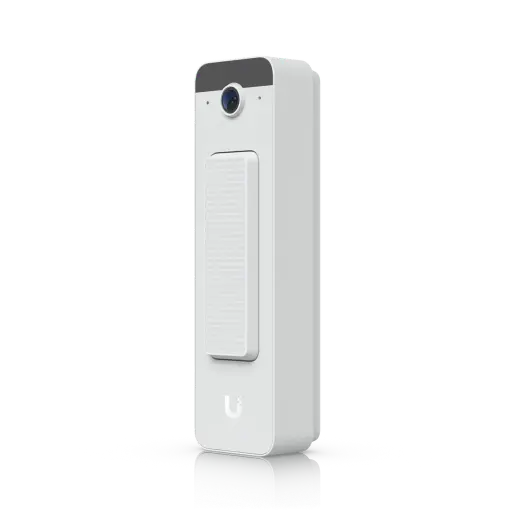
Ubiquiti UVC-Doorbell-Lite-W UniFi Doorbell Lite Compact PoE Video Doorbell With Two-way Audio (White)
Slim 40 mm wide body, 5MP portrait image, IPX5, 8 W PoE. Also available in black.
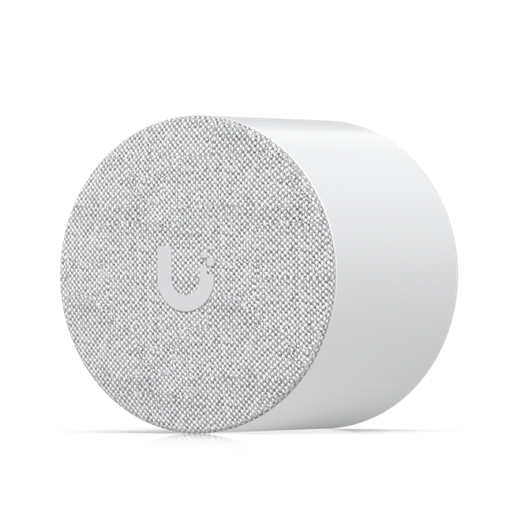
Ubiquiti UACC-Chime-PoE Unifi PoE Smart Chime Plug & Play Notification Device for Doorbell or Door Access Hub
PoE-powered chime (3 W max) for UniFi Protect and Access, with in-wall and on-wall mounts.
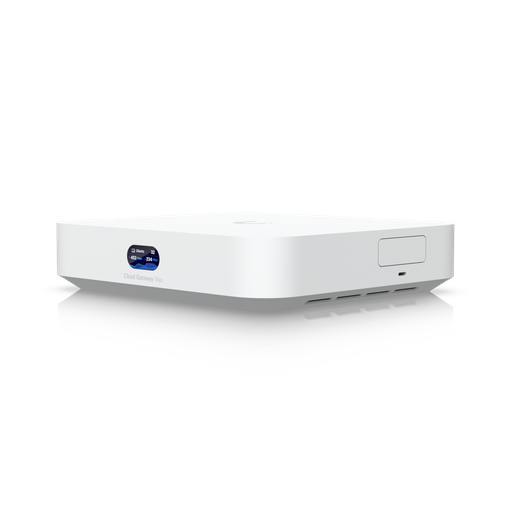
Ubiquiti UCG-Max-AU UniFi Controller Cloud Gateway Max
Runs UniFi Protect with NVMe SSD storage up to 2 TB, recommended for 15 HD / 8 2K / 5 4K cameras.
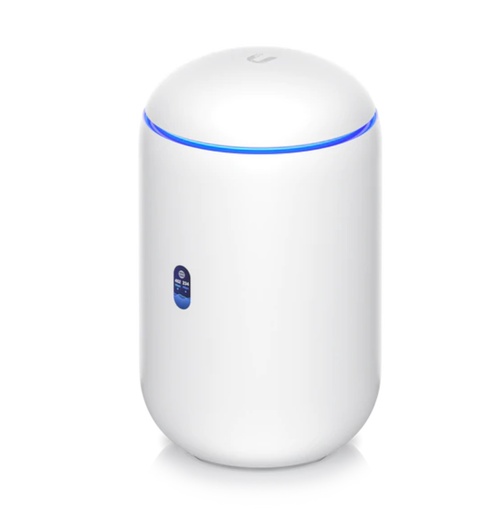
Ubiquiti UDR7 UniFi Dream Router 7 — WiFi 7 Router with 10G SFP+ WAN, 2.3 Gbps IDS/IPS, Built-In NVR (300+ Clients)
Wi-Fi 7 router with UniFi Protect, a microSD NVR and one PoE port (15.4 W) that can power a single PoE doorbell.
Ready to buy?
Shop genuine Ubiquiti at ARC IP Networks
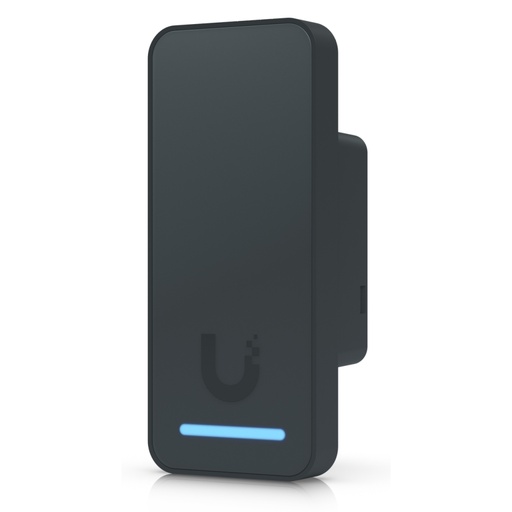
Authorised Ubiquiti reseller
Ubiquiti at ARC IP Networks
UniFi gateways, switches, Wi-Fi, Protect cameras and Access. Genuine Australian stock with the full manufacturer's warranty, competitive prices and price match available.
Frequently asked questions
No. UniFi Protect records to your own UniFi console, and Ubiquiti states there are no hidden or recurring fees and no paid cloud subscriptions. You pay once for the doorbell, console and storage.
No. The original G4 Doorbell is powered by a 16–24 V AC transformer (1.25 A max) and connects over Wi-Fi. The PoE models are the G4 Doorbell Pro PoE Kit, the Doorbell Lite and the G6 Entry.
The G4 Doorbell (transformer-powered) lists specific compatible mechanical and digital chimes. The G4 Doorbell Pro PoE Kit and Doorbell Lite list no wired chimes, so use the UniFi PoE Smart Chime. A G6 Entry can trigger a wired chime through a UniFi Access Control Hub.
Not if it is hard-wired. In Australia, a hard-wired doorbell transformer connects to 230 V mains, so a licensed electrician must install it. A plug-in AC adapter avoids fixed wiring, and PoE doorbells avoid mains work entirely because they are powered over the network cable.
Ubiquiti lists PoE+ with a maximum consumption of 16 W, which is above what a standard 802.3af PoE port supplies. Use a PoE+ switch port, and Cat 5e cable or better.
No. The UCG-Ultra's spec sheet lists only the UniFi Network application. To record a doorbell, use a console that runs UniFi Protect, such as the UCG-Max, UDR7 or UDM-Pro.
Yes. The kit includes the PoE Smart Chime, which is powered by PoE (3 W max) and connects over its own 10/100 Ethernet port.
The UDR7 has one PoE port with a 15.4 W budget. That can power a single Doorbell Lite (8 W) or G4 Doorbell Pro PoE (7 W), but not a G6 Entry (PoE+, 16 W) or a second device such as the chime.
It depends on your console's storage and your retention settings in Protect's Storage Manager. Enhanced Retention keeps recent footage at full quality and downgrades older footage to save space.
Recording happens locally on your UniFi console, so footage stays on your own hardware. Remote viewing from your phone while away from home needs an internet connection to reach the console.
Related guides
- Security Cameras Without a Subscription: How Local Recording Works
- What Else You Need to Buy With a UniFi NVR (The Full Shopping List)
- UniFi Cloud Gateway Comparison 2026: UCG-Fiber vs Ultra vs Max vs UXG
- UniFi Protect NVR Comparison 2026: Which Recorder Do You Need?
- How Much Storage Do You Need for Security Cameras? (2026 Sizing Guide)
- UniFi Access Explained: Complete Australian Door Access Guide (2026)
- Best Ubiquiti UniFi Access Door Entry Systems in 2026: Compared & Ranked (Australia)
- UniFi Protect Explained: Cameras, NVRs and How the System Works (Australia)
- PoE for CCTV: 802.3af, 802.3at & 802.3bt Explained
- UniFi Switch Comparison 2026: Every Ubiquiti Switch Explained
- Can CCTV Cameras Record Audio in Australia?
- UPS for NBN, Wi-Fi and CCTV/NVR: Keep Internet and Cameras Running
Who we are
About ARC IP Networks
ARC IP Networks is an Australian supplier of security cameras and CCTV systems, based in Blackburn, Melbourne, Victoria. We work with homeowners, installers, integrators and businesses across Australia, supplying Hikvision, Ubiquiti UniFi Protect, Dahua and Jovision CCTV.
We are an authorised reseller for every brand we sell, and the national distributor of Jovision in Australia, so you get genuine Australian stock with the full manufacturer's warranty, never grey imports, at competitive prices. Our team can help you choose the right equipment, and trade customers get trade accounts and project pricing on larger jobs.
- Genuine Australian stock with the full manufacturer's warranty
- Competitive prices, price match available
- Trade accounts for installers, integrators and MSPs
- Australia-wide delivery; showroom in Blackburn, Mon–Fri 9–5 (demos by appointment)
Need help choosing?
Tell the ARC IP Networks team what you are setting up and we will recommend the right equipment and quote it as one order.