Planning access control for your building? Ubiquiti's UniFi Access lets you unlock doors with a phone, card or keyfob, manage who goes where from one dashboard, and review every entry — with no monthly fees. This guide compares the most popular UniFi Access readers, intercom, hub and starter kit, so you can pick the right door-entry system and buy it in Australia.
At a glance — our top picks
- 🏆 Best overall reader: UA-G3
- 💲 Best value reader: UA-G2
- 👤 Best premium (facial): UA-G3-Pro
- 🚪 Best for gates / outdoor: UA-G3-Flex
- 📹 Best video-verified: UA-G2-Pro
- 🔔 Best video intercom: UA-G3-Intercom
- 📦 Best way to start: UA-G3-SK
- 🧠 Essential controller: UA-Hub-Door
Everything here is genuine Ubiquiti stock from ARC IP Networks — an authorised Ubiquiti reseller in Australia. Jump to the full UniFi Access range any time.
UniFi Access comparison table
| Device | Type | Credentials / Function | Display / Camera | Buy |
|---|---|---|---|---|
| UA-G3 | Reader | NFC, Bluetooth, card | Touchscreen | Buy → |
| UA-G2 | Reader | NFC, Bluetooth | — | Buy → |
| UA-G3-Pro | Reader | NFC, Bluetooth, card | Touchscreen + camera + facial | Buy → |
| UA-G3-Flex | Reader | NFC, Bluetooth, card | Weatherproof, compact | Buy → |
| UA-G2-Pro | Reader | NFC, Bluetooth, card | Camera + display | Buy → |
| UA-G3-Intercom | Intercom | Reader + 2-way audio | Camera + intercom | Buy → |
| UA-G3-SK | Starter kit | G3 reader + door hub | Complete single door | Buy → |
| UA-Hub-Door | Door hub | Powers reader + lock | Door controller | Buy → |
Readers need a door hub and lock to operate. See each product page for current pricing and stock.
How a UniFi Access door works
Every controlled door uses four parts: a reader at the door, a door hub that powers and controls it, an electric lock (such as a magnetic lock), and a request-to-exit button to leave. The reader and hub connect to the UniFi Access app, where you issue mobile, card and keyfob credentials and review entry logs. The simplest way to cover all of this for your first door is the UA-G3 starter kit, which bundles the reader and hub.
The most popular UniFi Access products, compared
UniFi Access Reader G3 (UA-G3)
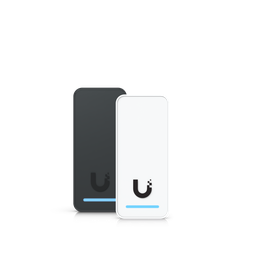
The best all-round UniFi Access reader — a sleek touchscreen unit that unlocks with NFC, Bluetooth and cards, suiting most office and building doors.
Type: Reader · Credentials/Function: NFC, Bluetooth, card · Display/Camera: Touchscreen · Best for: Modern flagship reader
Pros
- Touchscreen display
- NFC + Bluetooth + card
- Indoor/outdoor
- Looks the part on a main entrance
Cons
- Needs a door hub + lock to work
- No facial recognition (see G3 Pro)
View the UA-G3 Compare all UniFi Access products
UniFi Access Reader G2 (UA-G2)
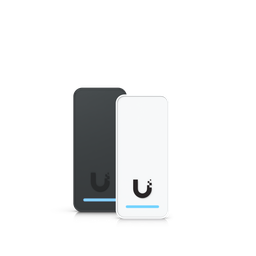
The best-value UniFi Access reader — compact and simple, unlocking with NFC and Bluetooth for everyday doors.
Type: Reader · Credentials/Function: NFC, Bluetooth · Display/Camera: — · Best for: Simple, cost-effective doors
Pros
- Lowest-cost UniFi reader
- NFC + Bluetooth unlock
- Compact, indoor/outdoor
Cons
- No display or camera
- Simpler feature set than the G3
View the UA-G2 Compare all UniFi Access products
UniFi Access Reader G3 Pro (UA-G3-Pro)
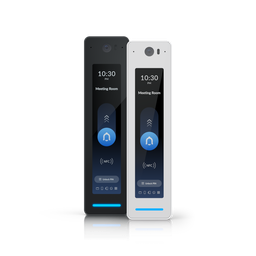
The flagship reader — a large touchscreen with a camera and facial recognition for fast, secure, hands-free entry at premium and high-traffic doors.
Type: Reader · Credentials/Function: NFC, Bluetooth, card · Display/Camera: Touchscreen + camera + facial · Best for: Premium entrances
Pros
- Facial recognition
- Large touchscreen + camera
- NFC + Bluetooth + card
- Video at the door
Cons
- Premium reader
- Needs a hub + lock
View the UA-G3-Pro Compare all UniFi Access products
UniFi Access Reader G3 Flex (UA-G3-Flex)
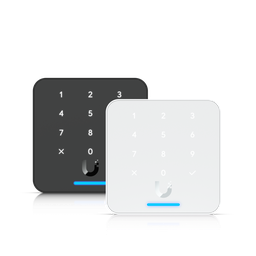
A compact, weatherproof reader for gates, lifts and tight mounts — NFC, Bluetooth and card in a rugged small footprint.
Type: Reader · Credentials/Function: NFC, Bluetooth, card · Display/Camera: Weatherproof, compact · Best for: Gates & tight mounts
Pros
- Weatherproof and compact
- NFC + Bluetooth + card
- Ideal for gates and lifts
Cons
- No display
- Needs a hub + lock
View the UA-G3-Flex Compare all UniFi Access products
UniFi Access Reader G2 Pro (UA-G2-Pro)
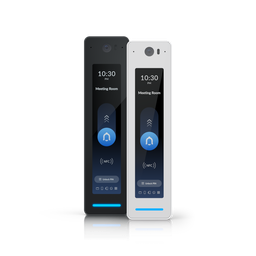
A mid-range reader that adds a camera and display to NFC, Bluetooth and card — video-verified entry without stepping up to the G3 Pro.
Type: Reader · Credentials/Function: NFC, Bluetooth, card · Display/Camera: Camera + display · Best for: Video-verified entry on a budget
Pros
- Camera + display
- NFC + Bluetooth + card
- Video-verified entry
Cons
- No facial recognition
- Needs a hub + lock
View the UA-G2-Pro Compare all UniFi Access products
UniFi Access G3 Intercom (UA-G3-Intercom)
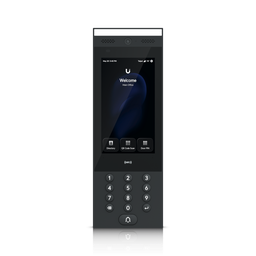
An indoor/outdoor video intercom terminal with a built-in reader, camera and two-way audio — let visitors call, see who's there and release the door.
Type: Intercom · Credentials/Function: Reader + 2-way audio · Display/Camera: Camera + intercom · Best for: Visitor entry & receptions
Pros
- Video intercom + reader in one
- Two-way audio
- Indoor/outdoor
- Pairs with the Intercom Viewer
Cons
- Dearer than a plain reader
- Needs a hub + lock
View the UA-G3-Intercom Compare all UniFi Access products
UniFi Access G3 Starter Kit (UA-G3-SK)
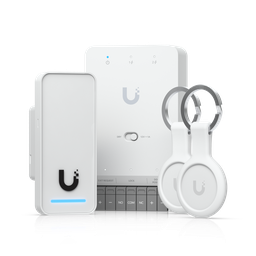
The easiest way to start — a single-door starter kit bundling a G3 reader and the door hub, so you have everything for one door in one box (just add a lock and exit button).
Type: Starter kit · Credentials/Function: G3 reader + door hub · Display/Camera: Complete single door · Best for: Getting started — one door
Pros
- Reader + hub bundled
- Everything to start one door
- The best first purchase
Cons
- Still need a lock + exit button
- Covers one door only
View the UA-G3-SK Compare all UniFi Access products
UniFi Access Hub Door (UA-Hub-Door)
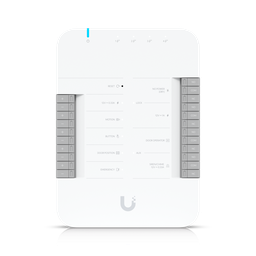
The PoE door hub is the brain of each door — it powers the reader and lock and connects them to UniFi Access. Every door needs one (or use a starter kit).
Type: Door hub · Credentials/Function: Powers reader + lock · Display/Camera: Door controller · Best for: The brain of each door
Pros
- Controls the reader + lock
- PoE-powered
- The core of every UniFi Access door
Cons
- Not a reader itself
- One required per door
View the UA-Hub-Door Compare all UniFi Access products
How to choose the right UniFi Access setup
- Pick the reader: the UA-G2 for simple doors, the touchscreen UA-G3 for most, the UA-G3 Pro for facial recognition, and the UA-G3 Flex for gates.
- One door or many? Start with a starter kit; for more doors, add a door hub and reader per door.
- Need visitor entry? Add the UA-G3 Intercom for video calling and door release.
- Retrofitting? Use the UA-Retrofit-Hub-2 and OSDP retrofit readers to reuse existing wiring.
Pairs with the rest of UniFi
UniFi Access runs on a UniFi console / gateway, is powered by UniFi PoE switches, and works alongside UniFi Protect cameras so you can see and record every entry. We can design the whole system as one project.
Why buy UniFi Access from ARC IP Networks?
ARC IP Networks is an authorised Ubiquiti reseller in Australia, so every UniFi Access product is genuine Australian stock with the official Ubiquiti manufacturer warranty — not grey-market imports. We dispatch Australia-wide from our Melbourne warehouse with same-day dispatch on most orders before 2pm AEST, and we price-match genuine UniFi gear from other authorised Australian resellers. Installers and integrators can open a trade account for project pricing.
Read more about why we're a trusted Ubiquiti reseller, browse the full UniFi Access range, or talk to our Melbourne team for an access-control design and quote.
Related reading: Best UniFi Protect Cameras in 2026 · Best UniFi Access Points in 2026 · Best UniFi Switches in 2026 · Best UniFi Routers in 2026.