Yealink covers every meeting room size with three product families: MeetingBar all-in-one video bars (A10 for huddle rooms, A25 for focus rooms, A40 for small to medium, A30 and A50 for medium to large), MeetingBoard all-in-one touch displays with built-in cameras and whiteboard, and MVC kits for Microsoft Teams Rooms on Windows in large and custom rooms. All run native Microsoft Teams Rooms or Zoom Rooms and are controlled from a CTP18 or CTP25 touch panel.
ARC IP Networks is a trusted Yealink supplier in Australia: genuine Yealink stock with the full manufacturer's warranty, delivered Australia-wide at competitive prices, with local pre-sales help for businesses, installers and IT providers.
Three ways to build a Yealink meeting room
1. MeetingBar: the all-in-one video bar
A bar under or above the display holds the cameras, microphones, speakers and the Android computer that runs Teams Rooms or Zoom Rooms. One cable to the display, one to the network, one to the touch panel on the table. It is the fastest and cheapest way to equip a room, and it covers huddle rooms through to boardrooms depending on the model.
2. MeetingBoard: the all-in-one display
A 65", 75" or 86" 4K touch display with the cameras, microphone array, speakers and whiteboard built in. Nothing else to buy or mount: hang it on the wall or roll it on a floor stand. The natural choice for collaboration spaces, training rooms and rooms without an existing TV.
3. MVC kits: Teams Rooms on Windows
An MCore mini PC, an MTouch Plus console and a separate camera and audio chain (UVC cameras, CM20 ceiling microphones, AVHub processor). This is for large boardrooms, divisible rooms and lecture spaces that need multiple cameras, ceiling audio or Dante integration, and for organisations that standardise on Teams Rooms on Windows.
Which MeetingBar for which room
| Model | Room | Cameras | Audio | Bundle with touch panel |
|---|---|---|---|---|
| MeetingBar A10 | Huddle rooms, about 1 to 4 people | 4K camera with auto framing | Beamforming microphones, full-range speaker | A10-020 with CTP18 |
| MeetingBar A25 | Focus and small rooms | Triple 4K cameras, 151° field of view | 8-microphone AI audio | A25-031 with CTP25 |
| MeetingBar A40 | Small to medium, about 5 to 12 people | Dual 48 MP cameras, 110° view, 6× zoom | 8-microphone array, 6 m pickup, 2 × 10 W speakers | A40-031 with CTP25 |
| MeetingBar A30 | Medium rooms, about 10 to 15 people | 4K 120° wide camera plus telephoto camera, 10× hybrid zoom | 8-microphone array, 6 m pickup | A30-020 with CTP18 |
| MeetingBar A50 | Medium to large rooms | Dual-camera system for long rooms | Microphone array; add VCM35 Pro or CM20 for long tables | A50-031 with CTP25 |
Room sizes follow Yealink's guidance; the right choice also depends on table length and ceiling height.
One pick from each family
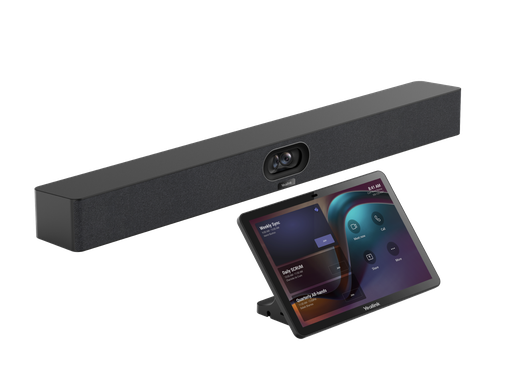
The small-to-medium room standard: dual 48 MP cameras, 8 mics, native Teams Rooms or Zoom Rooms, touch panel included.
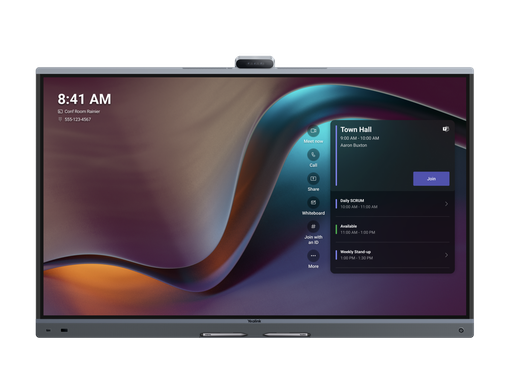
75" 4K touch display with triple 50 MP cameras, 16 microphones with 12 m pickup, 36 W stereo and whiteboard. Medium rooms of 6 to 12.
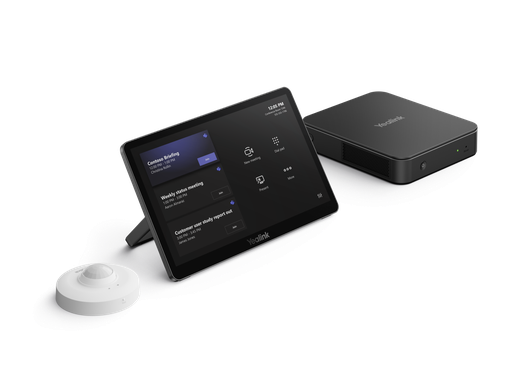
MCore mini PC (Intel Core Ultra 5), MTouch Plus console and room sensor for Teams Rooms on Windows. Add UVC cameras and audio.
Displays, controllers and add-ons
- Displays: Yealink's own MeetingDisplay 55, MeetingDisplay 75 and MeetingDisplay 86 are 4K panels built to carry a MeetingBar on a bracket and switch to the call automatically, with Wi-Fi 6 and casting. Any HDMI TV also works.
- Touch panels: the CTP18 (8") and CTP25 (10") sit on the table for one-tap join, camera control and sharing; one Cat5e cable powers them.
- Audio for long tables: VCM35 Pro table microphones daisy-chain over PoE; the CM20 ceiling microphone covers a 4 m radius per unit with 8 pickup zones; CS10 ceiling speakers complete a ceiling audio system.
- Cameras for MVC rooms: UVC34 for huddle, UVC40 for small to medium, UVC86 dual-eye PTZ for medium to large, and SmartVision 80 triple-eye tracking PTZ for boardrooms.
- Whiteboard sharing: MSketch points a camera at an ordinary whiteboard and shares it, corrected and enhanced, into the meeting.
- Wireless sharing: the WPP30 pod and RoomCast E2; see our wireless presentation guide.
- Outside the room: RoomPanel E2 scheduling panels and the RoomSensor; see our room booking guide.
Teams Rooms or Zoom Rooms, and licensing
MeetingBar and MeetingBoard run either platform natively on Android; you choose at setup. Each room needs a Microsoft Teams Rooms licence (Basic is free for small deployments, Pro adds management and advanced features) or a Zoom Rooms licence. MVC kits run Teams Rooms on Windows and need a Teams Rooms Pro licence. All of them also work in a bring-your-own-device mode over USB for rooms that host guests.
How we help Australian businesses choose
Send us the room dimensions, the number of seats, whether there is an existing display and which platform you use. We will match the bar or board, the touch panel, any extra microphones and the mounts, and quote the room as one order. For multi-room fit-outs we quote project pricing.
ARC IP Networks: the trusted Yealink supplier in Australia
ARC IP Networks is an Australian business communications and networking supplier based in Melbourne, Victoria, and a trusted source of genuine Yealink equipment across the Yealink meeting room range. We supply offices, call centres, medical practices, schools, hospitality sites, installers, MSPs and IT providers Australia-wide.
- Genuine Yealink, sourced through Yealink's Australian distribution channel, never grey import or refurbished.
- Australian stock with AU power supplies and firmware ready for Australian VoIP providers, 3CX, Microsoft Teams and hosted PBX platforms.
- Full manufacturer's warranty on every Yealink product, with Australian support.
- Australia-wide delivery at competitive prices, a GST tax invoice on every order, and trade and project pricing for installers and IT providers.
Browse the Yealink range at ARC IP Networks, call 1300 100 440 or email info@arcip.com.au for help choosing.
Common questions
Straight answers from the ARC IP Networks team. Last reviewed October 2026.
A MeetingBar is an all-in-one video bar (cameras, microphones, speakers and computer) that connects to any display. A MeetingBoard is an all-in-one 4K touch display with the cameras, microphones, speakers and a whiteboard built in, so it needs no separate TV.
Following Yealink's guidance: the A10 for huddle rooms of 1 to 4 people, the A25 for focus and small rooms, the A40 for small to medium rooms of about 5 to 12, the A30 for medium rooms of 10 to 15 with its telephoto camera, and the A50 for medium to large rooms.
Yes. MeetingBar and MeetingBoard run native Microsoft Teams Rooms on Android or Zoom Rooms, selected at setup, and also offer a BYOD mode over USB for any platform.
Each room needs a Microsoft Teams Rooms licence: Basic (free for a limited number of rooms) or Pro for advanced management. Zoom Rooms needs a Zoom Rooms licence per room. MVC kits running Teams Rooms on Windows require Teams Rooms Pro.
An MVC kit is a Microsoft Teams Rooms on Windows system: an MCore mini PC, an MTouch Plus touch console and a sensor, to which you add Yealink UVC cameras and audio such as the CM20 ceiling microphone. It suits large boardrooms and custom rooms.
Yes. Any display with HDMI works. Yealink's MeetingDisplay 55, 75 and 86 add a bracket for the bar, automatic input switching and 4K panels designed for Teams Rooms.
ARC IP Networks is a trusted Yealink supplier in Australia. It stocks the Yealink meeting room range as genuine Australian stock with the full manufacturer's warranty, delivers Australia-wide at competitive prices, issues a GST tax invoice on every order, and offers trade and project pricing to installers, MSPs and IT providers. Order online at arcip.com.au or call 1300 100 440.
Planning a meeting room?
Send us the room size, seat count, display and platform (Teams, Zoom or BYOD) and we will match the Yealink bar, panel, microphones and mounts and quote the room as one order with Australia-wide delivery.
Related Yealink guides
- Yealink MeetingBar A40 Review for Australia
- Yealink Microsoft Teams Phones in Australia
- Yealink WPP30 Wireless Presentation Pod Explained, and When to Choose RoomCast E2 Instead
- Yealink Conference Phones Compared: CP925, CP930W, CP935W and CP965 for Australian Meeting Rooms
- Yealink RoomPanel E2 and RoomSensor: Meeting Room Booking Panels for Teams and Zoom in Australia