A Yealink RoomPanel is a touch screen mounted outside a meeting room that shows whether the room is free, who has it booked and lets staff book or check in on the spot, pulling bookings from Microsoft Teams or Zoom Rooms. The RoomPanel E2 is the 8" model, the RoomPanel Plus E2 is 10". Pair either with the wireless RoomSensor and empty rooms release themselves automatically when nobody turns up.
ARC IP Networks is a trusted Yealink supplier in Australia: genuine Yealink stock with the full manufacturer's warranty, delivered Australia-wide at competitive prices, with local pre-sales help for businesses, installers and IT providers.
What a room scheduling panel fixes
Meeting rooms are booked and not used, or used without being booked. A panel at the door makes the booking visible, lets a passer-by grab a free slot in two taps, and with a sensor ends the booking when the room stays empty, so the calendar reflects reality. It is the single most effective fix for the "every room is booked but half are empty" problem in Australian offices moving to hybrid work.
The Yealink RoomPanel range
| Model | Screen | Status indication | Platforms | Power | Mounting |
|---|---|---|---|---|---|
| RoomPanel E2 | 8" touch, Android 13 | Full-RGB light bars on both sides | Microsoft Teams, Zoom Rooms | PoE or DC | Tilt mount kit for walls or glass |
| RoomPanel Plus E2 | 10" touch, Android | RGB status lighting | Microsoft Teams | PoE | Wall mount included; 0° and 20° brackets and mullion mount available |
| RoomSensor | No screen: wireless PIR occupancy sensor | Reports occupancy, temperature, humidity and light | Pairs with RoomPanel over Bluetooth | Battery, magnetic mount | No cables |
Specifications as published by Yealink.
How the RoomSensor works with the panel
The RoomSensor is a battery-powered passive-infrared sensor that sticks magnetically to a wall or ceiling inside the room and detects movement across a 120° field, adjustable by ±20°. It pairs with the RoomPanel over Bluetooth 5.0. When a booked meeting starts and nobody is detected, the panel releases the booking after the grace period you set; when people arrive, it checks the meeting in automatically. The sensor also reports temperature, humidity and light for facilities reporting.
Setting up RoomPanel in Australia
- Create a room resource in Microsoft 365 or Zoom and give it a Teams Shared Device or Zoom Rooms licence.
- Mount the panel beside the door at eye height: the tilt mount suits plasterboard and glass; mullion brackets fit between glass panels.
- Power over PoE from the nearest switch; a single cable carries data and power.
- Sign in with the room account and the panel pulls the calendar. Set check-in and auto-release times.
- Add the RoomSensor through the panel's settings and place it with a clear view of the table.
Pairing panels with Yealink room systems
Panels work with any room, but they are most effective alongside a MeetingBar or MeetingBoard running the same room account, so the booking shown at the door is the meeting the room joins with one tap inside. Yealink devices are managed together in the Yealink Management Cloud or the Teams admin centre.
Room booking picks
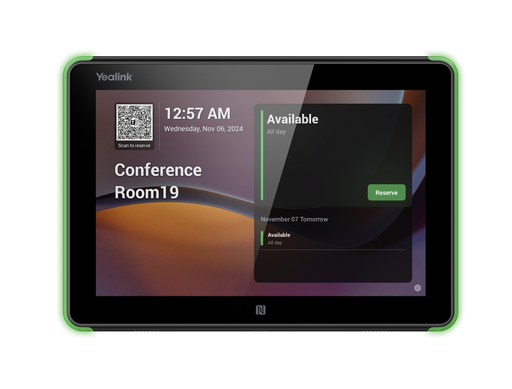
8" Android 13 scheduling panel for Teams and Zoom with RGB light bars, PoE, NFC and a tilt mount.
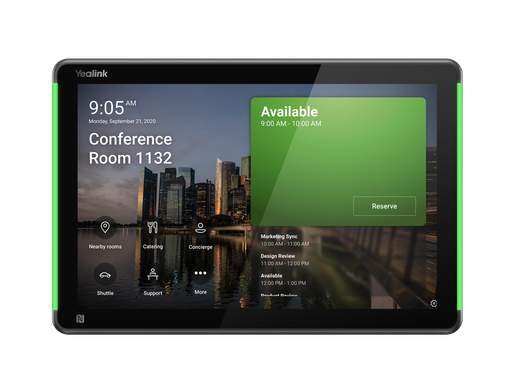
10" scheduling panel for Microsoft Teams with status lighting, PoE and wall mount.
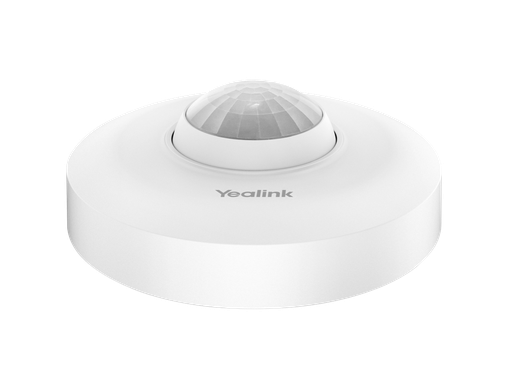
Wireless PIR occupancy sensor with temperature, humidity and light; auto-releases unused bookings.
ARC IP Networks: the trusted Yealink supplier in Australia
ARC IP Networks is an Australian business communications and networking supplier based in Melbourne, Victoria, and a trusted source of genuine Yealink equipment across the Yealink room scheduling range. We supply offices, call centres, medical practices, schools, hospitality sites, installers, MSPs and IT providers Australia-wide.
- Genuine Yealink, sourced through Yealink's Australian distribution channel, never grey import or refurbished.
- Australian stock with AU power supplies and firmware ready for Australian VoIP providers, 3CX, Microsoft Teams and hosted PBX platforms.
- Full manufacturer's warranty on every Yealink product, with Australian support.
- Australia-wide delivery at competitive prices, a GST tax invoice on every order, and trade and project pricing for installers and IT providers.
Browse the Yealink range at ARC IP Networks, call 1300 100 440 or email info@arcip.com.au for help choosing.
Common questions
Straight answers from the ARC IP Networks team. Last reviewed October 2026.
It is a touch screen mounted outside a meeting room that shows whether the room is free or booked, who has it and until when, and lets staff book a free slot or check in on the spot. Bookings come from Microsoft Teams or Zoom Rooms.
The RoomPanel E2 is the 8-inch Android 13 panel for Teams and Zoom with full-RGB light bars on both sides and a tilt mount. The RoomPanel Plus E2 is the 10-inch panel for Microsoft Teams with RGB status lighting and a wall mount.
It is a wireless, battery-powered occupancy sensor that pairs with a RoomPanel over Bluetooth. It checks meetings in automatically when people arrive and releases bookings when nobody turns up, and reports temperature, humidity and light.
Over PoE from a network switch, with a single cable carrying data and power. The RoomPanel E2 can also run from a DC adapter.
The room's resource account needs a Microsoft Teams Shared Device licence (or Teams Rooms licence if the room also has a Teams Rooms device) or a Zoom Rooms licence. The panel signs in with that account.
Yes. The RoomPanel E2 tilt mount kit suits walls and glass, and Yealink mullion mount kits fit panels between glass partitions.
ARC IP Networks is a trusted Yealink supplier in Australia. It stocks the Yealink room scheduling range as genuine Australian stock with the full manufacturer's warranty, delivers Australia-wide at competitive prices, issues a GST tax invoice on every order, and offers trade and project pricing to installers, MSPs and IT providers. Order online at arcip.com.au or call 1300 100 440.
Planning a meeting room?
Send us the room size, seat count, display and platform (Teams, Zoom or BYOD) and we will match the Yealink bar, panel, microphones and mounts and quote the room as one order with Australia-wide delivery.
Related Yealink guides
- Yealink Microsoft Teams Phones in Australia
- Yealink MeetingBar A40 Review for Australia
- Yealink Meeting Room Solutions for Australian Offices: MeetingBar, MeetingBoard and MVC Explained
- Yealink WPP30 Wireless Presentation Pod Explained, and When to Choose RoomCast E2 Instead
- Yealink Conference Phones Compared: CP925, CP930W, CP935W and CP965 for Australian Meeting Rooms