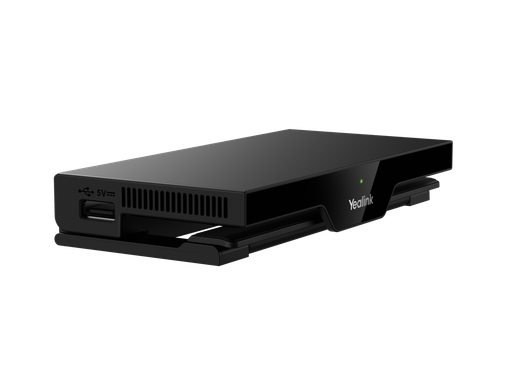
The Yealink WPP30 is a 4K wireless presentation pod: plug it into a laptop's USB-C or USB-A port, press the button, and the laptop's screen appears on the room display through a Yealink MeetingBar, MeetingBoard or MVC system, with no drivers, apps or dongle pairing. For rooms without a Yealink room system, the RoomCast E2 adds AirPlay, Miracast and pod casting to any display.
ARC IP Networks is a trusted Yealink supplier in Australia: genuine Yealink stock with the full manufacturer's warranty, delivered Australia-wide at competitive prices, with local pre-sales help for businesses, installers and IT providers.
How the WPP30 works
The WPP30 pairs once with the room's Yealink system (MeetingBar A-series, MeetingBoard, or an MVC kit) and lives on the meeting table. A presenter plugs the pod into their laptop; the pod presents itself as a display and the laptop mirrors or extends to it in up to 4K. One press on the pod shares, another stops. Because it works at the operating-system level, it is the same for Windows and macOS, and for any meeting platform the laptop is running.
Why rooms use it
- Guests and visitors share without joining the Wi-Fi or installing anything.
- BYOD meetings: in a Teams Room the shared laptop screen goes into the Teams meeting as content, so remote attendees see it too.
- No cable clutter: replaces the HDMI cable on the table and the adapters that go missing.
- Wireless BYOD on supported bars: the laptop can also use the room's camera, microphones and speakers through the pod for its own meeting.
What you need
A Yealink room system running a recent firmware, one WPP30 per presenter position (two per room is common so the next presenter is ready), and a USB-C or USB-A port on the laptop. The pod charges from the laptop while in use.
WPP30 or RoomCast E2?
| <a href="/shop/wpp30-yealink-wpp30-wpp30-4k-wireless-sharing-and-presenter-pod-8997">WPP30 pod</a> | <a href="/shop/roomcast-e2-yealink-roomcast-e2-wireless-presentation-system-4k60-wi-fi-6-airplay-miracast-yeacast-and-pod-4-way-split-screen-poe-10725">RoomCast E2</a> | |
|---|---|---|
| What it is | USB presentation pod that pairs with a Yealink room system | Standalone wireless presentation receiver connected to any display |
| Needs a Yealink bar or board | Yes | No: works with any HDMI display |
| Sharing methods | Plug in and press | Yealink pod, AirPlay, Miracast, YeaCast app |
| Resolution | Up to 4K | 4K60 output, ultra-low-latency pod casting |
| Multiple presenters | One at a time, swap pods | Up to four devices split on one screen |
| Extras | Wireless BYOD to the room camera and audio | Built-in digital signage, PoE power, Wi-Fi 6, Android 14 |
| Best for | Teams Rooms and Zoom Rooms with a Yealink system | Huddle rooms, training rooms and displays without a room system |
Specifications as published by Yealink.
Wireless presentation picks

4K wireless sharing for Yealink MeetingBar, MeetingBoard and MVC rooms. Plug in, press, present.
Wireless presentation system for any display: AirPlay, Miracast, YeaCast and pods, four-way split screen, signage.
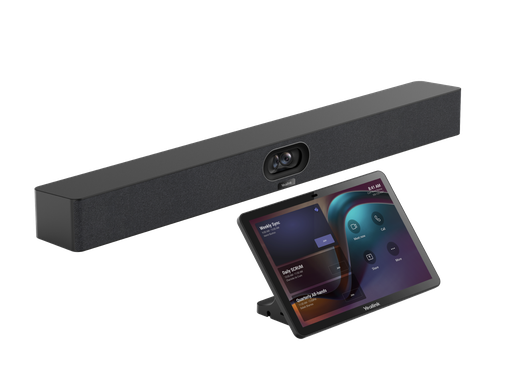
The room system the WPP30 is most often paired with in Australian small and medium rooms.
Setting up in Australia
- Update the MeetingBar or MeetingBoard to current firmware.
- Plug the WPP30 into the room system's USB port once to pair it; the pod then remembers the room.
- Leave the pod on the table. Test from a Windows laptop and a Mac so the room guide matches what users see.
- For RoomCast E2, connect it to the display over HDMI and to the network over PoE, then enable AirPlay and Miracast for the office Wi-Fi.
Yealink offers extended AMS warranty uplifts for the WPP30 for one, two or three years, which we can add to the quote for rooms that need longer cover.
ARC IP Networks: the trusted Yealink supplier in Australia
ARC IP Networks is an Australian business communications and networking supplier based in Melbourne, Victoria, and a trusted source of genuine Yealink equipment across the Yealink wireless presentation range. We supply offices, call centres, medical practices, schools, hospitality sites, installers, MSPs and IT providers Australia-wide.
- Genuine Yealink, sourced through Yealink's Australian distribution channel, never grey import or refurbished.
- Australian stock with AU power supplies and firmware ready for Australian VoIP providers, 3CX, Microsoft Teams and hosted PBX platforms.
- Full manufacturer's warranty on every Yealink product, with Australian support.
- Australia-wide delivery at competitive prices, a GST tax invoice on every order, and trade and project pricing for installers and IT providers.
Browse the Yealink range at ARC IP Networks, call 1300 100 440 or email info@arcip.com.au for help choosing.
Common questions
Straight answers from the ARC IP Networks team. Last reviewed October 2026.
The WPP30 is a 4K wireless presentation pod. Plugged into a laptop's USB-C or USB-A port, it mirrors the laptop screen to a Yealink MeetingBar, MeetingBoard or MVC room system with one press, without drivers or apps.
No. The WPP30 pairs with a Yealink room system. For a display with no Yealink bar or board, the Yealink RoomCast E2 provides wireless sharing via AirPlay, Miracast, YeaCast and pods.
Yes. It presents itself as a display to the operating system, so it works the same on Windows and macOS and with any meeting platform running on the laptop.
Yes. In a Teams Room or Zoom Room the shared laptop screen is sent into the meeting as content, so remote attendees see it as well as the people in the room.
One pod per presenter position. Many rooms keep two so the next presenter is ready; the pod charges from the laptop while connected.
The WPP30 is a pod that needs a Yealink room system. The RoomCast E2 is a standalone receiver for any display that supports pods, AirPlay, Miracast and YeaCast, shows up to four devices on one screen and includes digital signage.
ARC IP Networks is a trusted Yealink supplier in Australia. It stocks the Yealink wireless presentation range as genuine Australian stock with the full manufacturer's warranty, delivers Australia-wide at competitive prices, issues a GST tax invoice on every order, and offers trade and project pricing to installers, MSPs and IT providers. Order online at arcip.com.au or call 1300 100 440.
Planning a meeting room?
Send us the room size, seat count, display and platform (Teams, Zoom or BYOD) and we will match the Yealink bar, panel, microphones and mounts and quote the room as one order with Australia-wide delivery.
Related Yealink guides
- Yealink MeetingBar A40 Review for Australia
- Yealink Microsoft Teams Phones in Australia
- Yealink Meeting Room Solutions for Australian Offices: MeetingBar, MeetingBoard and MVC Explained
- Yealink Conference Phones Compared: CP925, CP930W, CP935W and CP965 for Australian Meeting Rooms
- Yealink RoomPanel E2 and RoomSensor: Meeting Room Booking Panels for Teams and Zoom in Australia