What VoIP phone system does a small business in Australia need?
A small business VoIP phone system needs IP or DECT phones, a phone system (hosted PBX, on-site PBX or UniFi Talk), a phone provider for your numbers (a hosted PBX service, or a SIP trunk for an on-site PBX or UniFi Talk), a business internet connection such as the NBN, and usually a PoE switch. Most NBN phone services stop working in a power outage, so confirm your provider supports 000 and keep a charged mobile phone on hand.
What is a VoIP phone system, and why do Australian businesses need one now?
A VoIP (Voice over Internet Protocol) phone system carries your business calls over your internet connection instead of the old copper telephone network. Your staff still pick up a desk phone, a cordless handset or a headset, but each call travels as data across your office network and the NBN to a phone provider, which connects it to mobiles and landlines anywhere.
For most Australian businesses this is no longer a choice, although nbn notes that some services are not affected, including those on non-nbn fibre networks and some business and Special Services (check with your provider). nbn lists the services that are permanently disconnected as the NBN rolls out, including Telstra home and landline phone services (except some Telstra Velocity lines), landline phone services from other companies that run over Telstra's copper lines, and all ADSL services. nbn also recommends moving your services well before they are switched off, which it says happens 18 months after the network is switched on in your area. Premises served by nbn Fixed Wireless and Sky Muster satellite are the exception: nbn says they won't be disconnected from their existing phone and internet services, and can choose to keep the copper landline or switch to a VoIP service through a provider. nbn suggests that Fixed Wireless and Sky Muster premises that rely on a landline in emergencies consider keeping the copper service active, especially without reliable mobile coverage.
In short, if your office is on fixed-line NBN, your phones are already VoIP or soon will be. The real decision is which phone system, which handsets and how to set up your network so calls stay clear, and that is what this guide covers.
What are the parts of a business VoIP phone system?
Most VoIP setups, from a two-person office to a 20-desk team, are built from these five parts:
| Part | What it does | Examples |
|---|---|---|
| Phones (endpoints) | What your staff use: desk IP phones, DECT cordless handsets, headsets and softphone apps | Yealink SIP-T53W, SIP-T73U, W77P DECT, WH64 DECT headset |
| Phone system (PBX) | Manages extensions, ring groups, transfers, voicemail and auto attendants. It can be hosted in the cloud, sit on-site in a box, or run as UniFi Talk on a UniFi console | Hosted/cloud PBX service, Grandstream UCM6301 on-site IP PBX, UniFi Talk |
| SIP trunk / phone provider | Connects your phone system to the public phone network and carries your phone numbers (DIDs) | Our ARC VoIP team can quote SIP trunks and phone numbers |
| Internet connection | Carries the calls between your office and the provider | NBN (fixed line, Fixed Wireless or satellite) or another business internet service |
| Office network | A PoE switch powers the phones over the network cable; a router or gateway connects the office to the internet | Grandstream GWN7801P (8 PoE ports) or GWN7802P (16 PoE ports) |
Business IP desk phones such as the Yealink SIP-T53W and SIP-T73U can be powered by PoE (Power over Ethernet), so one network cable gives each phone both data and power. The Yealink SIP-T53W and SIP-T73U, for example, both support IEEE 802.3af PoE (class 2) and have a second Gigabit port, so a desk computer can plug into the back of the phone and share the same wall outlet.
How to set up a VoIP phone system for a small business in Australia
- Check your NBN connection type and when your copper services will be switched off (fixed-line NBN areas lose copper landlines; Fixed Wireless and Sky Muster premises are not disconnected by nbn).
- List every phone-dependent device (EFTPOS, fax, alarms, lift phones, medical alarms) and confirm NBN compatibility with each supplier.
- Choose the phone system: hosted/cloud PBX, an on-site IP PBX such as the Grandstream UCM6301, or UniFi Talk with unlocked phones and a third-party SIP provider.
- Choose a SIP trunk/provider, confirm in writing that its service can call 000 and give it each site's correct street address.
- Request the port of your existing numbers through the new provider, and keep the old service active until the port is complete.
- Count every PoE phone and DECT base, add one port for the router uplink, then choose a PoE switch with enough ports and power budget (GWN7801P: 8 PoE ports/130 W; GWN7802P: 16 PoE ports/240 W).
- Set up a voice VLAN and QoS, follow your provider's router guidance (Ubiquiti's UniFi Talk guide says to disable SIP ALG on upstream routers), and avoid opening SIP ports to the whole internet.
- Use a registered cabler for any new outlets and a licensed electrician for any fixed 230 V work, then test inbound, outbound and transfer calls before go-live, and keep a charged mobile phone available for 000 in a power outage.
Hosted PBX, on-site PBX or UniFi Talk: which phone system suits a small business?
The phone system is the part that decides how calls are answered and routed. There are three common ways to run one in Australia:
| Hosted / cloud PBX | On-site IP PBX | UniFi Talk | |
|---|---|---|---|
| Where it runs | On the provider's servers; your phones register to it over the internet | On a box in your office, such as a Grandstream UCM6301 | As an application on a UniFi console that supports UniFi Talk |
| Phones | Any phone your provider supports. Check its supported-handset list | Any standards-based SIP phone | UniFi Talk phones; in Australia they must be the subscription-unlocked type, used with a third-party SIP provider |
| Outside calls | Usually bundled by the hosted provider. Check which numbers and call charges are included | Via a SIP trunk from a provider | Via a third-party SIP trunk (Ubiquiti's own Talk subscription is only offered in the US, UK and Canada) |
| Who maintains it | The provider runs the PBX; you still look after the phones and office network | You or your IT partner | You or your IT partner, within UniFi |
| Best fit | Small offices that want no PBX hardware on site | Businesses that want local control, analogue ports or in-house features | Sites already running a UniFi network that want phones in the same dashboard |
On-site example: Grandstream's datasheet lists the UCM6301 at 500 users and 75 concurrent G.711 calls (50 with SRTP encryption), with 1 FXS port for an analogue phone and 1 FXO port for an analogue line. Grandstream says all FXS and FXO ports have lifeline capability in a power outage, but keep in mind that an FXO port only helps if you still have a working analogue line, which most fixed-line NBN premises no longer have.
UniFi Talk in Australia: Ubiquiti's own guide says subscription-locked UniFi Talk phones are only available in the USA, Canada and UK, while subscription-unlocked phones can be used worldwide with a third-party SIP provider and can make internal calls without a Talk subscription. Ubiquiti adds that with a third-party SIP provider, that provider is responsible for emergency-calling (E911) compliance, so confirm 000 calling with your provider. To decide between Yealink and UniFi Talk handsets on a UniFi site, read our Yealink vs UniFi Talk comparison. We won't repeat it here.
How do business phone calls work on the NBN?
On fixed-line NBN, your phone service is delivered as a data service. Your phones (or your on-site PBX) send each call over the office network to your router, across the NBN connection, and on to your provider's network, which hands it to the wider phone network. Incoming calls to your numbers come back the same way.
nbn's business FAQs answer the questions most owners ask:
- Keeping numbers: nbn says number porting rules do not change with the NBN. Confirm with your provider that it will keep your number during the move.
- Multiple lines: nbn offers providers a wholesale business-grade product for businesses that need multiple phone lines.
- Call features: nbn says it should be possible to keep features such as call waiting, call forwarding, call barring and caller ID.
- Other equipment: nbn lists PBX systems, EFTPOS machines, fax machines, lift phones, fire alarms, security systems and medical alarms as equipment that may be affected. Check each one with its supplier before the copper service is switched off.
ACMA rules also protect you during the move. Your telco must not turn off your old service unless that is needed to get the NBN service working, and must offer a replacement service or compensation if it can't get your NBN service working within 3 days. Before you sign up, the telco must tell you whether you can keep your phone number, and its key facts sheet must list which services won't work during a power failure.
Can you call 000 on a VoIP phone, and what happens in a power outage?
This is the most important difference between VoIP and an old copper landline. Here is what the official sources say.
000 on VoIP. ACMA says you can call 000 from any fixed or mobile phone and from certain VoIP and satellite services. Not every VoIP service reaches 000, so ask your provider in writing whether its service does. Calls to 000 are free from any kind of phone.
Your location. ACMA says that from a traditional fixed line, the address for the line appears on the operator's screen. ACMA notes that from a mobile or VoIP service, the operator will ask for the town and state you are calling from, because you may not be at your home or billing address. The federal Triple Zero guidance says phone companies are required by law to send your address to the Integrated Public Number Database (IPND), so make sure your VoIP provider has the correct street address for every number. If a caller can't speak and presses 55, ACMA says police will use the address for the service.
Power outages. ACMA states that most services connected to the NBN network won't work during a power outage, so you won't be able to call 000 from that service in a power outage. ACMA recommends having another way to call 000, such as a charged mobile phone. nbn says all types of landline phones, including cordless and older unpowered corded phones, will not work in a power outage, because the NBN needs power both at the exchange and at your home or business. nbn advises being prepared to be without landline phone and internet services for a period of time.
Battery back-up. For FTTP, nbn says a phone service won't work in a blackout unless you have battery back-up and a corded phone correctly connected. That battery powers only the nbn connection box. It does not power your router, PoE switch, IP desk phones or PBX: nbn says each mains-powered item needs its own battery back-up. It also says that from June 2024 it no longer offers a power supply unit with battery back-up, so ask your provider if you need one. An existing battery back-up powers the nbn connection box for up to approximately five hours. A UPS can keep your own equipment running only if every mains-powered item in the chain is on it: the nbn connection box or modem, router, PoE switch and any on-site PBX. Calls will still fail if the nbn network or your provider also loses power, and an outage can last longer than any battery. nbn says to be prepared to be without phone and internet for a period of time. See our guides to a UPS for NBN and Wi-Fi and a UPS for small business to size one.
- Keep at least one charged mobile phone available at every site.
- Tell staff that 000 from a desk phone may need them to say the town and state.
- Give your provider each site's correct street address, and update it when you move.
- If anyone relies on a medical alarm, a monitored security alarm or a lift phone, confirm with that service's provider that it works on the NBN.
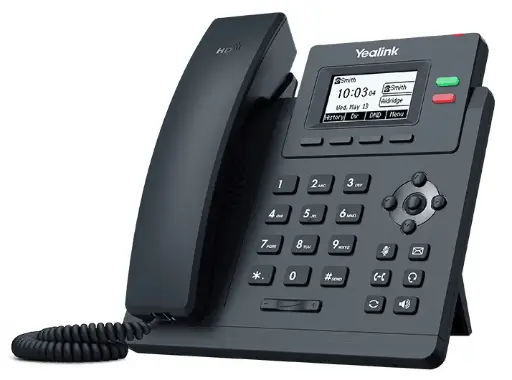
Shopping for Yealink?
Authorised Yealink reseller: genuine Australian stock, full warranty, competitive prices and price match available.
Can you keep your business phone number when moving to VoIP?
Usually, yes. Moving a number between telcos is called porting. According to ACMA:
- You can usually port local numbers (02, 03, 07 and 08), mobile numbers (04), and 1800, 13 and 1300 numbers.
- Your current telco must release the number when you or your new telco ask. The new telco usually accepts a port request but doesn't have to, so check before you sign up.
- Your new telco must get your permission and check that you are the account holder.
- Telcos generally complete ports within 8 to 15 days for a single local number. Ports of more than one local number can take up to 30 days, with limited exceptions. A mobile port usually takes 3 hours.
- Only active numbers can be ported. If a number is disconnected, you lose the rights to it and it goes into quarantine for 6 to 12 months. Don't cancel your old service before the port is complete.
- Your old telco may charge a porting fee, and you must pay any final bills.
Some telcos also let you port an out-of-area local number, such as keeping an 03 number after moving to Sydney. Ask your new provider whether it allows this.
Desk phone, DECT cordless or headset: which phones should you choose?
Choose by how each person works, not by the most expensive model:
| Model | Type | Key specs (manufacturer datasheet) | Suits |
|---|---|---|---|
| Yealink SIP-T73U | Desk phone | 2.8" 320x240 colour screen, 8 line keys (up to 40 DSS keys), 12 VoIP accounts, dual Gigabit, PoE 802.3af class 2 | General staff desks |
| Yealink SIP-T53W | Desk phone | Adjustable 3.7" screen, 8 line keys, 12 VoIP accounts, built-in Bluetooth 4.2 and dual-band Wi-Fi, USB 2.0 port, dual Gigabit, PoE 802.3af class 2 | Reception, managers, headset users |
| Yealink W77P (W70B base + W57R handset) | DECT cordless | Up to 10 handsets, 10 SIP accounts and 20 simultaneous calls per base; IP54 rugged handset; 50 m indoor / 300 m outdoor range in ideal conditions; base powered by PoE 802.3af class 1 | Warehouses, workshops, staff who walk around |
| Yealink WH64 Mono UC | DECT headset | DECT plus Bluetooth; base has USB connections for a PC and an IP phone; up to 14 hours DECT talk time (mono) | Heavy phone users and reception |
- Desk phones suit staff who sit at one desk. The extra line keys show colleagues' status (BLF) and give one-touch transfers. Compare models in our Yealink T7 series comparison, T53W vs T54W vs T57W guide and best Yealink IP phones guide.
- DECT cordless suits anyone away from a desk. One W70B base covers a single area. Yealink lists up to 6 RT30 repeaters per base to extend coverage, and larger sites can move to a multi-cell system. See our Yealink DECT phones compared and W80/W90 multi-cell guide.
- Headsets suit anyone on the phone for hours. The T53W datasheet lists support for wired and wireless USB headsets on its USB port. Check the exact pairing in Yealink's headset compatibility information before buying. See our Yealink headsets guide and DECT headsets compared.
Prefer Grandstream? We are authorised resellers of both Yealink and Grandstream. Our Yealink vs Grandstream guide explains the differences.
How many phones, lines and PoE ports do 2 to 20 staff need?
Size the system in three numbers: handsets (one per person or shared area), concurrent calls (the most calls in progress at once, which sets how many SIP trunk channels you need) and PoE ports (one for every PoE phone and DECT base you plan to power from the switch).
| Team size | Typical mix | PoE devices to count | Switch fit |
|---|---|---|---|
| 2 to 5 staff | Up to 4 desk phones plus 1 W77P cordless base | Up to 4 phones + 1 base = 5, plus 1 port for the router uplink = 6 | GWN7801P (8 Gigabit ports, all PoE) |
| 6 to 10 staff | Up to 9 desk phones plus 1 W77P base with extra handsets | Up to 9 phones + 1 base = 10, plus 1 uplink = 11 | GWN7802P (16 Gigabit ports, all PoE). The GWN7801P's 8 ports run out at 7 PoE devices plus the uplink |
| 11 to 20 staff | Up to 14 desk phones plus 1 W77P base with cordless handsets for the rest (up to 10 handsets per base) | 14 phones + 1 base = 15, plus 1 uplink = 16 | GWN7802P with every copper port used; add a second switch if you need more |
Power check: the T53W datasheet gives PoE consumption of 1.8 to 3.1 W, and the T73U datasheet gives 1.368 to 1.832 W. Fourteen T53W phones at their 3.1 W maximum come to 43.4 W, well inside the GWN7802P's 240 W total PoE budget (130 W on the GWN7801P, both with a 30 W per-port maximum). A desk PC plugs into the phone's second Gigabit port, so it doesn't use a switch port. The W77P handset charges in its own cradle, which plugs into a power point, and a WH64 headset base connects to the phone or PC by USB, not to the switch.
Calls and trunks: handsets aren't the same as lines. Ten staff rarely all talk at once, so you buy SIP trunk channels for the busiest moment, not for every desk. Our ARC VoIP team can quote SIP trunks and phone numbers. On-site, the UCM6301's listed 75 concurrent G.711 calls is far more than a 20-person office needs. For worked shopping lists, see Yealink phone systems for 5, 10 and 25 staff.
Do VoIP phones need QoS and a voice VLAN on a business network?
On a small, lightly used network, phones often work fine without any tuning. But as soon as someone uploads a large file or backs up to the cloud, voice packets compete with data and calls can break up. Three settings help:
- Voice VLAN: put the phones on their own VLAN, separate from PCs and guest Wi-Fi. The T53W and T73U datasheets list 802.1p/Q tagging (VLAN), Layer 3 ToS/DSCP, and LLDP/CDP/DHCP VLAN, so the phone can learn its voice VLAN automatically. Grandstream's GWN7801P/GWN7802P datasheet lists Voice VLAN, including auto voice VLAN with tagged and untagged OUI, plus LLDP and LLDP-MED.
- QoS: mark and prioritise voice traffic. The phones support DSCP marking, and the GWN switches support port priority, priority mapping and queue scheduling. The UCM6300 series lists Layer 2 (802.1Q, 802.1p) and Layer 3 (ToS, DiffServ, MPLS) QoS. Switch QoS prioritises traffic inside your office; it can't stop congestion on the NBN link itself, so leave headroom on your plan.
- Router settings: Ubiquiti's UniFi Talk network guide warns that SIP ALG on routers almost always corrupts SIP traffic. For other systems, follow your provider's router guidance. Symptoms include one-way or no audio, calls dropping after about 30 seconds, and phones that intermittently fail to register. Disable it on any upstream ISP modem or router. Ubiquiti also warns never to open a SIP port to the whole internet, because exposed SIP ports are scanned constantly and are a common target for toll fraud. Scope any port-forward to your carrier's IP addresses.
Ubiquiti's guide also notes that services behind CGNAT, which it says is common on cellular/5G, Starlink and some fibre, have no public IP. A SIP trunk that registers can still work there, but an IP-authenticated (non-registering) trunk needs a routable address. Ask your provider which type it supplies. For UniFi and MikroTik step-by-step settings, see running Yealink phones on UniFi and MikroTik: PoE budgets, VLANs and QoS.
Who can install a VoIP phone system in Australia?
Plugging phones into existing network outlets and a PoE switch is straightforward. Two rules apply to the rest:
- Data cabling: new network cabling, such as extra outlets for phones, connected to the telecommunications network must be installed by a registered cabler (under ACMA's cabling rules).
- Mains power: any fixed (hard-wired) 230 V work, such as a new power point for a comms rack or UPS, must be done by a licensed electrician. Plug-in power adapters and PoE don't need one.
Programming the PBX, the provider's trunk and VLANs is IT work. Your phone provider or IT partner can do it, or a competent in-house administrator.
Buying your VoIP phone system from ARC IP Networks
ARC IP Networks is an authorised Yealink and Grandstream reseller. Every phone, DECT system, headset and PoE switch we sell is genuine Australian stock with the full manufacturer's warranty, at competitive prices, and price match is available. Tell us your team size and how people work, and we'll suggest a handset mix and switch. Our ARC VoIP team can quote SIP trunks and phone numbers.
Our picks
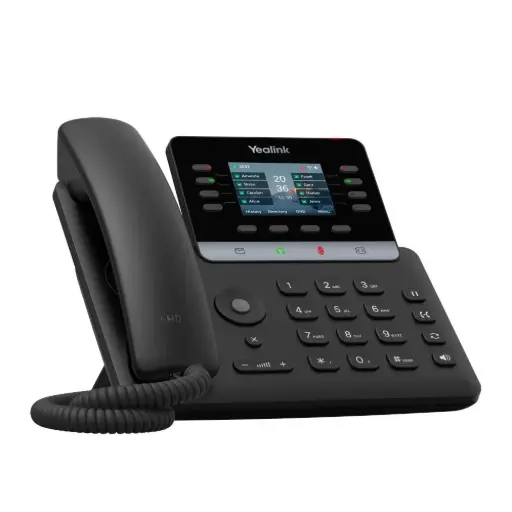
Yealink SIP-T73U Business IP Phone, 2.8" Colour Screen, 8 Line Keys, 12 SIP Accounts, Dual Gigabit, PoE
Yealink SIP-T73U: 2.8" colour screen, 8 line keys, 12 VoIP accounts, dual Gigabit and 802.3af PoE, so one cable serves both the phone and the PC.
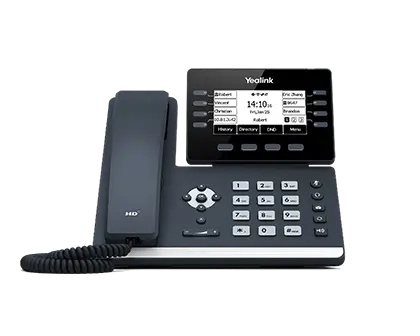
Yealink SIP-T53W Business IP phone
Yealink SIP-T53W: built-in Bluetooth 4.2 and dual-band Wi-Fi, a USB port for headsets or recording, and an adjustable 3.7" screen.

Yealink W77P DECT phone system (base and handset)
Yealink W77P: W70B base plus rugged IP54 W57R handset; the base takes up to 10 handsets, 10 SIP accounts and 20 simultaneous calls.

Yealink WH64 Mono UC DECT wireless headset
Yealink WH64 Mono UC: DECT plus Bluetooth, and a base with USB connections for both a PC and an IP phone.
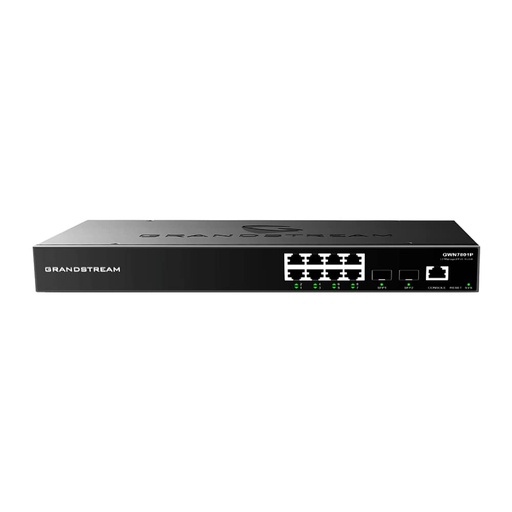
Grandstream GWN7801P PoE Network Switch 8xGigE 2xSFP
Grandstream GWN7801P: 8 PoE ports (802.3af/at, 130 W total), voice VLAN and QoS in a managed Layer 2+ switch.
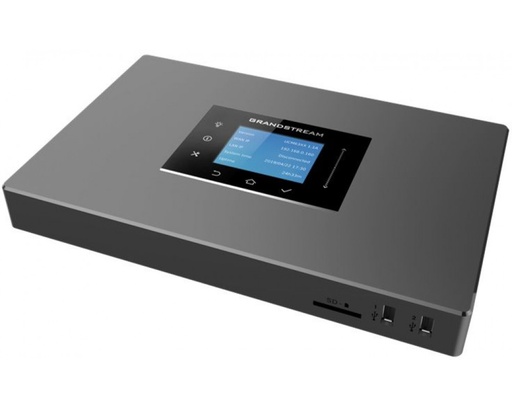
GrandStream UCM6301 IP PBX - 1 FXO, 1 FXS IP-PBX AU
Grandstream UCM6301 IP PBX: 500 users and 75 concurrent G.711 calls per Grandstream's datasheet, with 1 FXS and 1 FXO port.
Ready to buy?
Shop genuine Yealink at ARC IP Networks
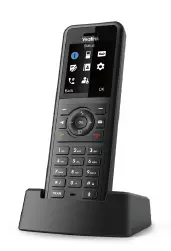

Authorised Yealink reseller
Yealink at ARC IP Networks
IP desk phones, DECT, headsets and meeting rooms. Genuine Australian stock with the full manufacturer's warranty, competitive prices and price match available.
Frequently asked questions
Usually not. ACMA says most NBN-connected services won't work in a power outage, and nbn says the NBN needs power at both the exchange and your premises. Keep a charged mobile phone available to call 000.
ACMA says you can call 000 from certain VoIP services, not all of them, so confirm with your provider. The operator may ask for your town and state, and your provider should hold your correct address for the IPND.
Usually yes. ACMA says local (02, 03, 07, 08), mobile, 1800, 13 and 1300 numbers can usually be ported, but the new telco doesn't have to accept the port, so check before signing up.
ACMA says telcos generally complete single local number ports within 8 to 15 days, while ports of more than one local number can take up to 30 days. Don't cancel the old service first, because a disconnected number can't be ported.
No. A hosted or cloud PBX runs on your provider's servers, so you don't need a PBX box on site. Your phones still need your office network and an internet connection. An on-site IP PBX such as the Grandstream UCM6301 suits businesses that want local control.
Yes, with subscription-unlocked UniFi Talk phones and a third-party SIP provider. Ubiquiti says its own Talk subscription and subscription-locked phones are only available in the USA, Canada and UK.
Not physically. Phones can share the office cabling, but a voice VLAN and QoS keep calls clear when the network is busy. Yealink desk phones and Grandstream GWN switches support VLAN tagging, LLDP and QoS.
Not necessarily. nbn lists PBX systems, EFTPOS machines, fax machines, lift phones, fire alarms, security systems and medical alarms as equipment that may be affected, so check each with its supplier.
Cabling connected to the telecommunications network must be installed by a registered cabler (under ACMA's cabling rules). Any fixed 230 V electrical work needs a licensed electrician.
Related guides
- Yealink Phones vs UniFi Talk Phones: Which Suits a UniFi Site in Australia?
- Running Yealink Phones on Ubiquiti UniFi and MikroTik Networks: PoE Budgets, VLANs and QoS
- Yealink Phone Systems for Small Business in Australia: What to Buy for 5, 10 and 25 Staff
- Best Yealink IP Phones in Australia: 2026 Buying Guide
- Yealink T7 Series Compared: T73U vs T73W vs T74U vs T74W vs T77U
- Yealink T53W vs T54W vs T57W: Which Prime Business Phone Should You Buy?
- Yealink Cordless DECT Phones in Australia: W70B, W73P, W76P, W56H and the Rugged W57R and W59R Compared
- Yealink W78P and W79P Pro Explained: Premium and Rugged DECT, Plus When to Go Multi-Cell with W80 and W90
- Best Yealink Headsets in Australia: DECT, Bluetooth and Wired Compared (2026)
- Yealink DECT Headsets Compared: WH62 vs WH63 vs WH64 vs WH66 vs WH67 vs WH68
- Yealink vs Grandstream: Which IP Phone Brand Is Better for Australian Businesses?
- UPS for NBN, Wi-Fi and CCTV/NVR: Keep Internet and Cameras Running
- UPS for Small Business: Stop Data Loss and Shut Down Gracefully
Who we are
About ARC IP Networks
ARC IP Networks is an Australian supplier of VoIP phones and business phone systems, based in Blackburn, Melbourne, Victoria. We work with homeowners, installers, integrators and businesses across Australia, supplying Yealink and Grandstream.
We are an authorised Yealink and Grandstream reseller, so you get genuine Australian stock with the full manufacturer's warranty, never grey imports, at competitive prices. Our team can help you choose the right equipment, and trade customers get trade accounts and project pricing on larger jobs.
- Genuine Australian stock with the full manufacturer's warranty
- Competitive prices, price match available
- Trade accounts for installers, integrators and MSPs
- Australia-wide delivery; showroom in Blackburn, Mon–Fri 9–5 (demos by appointment)
Need help choosing?
Tell the ARC IP Networks team what you are setting up and we will recommend the right equipment and quote it as one order.