Short answer: the UDM-Beast is the bigger box — 25 Gbps of threat inspection, eight 10 GbE ports built in, 7,500+ clients and a UniFi Protect recorder for up to 40 4K cameras. The EFG (Enterprise Fortress Gateway) is the more resilient and more deeply secured box — 95,000+ threat signatures on the CyberSecure Enterprise tier, one million concurrent sessions, SSL/TLS inspection, and two hot-swappable power supplies. Choose the Beast when you want maximum throughput and an all-in-one console; choose the EFG when session scale, deep inspection and hardware redundancy matter more than raw headline speed.
What these two actually are
Both are 1U rack-mount UniFi consoles that sit at the top of Ubiquiti's gateway range, both run the full UniFi application suite with no licensing fees, and both are physically the same size (442.4 × 43.7 × 325 mm). They are designed for genuinely different jobs.
UDM-Beast — the hyperscale all-in-one
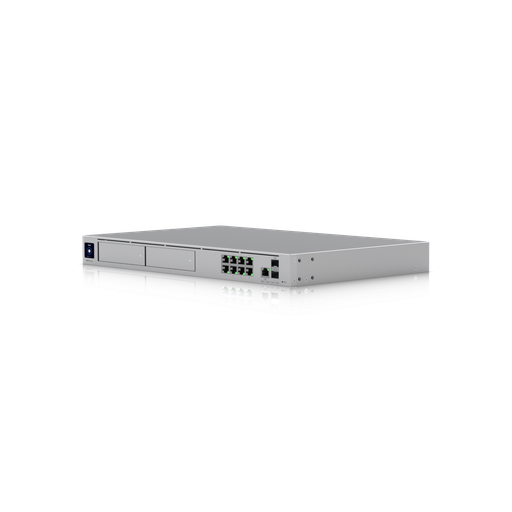
A Dream Machine scaled up: 25 Gbps IDS/IPS, an octa-core ARM v9 processor with 16 GB of memory, eight 10 GbE RJ45 ports plus 25G SFP28 and 10G SFP+, two NVR drive bays and a 128 GB SSD. It routes, switches at 10 GbE, and records cameras — all in one unit.
EFG — the enterprise security gateway
A dedicated gateway built around inspection and resilience: an 18-core ARM v8.2 processor, 12.5 Gbps IDS/IPS on the 95,000-signature CyberSecure Enterprise tier, one million concurrent sessions, SSL/TLS inspection, and two hot-swappable power supplies. No camera bays — it expects dedicated switching and recording alongside it.
Full specification comparison
| Specification | UDM-Beast | EFG |
|---|---|---|
| IDS/IPS throughput | 25 Gbps | 12.5 Gbps |
| Threat signatures | 55,000+ (CyberSecure) | 95,000+ (CyberSecure Enterprise) |
| Concurrent sessions | Not published | 1,000,000 |
| New sessions per second | Not published | 71,000 |
| SSL/TLS inspection sessions | Not published | 10,000 concurrent |
| Simultaneous users | 7,500+ | 5,000+ |
| Managed UniFi devices | 750+ | 500+ |
| Managed Access door hubs | 200 | Not published |
| UniFi Protect cameras | 100 HD / 60 2K / 40 4K | — no built-in recording |
| NVR drive bays | (2) 3.5" + 128 GB SSD | — |
| Default WAN ports | (1) 25G SFP28 + (1) 10 GbE RJ45 | (1) 25G SFP28 + (1) 2.5 GbE RJ45 |
| Max. WAN ports | 8 | 5 |
| RJ45 ports | 8× 10 GbE + 2× 1 GbE | 2× 2.5 GbE |
| SFP ports | (2) 25G SFP28 + (2) 10G SFP+ | (2) 25G SFP28 + (2) 10G SFP+ |
| MAC address table | 32,000 | Not published |
| Processor | Octa-core ARM v9 @ 2.1 GHz | 18-core ARM v8.2 @ 2 GHz |
| Memory | 16 GB | Not published |
| Power redundancy | Internal 150 W PSU + USP-RPS DC input | (2) hot-swappable 150 W CRPS |
| Gateway failover | Shadow Mode (VRRP) on both | |
| Max. power draw | 100 W | 82 W |
| Heat output | 342 BTU/hr | 280 BTU/hr |
| Weight | 5.5 kg | 6.5 kg |
| Form factor | 1U rack mount, 442.4 × 43.7 × 325 mm, 1.3" touchscreen | |
| Operating temperature | 0 to 40 °C | |
"Not published" above means Ubiquiti does not list that figure for that model — not that the capability is absent. We have deliberately left those cells honest rather than estimating.
Throughput vs session capacity — the real difference
It is tempting to read "25 Gbps beats 12.5 Gbps" and stop there. That would be a mistake, because the two models are optimised for different bottlenecks.
Throughput is how much data the gateway can inspect per second. It matters when you have a very fast internet service or heavy inter-VLAN routing — a large file transfer, a video production house, a site pulling multi-gigabit backups. On this measure the Beast is twice the EFG.
Session capacity is how many simultaneous connections the gateway can track. Every browser tab, app, IoT sensor and background sync opens connections; a modern phone alone can hold dozens. The EFG publishes one million concurrent sessions and 71,000 new sessions per second — figures Ubiquiti does not publish for the Beast. This is what limits a network full of users rather than a network full of bandwidth.
Security depth: CyberSecure vs CyberSecure Enterprise
Both gateways run Ubiquiti's application-aware firewall, intrusion detection and prevention, VLAN segmentation, DNS filtering and VPN services. The difference is the signature tier and inspection depth:
- UDM-Beast: 55,000+ threat signatures with CyberSecure.
- EFG: 95,000+ threat signatures with CyberSecure Enterprise — roughly 40,000 more rules — plus published SSL/TLS inspection for up to 10,000 concurrent sessions.
SSL/TLS inspection is the significant one for regulated environments. Because the large majority of web traffic is encrypted, a firewall that cannot inspect inside TLS is largely inspecting envelopes rather than letters. Being able to decrypt, inspect and re-encrypt a defined number of sessions is what lets you apply real policy to encrypted traffic — and it is why the EFG suits sites with compliance obligations even when their raw bandwidth is modest.
Ports, built-in switching and what you still need to buy
This is the difference that most changes your bill of materials.
The UDM-Beast includes eight 10 GbE RJ45 ports alongside two 1 GbE ports, two 10G SFP+ and two 25G SFP28. In effect it is a gateway with a small 10-gigabit switch built in — enough to connect a rack of servers, a NAS and several access-layer uplinks directly.
The EFG has just two 2.5 GbE RJ45 ports plus its SFP cages. It is not designed to connect endpoints; it is designed to sit at the edge and hand off to dedicated switching.
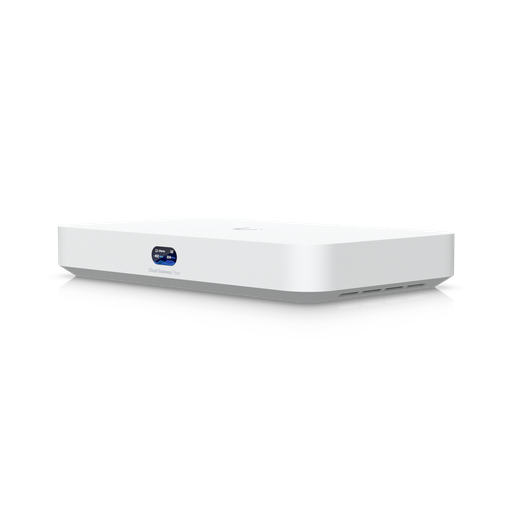
Shopping for UniFi Cloud Gateways?
Authorised Ubiquiti reseller: genuine Australian stock, full warranty, competitive prices and price match available.
Camera recording: the Beast has it, the EFG does not
The UDM-Beast includes two 3.5-inch NVR drive bays and a 128 GB system SSD, and records up to 100 HD, 60 2K or 40 4K UniFi Protect cameras — a genuinely large camera system with no per-camera licensing.
The EFG publishes no NVR storage. If your EFG site needs cameras, you add a dedicated recorder such as the UniFi Enterprise NVR (ENVR), which handles 210 HD or 70 4K cameras across 16 hot-swap bays with dual redundant power supplies.
That is not a weakness so much as a design decision: separating routing from recording means a firewall reboot does not interrupt surveillance, and each system can be sized and replaced independently. For security-critical sites, many integrators prefer exactly that separation.
Power redundancy and high availability
Both models support Shadow Mode (VRRP) gateway failover, where a second gateway runs in standby and assumes the role if the primary fails. Where they differ is inside the chassis:
- UDM-Beast: a single internal 150 W power supply, with a USP-RPS DC input for external backup power. If the internal supply fails, the unit needs service.
- EFG: two hot-swappable 150 W CRPS modules. A failed supply is pulled and replaced from the front while the gateway keeps running — no outage, no scheduled downtime.
For a site with a service-level obligation — a hospital, a data room, a 24-hour logistics operation — that single difference often decides the purchase on its own.
VPN and multi-site performance
Ubiquiti publishes detailed VPN throughput figures for the EFG, which is useful when you are designing a multi-site network:
| VPN type | EFG throughput | Typical use |
|---|---|---|
| Identity Endpoint (One-Click VPN) | 1.2 Gbps | Staff remote access |
| Teleport | 1.2 Gbps | Zero-config remote access |
| Site Magic (SD-WAN) | 1.1 Gbps | Site-to-site mesh |
| WireGuard | 980 Mbps | Modern high-speed tunnels |
| IPsec | 580 Mbps | Interop with third-party firewalls |
| L2TP | 280 Mbps | Legacy client VPN |
| OpenVPN | 180 Mbps | Legacy interoperability |
Ubiquiti does not publish an equivalent table for the UDM-Beast. If site-to-site throughput is a design constraint — for example linking branches over a business fibre service — the EFG is the model with documented numbers to design against.
Which one should you buy?
Choose the UDM-Beast if…
- You want one box that routes, switches at 10 GbE and records cameras.
- Raw inspection throughput matters — multi-gigabit internet, heavy internal transfers.
- You have a large camera count and want it in the same chassis (up to 40× 4K).
- Client count is very high (7,500+) and device count is large (750+).
Choose the EFG if…
- You need the 95,000-signature CyberSecure Enterprise tier or SSL/TLS inspection.
- Session count, not bandwidth, is your scaling problem.
- Hot-swappable redundant power is a requirement, not a nice-to-have.
- You are designing site-to-site VPN against published throughput figures.
- Your architecture separates routing, switching and recording by design.
Total cost of the deployment, not just the box
Comparing these two on unit price alone is misleading, because they imply different shopping lists:
- Beast deployment: gateway + access points + drives. Its eight 10 GbE ports may cover your server and uplink connectivity, and its NVR bays cover cameras.
- EFG deployment: gateway + access switch + (often) aggregation switch + separate NVR + access points + drives. More hardware, but each element is independently sized and replaceable.
For a site of 300 users with 20 cameras, those two lists can land in very different places. If you would like the comparison run against your actual device counts, our team will size both options — see the buying section below.
Ready to buy?
Shop genuine Ubiquiti at ARC IP Networks
Authorised Ubiquiti reseller
Ubiquiti at ARC IP Networks
UniFi gateways, switches, Wi-Fi, Protect cameras and Access. Genuine Australian stock with the full manufacturer's warranty, competitive prices and price match available.
Frequently asked questions
The UDM-Beast delivers 25 Gbps IDS/IPS, eight built-in 10 GbE ports, 7,500+ clients, 750+ managed devices and two NVR bays recording up to 40 4K cameras. The EFG delivers 12.5 Gbps IDS/IPS but on the 95,000-signature CyberSecure Enterprise tier, with one million concurrent sessions, 71,000 new sessions per second, SSL/TLS inspection for 10,000 sessions, and two hot-swappable power supplies. The Beast is the bigger all-in-one; the EFG is the more resilient, more deeply inspecting dedicated gateway.
The UDM-Beast, on raw throughput: 25 Gbps of IDS/IPS inspection versus 12.5 Gbps on the EFG. However the EFG publishes far higher session-handling figures (one million concurrent sessions, 71,000 new sessions per second), which is the limit that actually matters on networks with very large numbers of users rather than very large file transfers.
No. Ubiquiti publishes no NVR storage for the EFG - it is a dedicated gateway. For cameras on an EFG site you add a separate recorder such as the UniFi Enterprise NVR (ENVR), which records up to 210 HD or 70 4K cameras across 16 drive bays. The UDM-Beast, by contrast, has two built-in NVR bays for up to 40 4K cameras.
Not internally. The UDM-Beast has a single internal 150 W power supply plus a USP-RPS DC input for external backup power. The EFG is the model with two hot-swappable 150 W CRPS modules, allowing a failed supply to be replaced while the gateway keeps running.
They are Ubiquiti's threat-signature tiers for intrusion detection and prevention. CyberSecure provides 55,000+ signatures and is what the UDM-Beast uses. CyberSecure Enterprise provides 95,000+ signatures and is what the EFG uses, alongside published SSL/TLS inspection capacity for up to 10,000 concurrent encrypted sessions.
Almost always, yes. The EFG has only two 2.5 GbE RJ45 ports plus SFP cages, so it is not designed to connect endpoints directly. Most EFG deployments add an access switch such as the USW-Pro-XG-24-PoE or USW-Enterprise-48-PoE, and often an aggregation switch to terminate the 25G uplinks. The UDM-Beast's eight 10 GbE ports can reduce or remove that requirement on smaller sites.
The UDM-Beast supports 7,500+ simultaneous users and 750+ managed UniFi devices. The EFG supports 5,000+ simultaneous users and 500+ managed UniFi devices. Both far exceed what a typical Australian SME needs, so the choice usually comes down to security depth, redundancy and port layout rather than client count.
You would not normally run both as gateways on one site, but in a multi-site organisation it is common to mix: an EFG at head office where redundancy and inspection depth matter, and Beasts or Dream Machines at branches. Site Magic SD-WAN links them, and all sites are managed from the same UniFi interface.
Ubiquiti publishes: 1.2 Gbps for Identity Endpoint One-Click VPN and Teleport, 1.1 Gbps for Site Magic, 980 Mbps for WireGuard, 580 Mbps for IPsec, 280 Mbps for L2TP and 180 Mbps for OpenVPN. Equivalent figures are not published for the UDM-Beast.
Both are actively cooled 1U rack units intended for a rack, comms room or server room rather than an occupied office. Both are 442.4 x 43.7 x 325 mm and rated for 0 to 40 degrees C ambient, so ventilation matters in Australian summer conditions.
No. UniFi Network, Protect, Access and Talk run on the hardware without licensing or per-device subscription fees. Some optional cloud services carry a fee, but the core routing, security, camera and access functionality does not.

Related reading
- What else you need to buy with a UniFi NVR
- Outgrowing a UniFi Cloud Key: when to move to a rack console
- How much storage do you need for security cameras?
- How to set up a UniFi Protect NVR — and migrate cameras from an old one
- UniFi Protect NVR comparison: which recorder do you need?
- Ubiquiti ENVR: the complete Australian guide
- Ubiquiti UDM-Beast: the complete Australian guide
- UDM-Beast vs UDM-Pro-Max: do you need the Beast?
- Start here: Ubiquiti Australia — the complete UniFi buying guide
- UniFi Cloud Gateway comparison: UCG-Fiber vs Ultra vs Max vs UXG
- UniFi Access explained: complete Australian door access guide
- UniFi access points compared: which Ubiquiti AP do you need?
- Best UniFi Protect cameras in Australia: complete range guide
- UniFi switch comparison 2026: every Ubiquiti switch explained
- Ubiquiti EFG Enterprise Fortress Gateway: complete Australian guide
- UXG Enterprise vs EFG vs UDM-Beast: choosing a rack-mount UniFi gateway
- UDM Pro vs UDM SE vs UDM Pro Max: which Dream Machine?
- Ubiquiti UniFi Cloud Gateways: the complete range
- UniFi Enterprise NVR for large camera systems
Who we are
About ARC IP Networks
ARC IP Networks is an Australian supplier of networking, Wi-Fi and gateway equipment, based in Blackburn, Melbourne, Victoria. We work with homeowners, installers, integrators and businesses across Australia, supplying Ubiquiti UniFi, MikroTik, TP-Link, Ruijie, Teltonika and D-Link.
We are an authorised Ubiquiti, MikroTik, TP-Link, Ruijie, Teltonika and D-Link reseller, so you get genuine Australian stock with the full manufacturer's warranty, never grey imports, at competitive prices. Our team can help you choose the right equipment, and trade customers get trade accounts and project pricing on larger jobs.
- Genuine Australian stock with the full manufacturer's warranty
- Competitive prices, price match available
- Trade accounts for installers, integrators and MSPs
- Australia-wide delivery; showroom in Blackburn, Mon–Fri 9–5 (demos by appointment)
Need help choosing?
Tell the ARC IP Networks team what you are trying to achieve and we will recommend the right equipment and quote it as one order.