Docker packages an application together with everything it needs to run into a lightweight container, so the same app runs the same way on almost any hardware. ASUSTOR provides the Docker Engine for most of its NAS models through App Central, and supports Portainer, a web interface for deploying and managing containers without typing Docker commands.
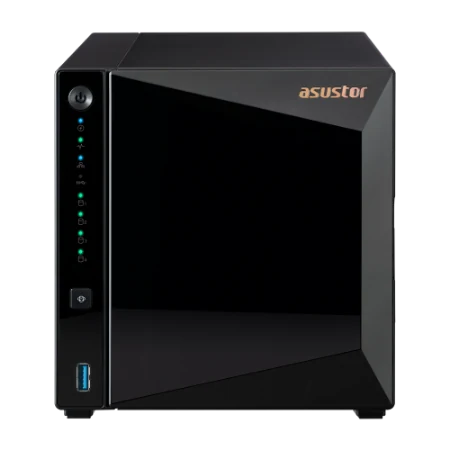
Quick pick: trying a few containers at home → Drivestor 4 Pro Gen2 (AS3304T v2); a home lab with many containers → AS5404T (memory to 16 GB); business apps, databases and heavy containers → Lockerstor 4 Gen3 (AS6804T, 16 GB ECC DDR5 to 64 GB). ARC IP Networks is a trusted ASUSTOR supplier in Australia: genuine ASUSTOR NAS and accessories at competitive prices, with the full ASUSTOR manufacturer warranty, Australia-wide delivery and trade pricing.
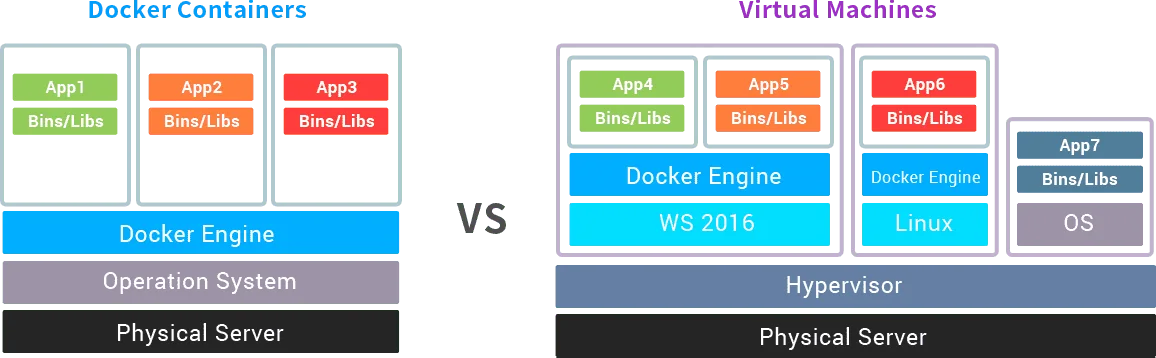
Docker containers vs virtual machines at a glance
ASUSTOR's Docker page compares the two approaches like this:
| Container | Virtual machine | |
|---|---|---|
| Startup | Seconds | Minutes |
| Disk use | Megabytes | Gigabytes |
| Efficiency | Fast | Slow |
| Support | Many container types | Few virtual machine types |
| Common use | Rapid deployment | Disaster recovery |
Source: ASUSTOR's "Using an ASUSTOR NAS with Docker" page.
In ASUSTOR's words, containers are like virtualisation implemented at the operating system level, using the host's operating system directly, while traditional virtual machines work at the hardware level and each need an independent operating system, which uses more resources.
What is Docker?
ASUSTOR describes Docker as a set of platform-as-a-service products that use operating-system-level virtualisation to deliver software in packages called containers. Because Docker packages an app with its operating environment, a container runs wherever Docker is installed, with no need to rebuild the app or environment for each new machine. ASUSTOR also notes that containers start quickly, faster than traditional virtual machines, and use system resources efficiently.
The three building blocks
| Component | What it is |
|---|---|
| Image | The read-only template used to launch an application in a container, similar in concept to a virtual machine image |
| Container | The running application: an independent, isolated environment created from an image |
| Registry | Where images are stored and shared. Registries can be public or private; Docker Hub is the main public one |
Descriptions summarised from ASUSTOR's Docker page.
Why run Docker on a NAS?
ASUSTOR gives a practical example: imagine deploying a server with an unfamiliar operating system that needs apps such as PHP 7 and MySQL. Installing them by hand can be slow and fiddly; with Docker you deploy a ready-made image instead. ASUSTOR lists four advantages:
- Faster build and release: developers create containers from a standard image and operations staff deploy the same container, which keeps the process transparent.
- Easy deployment: different applications are deployed with standard commands.
- More efficient virtualisation: containers need no extra virtualisation layer, so you run more on the same hardware.
- Easy to expand and move: containers run on physical machines, virtual machines, public clouds and NAS devices, so an app can move between platforms.
A NAS is a natural Docker host for a small business or home lab: it is already on 24/7, already holds the data your apps use, and draws far less power than a server. Typical uses include internal web apps, databases, monitoring dashboards, automation tools and development or test environments.



Docker on ASUSTOR ADM
ADM is ASUSTOR's Linux-based operating system and is compatible with Docker. ASUSTOR provides the Docker Engine on most models: install it from App Central, then deploy containers from developers on Docker Hub. ASUSTOR's system requirements list includes the Drivestor Gen2, Drivestor Pro Gen2, AS54, Lockerstor Gen2+, Lockerstor Gen3, Flashstor and Flashstor Gen2 families, which covers every NAS we stock.
Portainer: Docker without the command line
Docker has no graphical interface of its own. ASUSTOR supports Portainer, a web-based management tool that makes deploying and managing images and containers easier for people not familiar with Docker commands, with thousands of Docker Hub images available. ASUSTOR's product pages for the Drivestor Pro Gen2, AS54, Lockerstor and Flashstor models feature Portainer for easy Docker deployments.
Check the processor architecture
ASUSTOR notes that the types of containers you can deploy depend on the platforms each developer supports, and that hardware differs between models, so check compatibility before buying. In practice this matters most for the processor:
| Model | Architecture | Memory | What it suits |
|---|---|---|---|
| AS1204T | ARM64 64-bit | 1GB DDR4 | Light containers; check each image offers an ARM64 build |
| AS3304T v2 | ARM64 64-bit | 2GB DDR4 | A few light containers; ARM64 images |
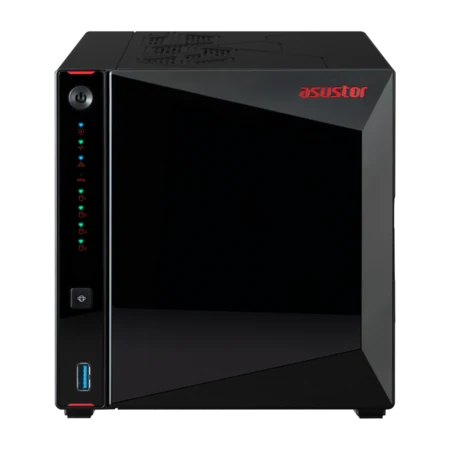
| AS5404T | x64 64-bit | 4GB DDR4 (max 16GB) | Home lab: many containers, the widest image choice |
| AS6704T v2 | x64 64-bit | 4GB DDR4 (max 16GB) | Small business apps alongside file serving |
| AS6804T | x64 64-bit | 16GB DDR5 ECC (max 64GB) | Databases, heavy and many concurrent containers |
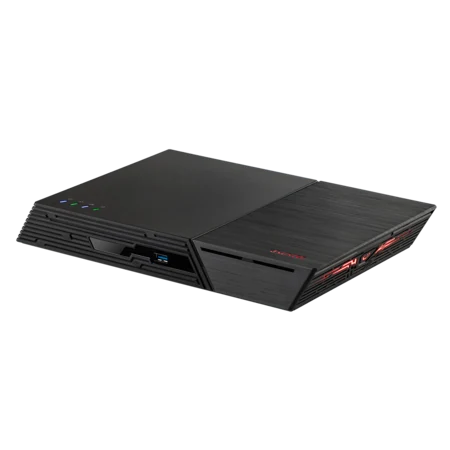
| FS6806X | x64 64-bit | 8GB DDR5 (max 64GB) | Fast all-flash container storage |
Architecture and memory from ASUSTOR specifications. Suitability is ARC IP Networks guidance.
How to size a NAS for Docker
- Memory first: every container uses RAM. ARM models have fixed memory (1 GB on the AS1204T, 2 GB on the AS3304T v2), while the AS5404T and Lockerstor Gen2+ expand to 16 GB and the AS6804T to 64 GB.
- Put containers on SSD: databases and app data feel much faster on NVMe. The AS5404T, Lockerstor and Flashstor models have M.2 slots; ASUSTOR advises using at least two M.2 SSDs if SSDs hold the main volume.
- Processor headroom: the Intel Celeron N5105 handles a busy home lab; the AMD Ryzen Embedded V3C14 in the AS6804T and FS6806X suits business workloads.
- ECC memory for business data: the AS6804T ships with ECC DDR5, which detects and corrects memory errors.
- Back up the volumes: containers are disposable, but their data is not. Snapshot the Docker folder and follow the 3-2-1 backup rule.
- Keep it private: do not expose container dashboards straight to the internet. Use a VPN, and see our NAS security checklist.
Docker or a virtual machine: which should you use?
Use a container when the app is published as a Docker image and runs on Linux: it starts in seconds, uses little disk and shares the NAS's resources efficiently. Use a virtual machine when you need a whole separate operating system, such as a Windows-only application. ASUSTOR lists rapid deployment as the common use for containers and disaster recovery for virtual machines. If you are building a cluster of ESXi hosts, a NAS is better used as shared storage: see our ASUSTOR and VMware guide.
Build it with ARC IP Networks
ARC IP Networks is a trusted ASUSTOR supplier in Australia, with genuine ASUSTOR NAS, memory-ready models, NAS and drive bundles and trade and project pricing for developers, MSPs and IT teams.
| You are | What we suggest | Why |
|---|---|---|
| Curious beginner at home | AS3304T v2 | 2 GB RAM, hot-swap bays, Portainer listed |
| Home lab enthusiast | AS5404T with IronWolf 4 TB | x64 Celeron, RAM to 16 GB, four M.2 for containers |
| Small business running internal apps | AS6704T v2 | Dual 5GbE, 10GbE-ready, RAM to 16 GB |
| Developer or MSP with heavy workloads | AS6804T with IronWolf 4 TB | Ryzen, ECC DDR5 to 64 GB, dual 10GbE |
| All-flash container host | FS6806X | Six PCIe 4.0 M.2 slots, Ryzen, 10GbE |
Not sure which model fits? Our ASUSTOR buying guide and range explainer compare every model. Running business apps around the clock? Protect them with a UPS from our PowerShield range (see our best UPS for a NAS guide). Call 1300 100 440 for trade pricing.
Shop genuine ASUSTOR NAS for Docker
Genuine ASUSTOR with the full 3-year manufacturer warranty. Current Australian pricing (inc. GST) is on each product page.



Common questions
Straight answers from the ARC IP Networks team. Last reviewed October 2026.
Docker packages an application with everything it needs into a container, so it runs the same way on almost any hardware. ASUSTOR describes it as operating-system-level virtualisation that is lighter and faster to start than a traditional virtual machine.
Yes. ASUSTOR provides the Docker Engine on most models through App Central. Its requirements list includes the Drivestor Gen2, Drivestor Pro Gen2, AS54, Lockerstor Gen2+, Lockerstor Gen3, Flashstor and Flashstor Gen2 families.
Portainer is a web-based tool for deploying and managing Docker images and containers without the command line. ASUSTOR supports it and features it on its Drivestor Pro Gen2, AS54, Lockerstor and Flashstor product pages.
ASUSTOR compares them as follows: containers start in seconds and use megabytes of disk, while virtual machines take minutes and use gigabytes. Containers share the host operating system; each virtual machine needs its own.
Not always. The Drivestor Gen2 and Drivestor Pro Gen2 use ARM64 processors, so each image must offer an ARM64 build. x64 models such as the AS5404T, Lockerstor and Flashstor run the widest range of images. ASUSTOR advises checking compatibility before buying.
It depends on the containers, but more is better. The AS5404T and Lockerstor Gen2+ expand to 16 GB, and the Lockerstor 4 Gen3 AS6804T ships with 16 GB of ECC DDR5 and expands to 64 GB.
For a home lab, the AS5404T with its x64 Celeron, memory to 16 GB and four M.2 slots. For business apps and databases, the Lockerstor 4 Gen3 AS6804T with an AMD Ryzen processor, ECC DDR5 and dual 10GbE.
ARC IP Networks is a trusted ASUSTOR supplier in Australia with genuine ASUSTOR NAS, competitive prices, the full manufacturer warranty and Australia-wide delivery. Call 1300 100 440 for trade and project pricing.
Planning a Docker host?
Tell us which containers you want to run and how many users rely on them. ARC IP Networks will match the ASUSTOR NAS, memory and SSDs, with trade and project pricing.