For a huddle or focus room (two to six people), choose between the Yealink MeetingBar A10 (a compact 4K bar with auto framing, bundled with the CTP18 panel as the A10-020) and the MeetingBar A25 (triple 4K cameras with a 151° field of view, 8 microphones, bundled with the CTP25 as the A25-031). The A20 sits between them in Yealink's line-up but is not part of our current range; the A25 is the better buy for the same room.
ARC IP Networks is a trusted Yealink supplier in Australia: genuine Yealink stock with the full manufacturer's warranty, delivered Australia-wide at competitive prices, with local pre-sales help for businesses, installers and IT providers.
Why small rooms are hard
In a six-person room the camera is close to the table and people sit at wide angles, so a standard 90° camera cuts off the ends of the table. Small-room bars solve it with very wide lenses or multiple cameras, and with microphones tuned for a short table rather than a boardroom.
A10 vs A20 vs A25
| <a href="/shop/a10-010-yealink-a10-010-a10-010-all-in-one-collab-bar-psu-w-mount-bracket-cables-2yr-huddle-room-9545">MeetingBar A10</a> | MeetingBar A20 | <a href="/shop/a25-010-yealink-meetingbar-a25-all-in-one-video-bar-for-focus-rooms-151deg-triple-4k-cameras-teams-rooms-and-zoom-rooms-on-android-a25-010-10686">MeetingBar A25</a> | |
|---|---|---|---|
| Room | Huddle, about 1 to 4 people | Huddle to small, about 4 to 7 | Focus and small rooms, up to about 6 |
| Cameras | 4K camera with auto framing | Dual-camera system | Triple 4K (one 151° ultra-wide, two tele), electric privacy shutter |
| AI video | Auto Framing | Auto Framing, Speaker Tracking | IntelliFocus, Video Fence, Auto Framing, Speaker Tracking, Picture-in-Picture, Smart Gallery (Zoom) |
| Audio | Beamforming mic array, full-range speaker | Mic array | 8 MEMS mics, 10 W speaker, 5 m pickup, AI Audio 2.0 with Audio Fence |
| Platform | Android, Teams Rooms or Zoom Rooms, BYOD | Android, Teams Rooms or Zoom Rooms | Android 13 with MDEP, Teams Rooms or Zoom Rooms, BYOD USB |
| Touch panel bundle | A10-020 with CTP18 | A20 with CTP18 | A25-031 with CTP25 |
| Available from ARC IP Networks | Yes | Not in current range | Yes |
Room sizes follow Yealink's guidance. Specifications as published by Yealink.
Which to choose
- Phone booths, two-person rooms, a manager's office used for video calls: the A10. Compact, one camera, one cable to the display.
- Four- to six-seat focus rooms where the table runs toward the screen: the A25. The 151° view and Video Fence keep everyone in frame and ignore the corridor through the glass.
- Rooms that will grow or have a long table: skip to the A40; see our A40 review.
What else the room needs
- A display with HDMI. Yealink's MeetingDisplay 55 is sized for these rooms and mounts the bar on its own bracket.
- The touch panel from the bundle (CTP18 or CTP25) on the table for one-touch join.
- A WPP30 pod or the VCH51 Pro wired sharing hub so laptops can present.
- A RoomPanel E2 outside the door if the room is booked.
- A Teams Rooms or Zoom Rooms licence for the room account.
Huddle-room picks
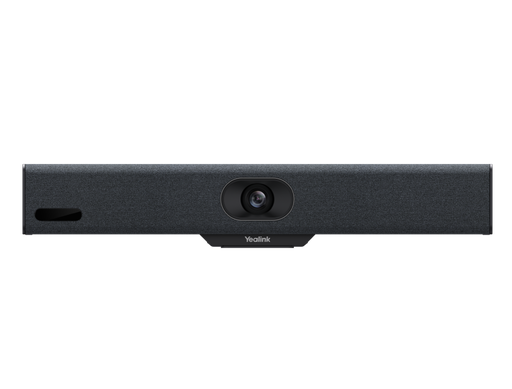
The huddle-room bundle: compact 4K bar with auto framing and an 8" touch panel.
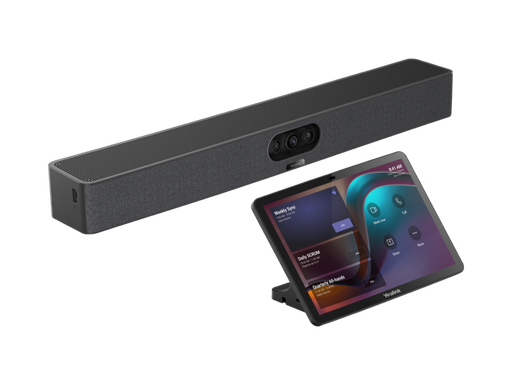
Triple 4K cameras with a 151° view, 8 microphones and a 10" touch console for focus rooms.
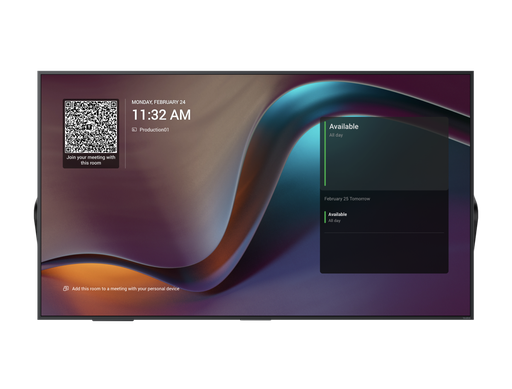
A 55" 4K display built to carry a MeetingBar and switch to the call automatically.
ARC IP Networks: the trusted Yealink supplier in Australia
ARC IP Networks is an Australian business communications and networking supplier based in Melbourne, Victoria, and a trusted source of genuine Yealink equipment across the Yealink MeetingBar huddle-room range. We supply offices, call centres, medical practices, schools, hospitality sites, installers, MSPs and IT providers Australia-wide.
- Genuine Yealink, sourced through Yealink's Australian distribution channel, never grey import or refurbished.
- Australian stock with AU power supplies and firmware ready for Australian VoIP providers, 3CX, Microsoft Teams and hosted PBX platforms.
- Full manufacturer's warranty on every Yealink product, with Australian support.
- Australia-wide delivery at competitive prices, a GST tax invoice on every order, and trade and project pricing for installers and IT providers.
Browse the Yealink range at ARC IP Networks, call 1300 100 440 or email info@arcip.com.au for help choosing.
Common questions
Straight answers from the ARC IP Networks team. Last reviewed October 2026.
The MeetingBar A10 for one to four people in a phone booth or small office, and the MeetingBar A25 for four- to six-seat focus rooms where its 151-degree triple-camera system keeps everyone in frame.
The A10 has a single 4K camera with auto framing and a beamforming microphone array. The A25 has three 4K cameras (one 151-degree ultra-wide and two tele), an 8-microphone array with 5 m pickup, a 10 W speaker and the full set of AI framing features including Video Fence.
The A20 is not part of our current range. For the same rooms we supply the MeetingBar A25, which has newer cameras and audio, or the A10 for smaller spaces.
Yes. Both run native Teams Rooms on Android or Zoom Rooms, and both offer a BYOD mode where the bar acts as a USB camera and speakerphone for a laptop on any platform.
The A10-010 is the bar with power supply, bracket and cables. The A10-020 adds the CTP18 8-inch touch panel for one-touch meeting join and camera control.
Any HDMI display. Yealink's MeetingDisplay 55 is sized for huddle and focus rooms and includes a bracket for the bar and automatic switching to the call.
ARC IP Networks is a trusted Yealink supplier in Australia. It stocks the Yealink MeetingBar huddle-room range as genuine Australian stock with the full manufacturer's warranty, delivers Australia-wide at competitive prices, issues a GST tax invoice on every order, and offers trade and project pricing to installers, MSPs and IT providers. Order online at arcip.com.au or call 1300 100 440.
Need help choosing Yealink gear?
Tell us the room or the role, and we will match the right Yealink model and accessories and quote them as one order with Australia-wide delivery and trade pricing for installers.
Related Yealink guides
- Yealink Meeting Room Solutions for Australian Offices
- Yealink MeetingBar A40 Review
- Yealink W78P and W79P Pro Explained: Premium and Rugged DECT, Plus When to Go Multi-Cell with W80 and W90
- Yealink MeetingBoard 65 vs 75 Pro vs 86: Which All-in-One Touch Display for Which Room
- Yealink UVC40 vs UVC86 vs SmartVision 80: Cameras for Microsoft Teams Rooms on Windows and BYOD Rooms