For call centres, hot desks and anyone at a fixed PC, a wired Yealink USB headset is the cheapest reliable option: no battery, no pairing. The UH34 is the all-day standard (mono or dual, leatherette cushions), the UH34 Lite is the lighter foam-cushion version for large rollouts, the UH34 SE adds USB-C plus 3.5 mm with a detachable inline controller, and the UH37 is the premium model with dual noise-cancelling microphones and leather cushions. All come in UC and Teams (MS) versions.
ARC IP Networks is a trusted Yealink supplier in Australia: genuine Yealink stock with the full manufacturer's warranty, delivered Australia-wide at competitive prices, with local pre-sales help for businesses, installers and IT providers.
The UH range
| Model | Wearing | Cushions | Connection | Microphone | Best for |
|---|---|---|---|---|---|
| UH34 | Mono or dual (D) | Leatherette | USB-A (C/A versions add a USB-C adapter) | Noise-cancelling | Office and contact-centre standard |
| UH34 Lite | Mono or dual | Foam | USB-A (C/A versions available) | Noise-cancelling | Large rollouts, training rooms, lowest cost |
| UH34 SE | Mono or dual | Soft leatherette, replaceable | USB-C or 3.5 mm via detachable YHC20 inline controller | Noise-cancelling with Acoustic Shield | Laptops with USB-C, shared desks, mobiles |
| UH37 | Mono or dual | Leather | USB-C (USB-A adapter included) | Dual noise-cancelling mics | Premium seats, noisy floors |
UC and Microsoft Teams (MS) versions of each model; MS versions add a Teams button. Specifications as published by Yealink.
Shopping for Yealink?
Authorised Yealink reseller: genuine Australian stock, full warranty, competitive prices and price match available.
Mono or dual?
Contact-centre teams usually split: dual (both ears) for agents on noisy floors who need to concentrate, mono for team leaders and anyone who has to hear the room. Yealink marks them M and D in the model code.
UC or Teams?
If agents work in Microsoft Teams, buy MS: the dedicated button answers, mutes and raises a hand. For a contact-centre platform, 3CX, Zoom or a hosted softphone, buy UC. The audio hardware is the same.
Why wired still wins in call centres
- No charging. A headset that is flat at 9 am is a seat that is down. Wired headsets never are.
- Hot desking. Plug in, log in, work. No pairing to a new PC.
- Cost. Wired headsets cost a fraction of DECT or Bluetooth, which matters at 20 or 50 seats.
- Spares. Replacement leather and foam ear cushions for the UH34 and leather cushions for the UH37 are available, so hygiene and wear are handled without replacing headsets.
Wired headsets on Yealink desk phones
Yealink T4U and T5W desk phones have a USB port, so a UH34 or UH37 plugs straight into the phone as well as into a PC. For the T3 series, use an RJ9 headset or a DECT headset with the EHS35 adapter.
Wired headset picks

The contact-centre standard: dual-ear, noise-cancelling mic, Teams button, USB-A.
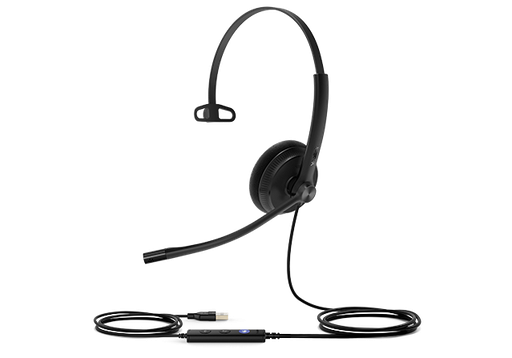
Lightweight mono headset with USB-C and 3.5 mm via a detachable inline controller.
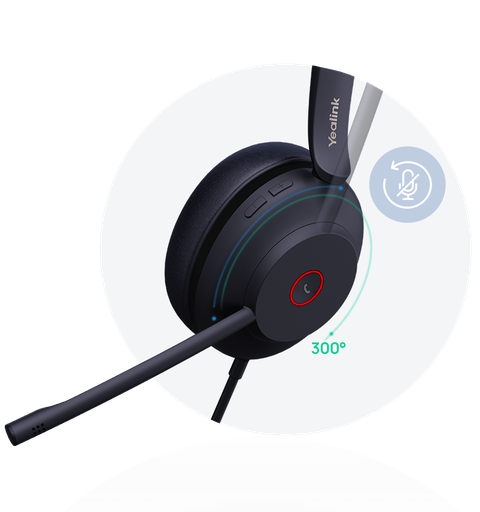
Premium wired headset with dual noise-cancelling microphones and leather cushions.
Ready to buy?
Shop genuine Yealink at ARC IP Networks

Authorised Yealink reseller
Yealink at ARC IP Networks
IP desk phones, DECT, headsets and meeting rooms. Genuine Australian stock with the full manufacturer's warranty, competitive prices and price match available.
Common questions
Straight answers from the ARC IP Networks team. Last reviewed October 2026.
The UH34 is the all-day standard wired headset with leatherette cushions and a noise-cancelling microphone, USB-A with optional USB-C adapter. The UH37 is the premium model with dual noise-cancelling microphones, leather cushions and native USB-C with a USB-A adapter included.
A lighter, lower-cost version of the UH34 with foam ear cushions, in mono and dual, UC and Teams versions. It suits large rollouts and training rooms.
The Special Edition connects by USB-C or a 3.5 mm plug through a detachable YHC20 inline controller, so one headset works with laptops, desk phones and mobiles. It is lightweight with soft replaceable cushions and Yealink Acoustic Shield noise cancelling.
Dual (both ears) for agents on noisy floors who need to focus on the caller; mono for team leaders and anyone who needs to hear colleagues. Yealink marks the versions M and D.
Yes. Yealink T4U and T5W desk phones have a USB port that accepts the UH34 and UH37 directly. T3-series phones use RJ9 headsets or a DECT headset via the EHS35 adapter.
Yes. Leather and foam cushions for the UH34 and leather cushions for the UH37 are sold as spares, so cushions can be replaced for hygiene and wear without replacing the headset.
ARC IP Networks is a trusted Yealink supplier in Australia. It stocks the Yealink wired USB headset range as genuine Australian stock with the full manufacturer's warranty, delivers Australia-wide at competitive prices, offers trade and project pricing to installers, MSPs and IT providers. Order online at arcip.com.au or call 1300 100 440.
Who we are
About ARC IP Networks
ARC IP Networks is an Australian supplier of VoIP phones and business phone systems, based in Blackburn, Melbourne, Victoria. We work with homeowners, installers, integrators and businesses across Australia, supplying Yealink and Grandstream.
We are an authorised Yealink and Grandstream reseller, so you get genuine Australian stock with the full manufacturer's warranty, never grey imports, at competitive prices. Our team can help you choose the right equipment, and trade customers get trade accounts and project pricing on larger jobs.
- Genuine Australian stock with the full manufacturer's warranty
- Competitive prices, price match available
- Trade accounts for installers, integrators and MSPs
- Australia-wide delivery; showroom in Blackburn, Mon–Fri 9–5 (demos by appointment)
Need help choosing Yealink gear?
Tell us the room or the role, and we will match the right Yealink model and accessories and quote them as one order with Australia-wide delivery and trade pricing for installers.
Related Yealink guides
- Best Yealink Headsets in Australia
- Yealink Microsoft Teams Phones in Australia
- Yealink W78P and W79P Pro Explained: Premium and Rugged DECT, Plus When to Go Multi-Cell with W80 and W90
- Yealink MeetingBar A10 vs A20 vs A25: Choosing a Video Bar for Huddle and Focus Rooms
- Yealink MeetingBoard 65 vs 75 Pro vs 86: Which All-in-One Touch Display for Which Room