Choose MikroTik when routing depth, price per port and no subscriptions matter and a capable engineer will run it. Choose Ubiquiti UniFi when one controller for gateway, switching, Wi-Fi and cameras matters more than raw routing features. Many Australian sites run a MikroTik router in front of UniFi switches and access points and get the best of both.
Two different philosophies
MikroTik sells RouterOS: one operating system with the same feature set on a $70 hEX and a 100G CCR. Every device is configured individually and exposes everything — BGP, OSPF, MPLS, VRF, WireGuard, IPsec, hotspot, queue trees, scripting. Nothing is behind a licence tier or a subscription.
Ubiquiti UniFi sells a system: cloud gateways, switches, access points, cameras, door access and phones managed from one UniFi application. Configuration is opinionated and mostly point-and-click, and the whole site is visible on one screen. Routing features are far fewer than RouterOS, but the day-to-day operation needs much less expertise.
Head to head
| MikroTik RouterOS | Ubiquiti UniFi | |
|---|---|---|
| Routing features | Full: BGP, OSPF, MPLS, VRF, policy routing, queues, scripting | Essentials: static, OSPF, policy-based routing, traffic rules |
| Management | Per device via WinBox / WebFig / CLI; CAPsMAN for Wi-Fi | One controller for the whole site, cloud or self-hosted |
| Wi-Fi | Good hardware (hAP, cAP ax, Wi-Fi 7 be range); controller is basic | Best-in-class controller, roaming and client visibility |
| Cameras, access, phones | Not offered | UniFi Protect, Access and Talk in the same app |
| Hardware cost | Lower per port and per megabit | Higher, but includes the ecosystem |
| Licensing | RouterOS included, no subscription | No subscription for core features |
| Who runs it well | Network engineers, ISPs, integrators, labs | IT generalists, MSPs, businesses without a network specialist |
Where MikroTik wins
Edge routing with real requirements: multiple WANs with policy routing, dozens of VPN tunnels, per-customer queues, BGP peering, MPLS. A RB5009 does at a small-business price what needs a much more expensive box elsewhere, and a CCR2116 is a genuine ISP core router. Cheap 10G switching is another win: the CRS305 and CRS309 have no UniFi equivalent at their price.
Where UniFi wins
Any site where the person managing it is not a network engineer, and any site that wants Wi-Fi, switching, cameras and door access under one login. A UniFi Cloud Gateway Ultra or Dream Router 7 with UniFi switches and U7 Pro access points is set up in an afternoon and stays understandable for years.
The hybrid most integrators build
MikroTik at the edge, UniFi inside. The MikroTik router handles WAN, VPN, VLAN routing and traffic control; UniFi handles switching, Wi-Fi and cameras behind it. It is a common design in Australian offices, schools and hospitality sites, and we supply both halves. See the MikroTik range and the Ubiquiti UniFi range.
Typical hardware on each side
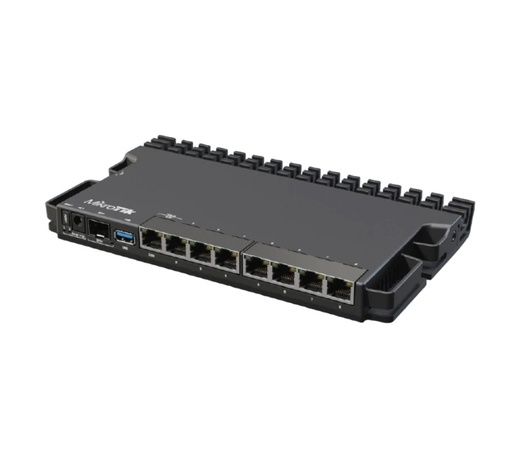
The MikroTik edge router most hybrid sites use: 2.5G, SFP+ 10G, RouterOS level 5.
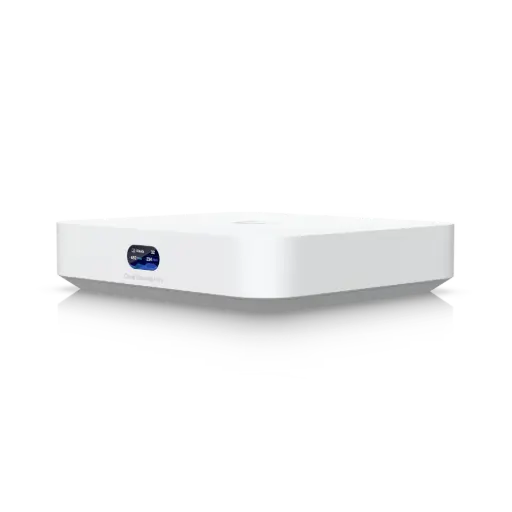
Compact UniFi gateway with the full UniFi Network application built in.
Buying the MikroTik and Ubiquiti ranges in Australia from ARC IP Networks
- Genuine MikroTik sourced through MikroTik's Australian distribution channel, not grey import.
- Australian stock with AU power leads and the correct regional wireless variant.
- Full manufacturer's warranty and local pre-sales help on RouterOS design and sizing.
- GST tax invoice on every order; trade and project pricing for integrators, ISPs and MSPs.
Browse the MikroTik range or call 1300 100 440 for a sizing check.
Common questions
Straight answers from the ARC IP Networks team. Last reviewed September 2026.
Neither is better in general. MikroTik gives you deeper routing (BGP, MPLS, full queueing, scripting) at a lower hardware price and no subscription; Ubiquiti UniFi gives you a single polished controller for gateway, switches, Wi-Fi, cameras and access with far less configuration. The right answer depends on who will run the network.
Yes, and it is common in Australia: a MikroTik router at the edge for routing, VPN and traffic control, with UniFi switches and access points behind it managed from the UniFi Network application.
Per port and per megabit MikroTik hardware is usually cheaper, and RouterOS has no subscription. UniFi hardware costs more but bundles the controller and needs far less engineering time, which is the larger cost on many projects.
UniFi. Its controller applies sensible defaults and manages every device from one screen. MikroTik RouterOS is configured per device through WinBox, WebFig or CLI and rewards people who understand networking.
MikroTik for the routing core and CPE: BGP, MPLS, OSPF and per-customer queueing are included at every price point. Many WISPs still use UniFi for customer Wi-Fi and cameras.
Yes. ARC IP Networks is an authorised Ubiquiti reseller in Australia and supplies genuine MikroTik hardware from Australian stock with manufacturer warranty on both.
Need help choosing?
Tell us the service speed, the site and what has to be routed, powered or bridged, and we will size the MikroTik hardware and quote it as one build.
Related MikroTik guides
- Which MikroTik Router Should You Buy in Australia? hEX, hAP ax, RB5009, L009 and CCR Compared (2026)
- MikroTik Switch Buying Guide Australia: CRS vs CSS, PoE, 2.5G, 10G and 100G Options (2026)
- MikroTik RB5009 Guide: RB5009UG+S+IN vs RB5009UPr+S+IN, and When It Beats a hEX or RB4011
- MikroTik hAP ax2 vs hAP ax3 vs hAP ax lite vs hAP be lite: Which Wi-Fi Router to Buy in Australia (2026)