Yes — in Australia homeowners can install CCTV to protect their own property. The sensible approach is to aim cameras at your own home and boundaries, be considerate of neighbours' private living areas, decide on audio carefully, and follow any strata by-laws. ARC IP Networks is an authorised Hikvision reseller in Australia. This is general information only, not legal advice — always check your current state or territory legislation.
Can homeowners install CCTV in Australia?
Generally, yes. Australian homeowners can install security cameras on their own home to help protect people and property, and CCTV is a normal, legitimate part of home security. The practical rule of thumb is simple: record what's yours — your entries, driveway, yard and perimeter — and be considerate of the people next door.
There is no single national CCTV licence for a homeowner filming their own property. Instead, a mix of state and territory surveillance and listening-device laws, plus strata by-laws for units, set the boundaries. If you're still planning your system, our guides on the best Hikvision cameras for home security and how many cameras you need are a good place to start.
Where can I point my security cameras?
Aim cameras at your own property and its boundaries. The most useful coverage for a home is your entry points, garage, driveway, yard and the edge of your land. It's common — and often unavoidable — for a camera to capture a little of the public footpath or street, and that's usually fine. The considerate approach is to frame the view so your own property is the focus and to avoid pointing directly into a neighbour's private living areas.
| Great to cover | Take extra care with |
|---|---|
| Your front door and entries | A neighbour's windows or doors |
| Your driveway and garage | A neighbour's backyard or pool |
| Your yard and perimeter | The inside of another home |
| Incidental footpath or street | Shared strata areas without approval |
Choosing the right camera style and lens makes it easier to keep the frame on your own land — see turret vs dome vs bullet for placement ideas.
Can my CCTV record my neighbour's property?
A small amount of incidental capture of adjoining areas or public space is common and usually unavoidable, especially in tighter suburban blocks. The considerate approach is to keep your camera's main view on your own property, and to angle or reposition so you're not deliberately overlooking a neighbour's windows, yard or private spaces.
- Angle first. Adjust tilt and position so the frame favours your land before anything else.
- Use privacy masking. Many IP cameras let you black out zones in the image, so you can mask a neighbour's window or garden.
- Talk to your neighbours. A quick chat prevents most concerns, and if someone raises one, adjusting the view usually resolves it.
This is about being neighbourly and respecting reasonable privacy expectations — a well-aimed system protects your home without troubling anyone else.
Can I record audio on my home CCTV?
This is the part to treat carefully. Many security cameras can record sound as well as video, and audio is generally treated separately from video under state and territory listening-device and surveillance-device laws. Those laws commonly restrict recording private conversations that you are not a part of.
Because of that, many homeowners choose to disable the microphone, or to limit audio to their own front door where it's used for two-way talk to a visitor. If you plan to record sound — particularly anywhere it could pick up conversations beyond your own boundary — check your state or territory's current rules first. When in doubt, video-only is the simplest, safest option and still delivers strong home security.

Shopping for Hikvision?
Authorised Hikvision reseller: genuine Australian stock, full warranty, competitive prices and price match available.
CCTV rules for units, apartments and strata
If you live in an apartment, unit or townhouse, the common property — hallways, foyers, car parks, external walls and shared structure — is usually managed by the owners corporation or body corporate. Installing a camera that covers those common areas, or mounting a camera on shared structure, typically needs approval and may be governed by the scheme's by-laws.
Inside your own lot you generally have more freedom, but the same neighbourly and audio considerations still apply. Before you drill into or film any common property, check your by-laws and seek approval. Our guide to the best Hikvision cameras for an apartment or unit covers discreet, strata-friendly options.
Do CCTV laws differ by state or territory?
Yes. Each state and territory has its own surveillance and/or listening-device legislation, so the finer points differ depending on where you live. The federal Privacy Act 1988 generally applies to businesses and organisations rather than to individuals recording their own household for personal purposes — so if you run a home business or a short-stay rental, you may have extra obligations worth checking.
| State / Territory | Commonly cited legislation |
|---|---|
| New South Wales | Surveillance Devices Act 2007 (NSW) |
| Victoria | Surveillance Devices Act 1999 (Vic) |
| Queensland | Invasion of Privacy Act 1971 (Qld) |
| Western Australia | Surveillance Devices Act 1998 (WA) |
| South Australia | Surveillance Devices Act 2016 (SA) |
| Tasmania | Listening Devices Act 1991 (Tas) |
| ACT | Listening Devices Act 1992 (ACT) |
| Northern Territory | Surveillance Devices Act 2007 (NT) |
Legislation names and versions change over time, so please treat this table as a starting point only and read the current version on your state or territory's official legislation website.
How to set up home CCTV the neighbourly way
A simple, positive checklist keeps your system effective and considerate:
- Map coverage to your own property — entries, driveway, yard and perimeter.
- Angle away from neighbours and use privacy masking over any window or yard you can't avoid.
- Decide on audio deliberately and check your state or territory rules before recording sound.
- For units, get owners-corporation approval before touching common property.
- A small 'CCTV in use' sign is a courteous, low-cost touch and can be expected of businesses.
- Keep footage secure with a strong password and up-to-date firmware.
- Buy genuine gear from an authorised Australian reseller for proper warranty and support.
Ready to install? Our DIY Hikvision installation guide walks through mounting and setup, and you can always find where to buy genuine Hikvision in Australia.
Genuine Hikvision cameras for your home
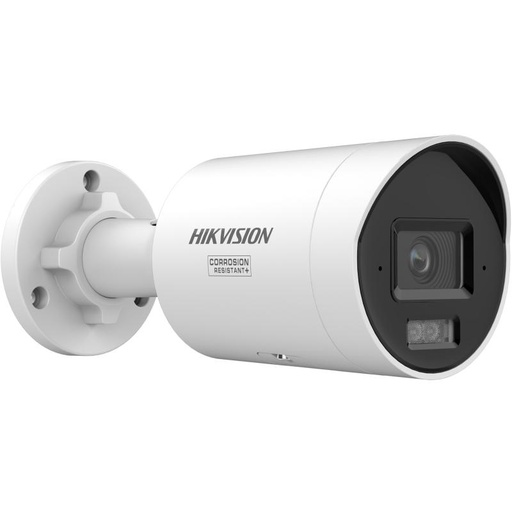
Hikvision DS-2CD2067G3 6MP 2.8mm ColorVu Bullet Camera
A 6MP ColorVu bullet built for driveways and perimeters — ideal for aiming along your own boundary with clear, full-colour night footage.
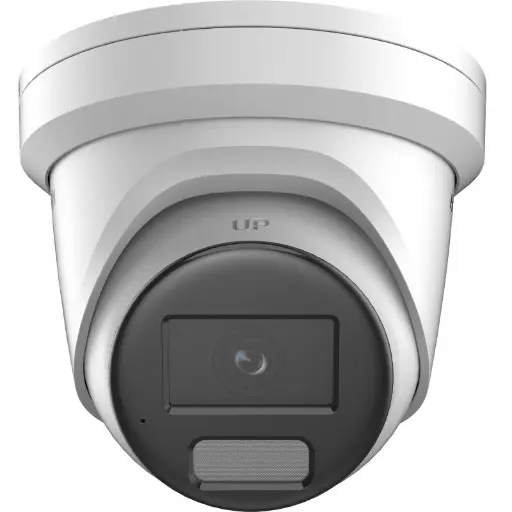
Hikvision DS-2CD2366G2H 6MP 2.8mm Turret IP Camera w/ Mic
A discreet 6MP turret for entries and yards. Like most IP cameras it includes a microphone, so set audio deliberately in line with your state's rules.
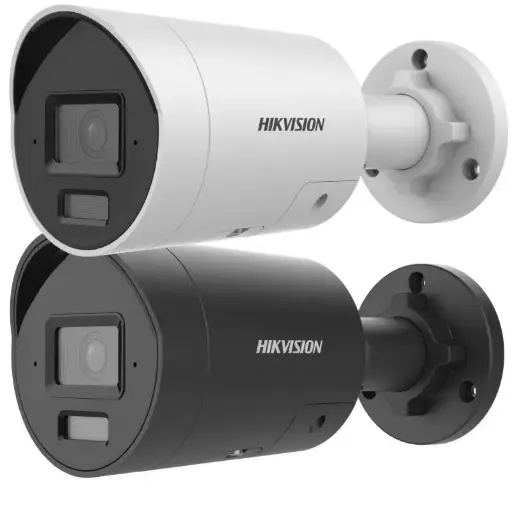
Hikvision DS-2CD2066G2H 6MP 2.8mm AcuSense Strobe Light and Audible Warning Fixed Bullet Network Camera
A 6MP AcuSense bullet that focuses alerts on people and vehicles, so you record what matters on your own property with fewer nuisance notifications.
Related Hikvision guides
- Best Hikvision Cameras for Home Security in Australia
- How to Install Hikvision CCTV Yourself (DIY Guide)
- How Many Security Cameras Do I Need?
- Where to Buy Hikvision Cameras in Australia
- CCTV Signage & Privacy: What's Required in Australia?
- Workplace CCTV & Employee Surveillance in Australia: What Businesses Should Know
Ready to buy?
Shop genuine Hikvision at ARC IP Networks


Authorised Hikvision reseller
Hikvision at ARC IP Networks
AcuSense, ColorVu and DeepinView cameras, NVRs and complete systems. Genuine Australian stock with the full manufacturer's warranty, competitive prices and price match available.
Frequently asked questions
Last updated: 2026-07-14 · Written by the ARC IP Networks team, an authorised Hikvision reseller in Australia.
Generally, yes — homeowners can install CCTV to protect their own property. The specifics are governed by state and territory surveillance and listening-device laws. This is general information, not legal advice; check your current local legislation.
Incidental capture of public space such as the footpath or street is common and usually fine. The considerate approach is to keep your camera's main view on your own property.
It's best avoided. Angle the camera to favour your own land, use privacy masking over any window or yard you can't avoid, and a friendly chat with your neighbour usually prevents any concern.
Audio is treated separately from video and is governed by state and territory listening/surveillance-device laws, which commonly restrict recording private conversations you're not part of. Many homeowners disable the microphone or limit audio to their own door. Check your local rules first.
Signage is good practice and is often expected of businesses. For a home, a visible 'CCTV in use' sign is a courteous touch. Requirements vary by location, so check your state or territory rules.
Inside your own lot you generally can, subject to the usual neighbourly and audio considerations. Cameras covering common property such as hallways or car parks typically need owners-corporation approval and must comply with the scheme's by-laws.
The federal Privacy Act 1988 generally applies to businesses and organisations rather than to individuals recording their own household for personal purposes. A home business or short-stay rental may have additional obligations worth checking.
Refer to your state or territory's official legislation website, or speak with a qualified legal professional. This article is general information only and is not legal advice.
Who we are
About ARC IP Networks
ARC IP Networks is an Australian supplier of security cameras and CCTV systems, based in Blackburn, Melbourne, Victoria. We work with homeowners, installers, integrators and businesses across Australia, supplying Hikvision, Ubiquiti UniFi Protect, Dahua and Jovision CCTV.
We are an authorised reseller for every brand we sell, and the national distributor of Jovision in Australia, so you get genuine Australian stock with the full manufacturer's warranty, never grey imports, at competitive prices. Our team can help you choose the right equipment, and trade customers get trade accounts and project pricing on larger jobs.
- Genuine Australian stock with the full manufacturer's warranty
- Competitive prices, price match available
- Trade accounts for installers, integrators and MSPs
- Australia-wide delivery; showroom in Blackburn, Mon–Fri 9–5 (demos by appointment)
Need help choosing?
Tell the ARC IP Networks team what you are trying to achieve and we will recommend the right equipment and quote it as one order.