For a granny flat or secondary dwelling, the best Hikvision setup is small and self-contained: a compact 4-channel PoE NVR (or a spare run of cables back to the main house recorder) plus one to three cameras covering the entry, driveway and yard. ARC IP Networks, an authorised Hikvision reseller in Australia, can match the kit to your block. Aim every camera at your own boundaries.
What CCTV setup does a granny flat need?
A granny flat, studio or secondary dwelling only needs a handful of cameras, so you don't want a big 16-channel system built for a whole estate. A tidy, cost-effective setup is a compact 4-channel PoE NVR with one to three cameras. The NVR powers and records each camera down a single network cable, so there's no separate power supply at every camera and nothing stored in the cloud that you don't control.
Most secondary dwellings are well covered by three views: the front entry or porch, the driveway or off-street parking, and the rear yard or side access. If it's a genuinely tiny studio, a single well-placed camera over the door often does the job. For help sizing it up, see our guide on how many security cameras you need.
Should you share the main house NVR or run a separate one?
There are two sensible ways to record a granny flat, and the right one depends on who lives there and how the two dwellings are managed.
- Share the main house NVR — if the flat is used by family and the main home already has a Hikvision recorder with spare channels and PoE ports, simply run cables from the flat's cameras back to that NVR. One system, one app login, nothing extra to maintain. Check you have free channels first — our camera-count guide and the NVR range both help here.
- Run a separate compact NVR in the flat — if the flat is rented, occupied by a tenant, or you want its footage kept independent, give it its own small 4-channel PoE NVR. Each household then controls and views only its own cameras. This is the tidiest option for privacy and for clear boundaries between the two dwellings.
For a rented secondary dwelling, a standalone recorder is usually the fairer choice. Our rental-property camera guide covers the landlord-tenant considerations in more detail.
Which cameras and where do they go?
Match the camera to the view. Compact turret cameras suit entries and tight spots, a discreet mini bullet reaches down a driveway, and a ColorVu model keeps a dim, unlit yard in full colour after dark. Here's a simple placement plan for a typical secondary dwelling:
| Area | What you want to see | Camera style | Handy feature |
|---|---|---|---|
| Front entry / porch | Faces of anyone at the door | Compact 6MP turret | Built-in mic, tight framing |
| Driveway / parking | Vehicles and the path to the door | Mini bullet | Longer reach, weatherproof |
| Rear yard / side access | Movement in unlit areas | ColorVu turret | Full-colour night vision |
| Shared gate (optional) | Who comes and goes | Turret or bullet | Person/vehicle detection |
All of these are weatherproof (IP67) for outdoor use. If you're weighing up camera shapes, our turret vs dome vs bullet guide breaks down where each one shines. AcuSense person and vehicle detection helps cut false alerts from trees and passing cars.
How do you respect the occupant's privacy?
A granny flat often houses a family member or tenant with their own front door and their own life, so a little courtesy goes a long way. As a rule, aim every camera at your own boundaries — the entry, driveway, gate and open yard — not at the flat's private windows, its indoor living space or a neighbour's property.
- Frame shots so they cover paths and approaches, not through-windows into bedrooms or bathrooms.
- Keep cameras outdoors and on shared, external areas only.
- If the flat is tenanted, let the occupant know the cameras are there and what they cover — it's courteous and it avoids surprises.
- Trim the field of view (or use privacy masks in the Hikvision menu) if a camera unavoidably catches a private area.
This is general guidance rather than legal advice; recording rules vary by state, so a quick check of your local requirements is worthwhile before you install.

Shopping for Hikvision?
Authorised Hikvision reseller: genuine Australian stock, full warranty, competitive prices and price match available.
Shared or separate Hik-Connect access and self-monitoring
Hikvision's free Hik-Connect app lets you watch live and play back footage from your phone, wherever you are. How you set up access depends on whether the flat shares the main NVR or has its own.
- Separate NVR: add that recorder to the occupant's Hik-Connect account so they self-monitor their own dwelling. You can optionally share the device to a second account (for example the property owner) with view-only rights.
- Shared NVR: everyone views through the one account, or you share individual cameras to a family member's app. Sharing is granular, so you can grant live view without giving full recorder control.
Setup takes a few minutes with the recorder online — follow our step-by-step Hik-Connect remote viewing guide. From there you'll get motion push alerts on your phone, so a small dwelling is genuinely easy to self-monitor without a monitoring contract.
How to choose the right kit
Keep it simple. Count your views (usually one to three), pick a recorder with enough channels and PoE ports, then choose cameras to suit each spot:
- Recorder: a 4-channel PoE NVR covers a granny flat with room to spare, and built-in PoE means one cable per camera. Choose a model with a hard drive already fitted so it records out of the box.
- Everyday cameras: a 6MP compact turret gives sharp, clear detail for entries and general coverage.
- Dark areas: a ColorVu camera keeps unlit driveways and yards in full colour at night.
- Discreet reach: a mini bullet is neat and points naturally down a driveway or path.
Not sure which cameras suit a small home? Our roundup of the best Hikvision cameras for home security in Australia and the apartment and unit guide both cover compact setups. The ARC IP Networks team can spec the exact kit for your block — just ask.
A tidy Hikvision kit for a granny flat
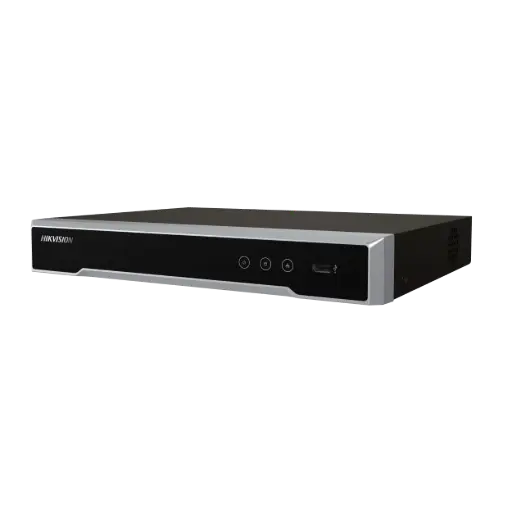
Hikvision DS-7604NI-M1/4P 4-Ch PoE 8K NVR (2TB)
Compact 4-channel PoE NVR with a 2TB drive fitted — the ideal self-contained recorder for a granny flat, or a neat second recorder alongside the main house system. One cable powers and records each camera.
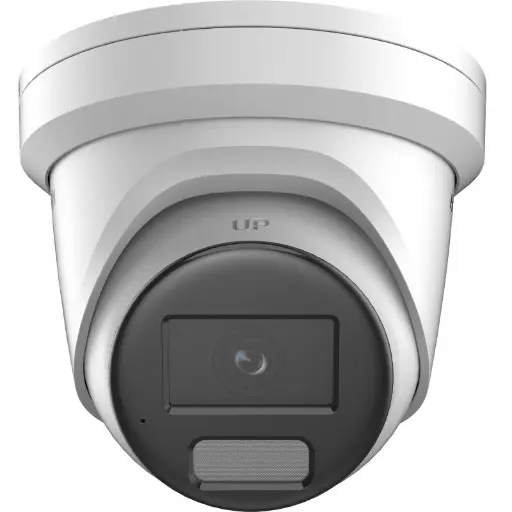
Hikvision DS-2CD2366G2H 6MP 2.8mm Turret IP Camera w/ Mic
6MP compact turret with a built-in mic and a tight 2.8mm view — perfect over a front door or porch for clear faces at the entry.
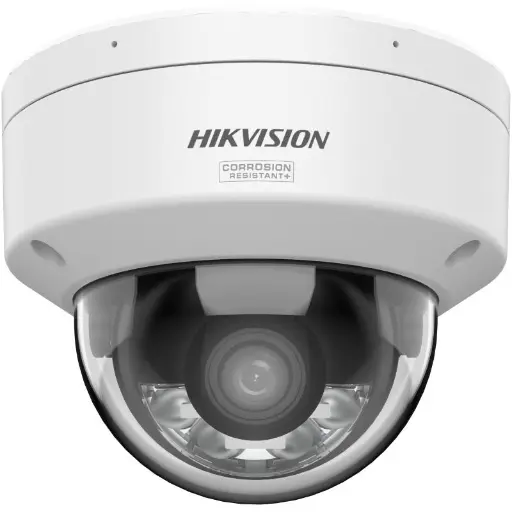
Hikvision DS-2CD2167G3 6MP 2.8mm ColorVu AcuSense Turret
6MP ColorVu AcuSense turret that keeps an unlit driveway or rear yard in full colour after dark, with person and vehicle detection to cut false alerts.
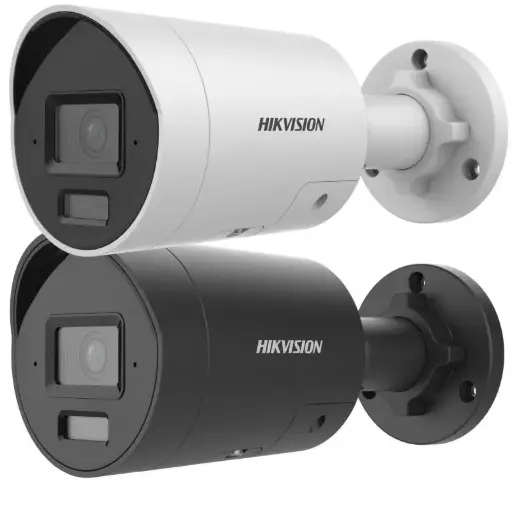
Hikvision DS-2CD2066G2H-IU(2.8mm)(eF) 6MP 2.8mm Powered by Darkfighter Fixed Mini Bullet Network Camera
6MP Darkfighter mini bullet — discreet and weatherproof, it points naturally down a driveway or side path for vehicle and approach coverage.
Related Hikvision guides
- Best Hikvision Security Cameras for an Apartment or Unit
- Best Hikvision Cameras for Home Security in Australia (2026)
- How Many Security Cameras Do I Need? A Simple Guide
- Hik-Connect Setup: Hikvision Remote Viewing Guide
- How to Stop Package & Porch Theft with Security Cameras
- How to Secure Your Home While You're on Holiday (CCTV Guide)
Ready to buy?
Shop genuine Hikvision at ARC IP Networks


Authorised Hikvision reseller
Hikvision at ARC IP Networks
AcuSense, ColorVu and DeepinView cameras, NVRs and complete systems. Genuine Australian stock with the full manufacturer's warranty, competitive prices and price match available.
Frequently asked questions
Last updated: 2026-07-14 · Written by the ARC IP Networks team, an authorised Hikvision reseller in Australia.
Who we are
About ARC IP Networks
ARC IP Networks is an Australian supplier of security cameras and CCTV systems, based in Blackburn, Melbourne, Victoria. We work with homeowners, installers, integrators and businesses across Australia, supplying Hikvision, Ubiquiti UniFi Protect, Dahua and Jovision CCTV.
We are an authorised reseller for every brand we sell, and the national distributor of Jovision in Australia, so you get genuine Australian stock with the full manufacturer's warranty, never grey imports, at competitive prices. Our team can help you choose the right equipment, and trade customers get trade accounts and project pricing on larger jobs.
- Genuine Australian stock with the full manufacturer's warranty
- Competitive prices, price match available
- Trade accounts for installers, integrators and MSPs
- Australia-wide delivery; showroom in Blackburn, Mon–Fri 9–5 (demos by appointment)
Need help choosing?
Tell the ARC IP Networks team what you are trying to achieve and we will recommend the right equipment and quote it as one order.