For a rental or investment property, the best Hikvision setup is a few weatherproof ColorVu or AcuSense cameras covering entries, the driveway and your own boundaries, wired to a small 4-channel PoE NVR you can watch remotely in Hik-Connect. ARC IP Networks supplies genuine Australian-stock gear with local support.
Can I put security cameras on a rental property?
Yes. Landlords routinely protect an investment property with CCTV, and many tenants add cameras for their own peace of mind. The courteous, low-fuss approach is to keep coverage external only — entries, the driveway, the garage and your own boundaries — so the system watches the property, not the people living in it.
Because a rental is often left to run itself, the priorities are simple: cameras that survive Australian weather, footage you can check from your phone, and a tidy install that does not tear up the building. Hikvision's ColorVu and AcuSense outdoor ranges tick all three. New to the brand? Our best Hikvision cameras for home security guide is a good primer, and every model here is genuine Australian stock from ARC IP Networks.
Where should I point cameras at a rental?
Aim for the spots that matter to the property and to whoever is responsible for it, while respecting the privacy of anyone living inside:
- Front entry & door — who comes and goes, plus parcel deliveries.
- Driveway & kerb — vehicles, number plates and the approach.
- Garage, side gate & rear access — the quiet points people test first.
- Shared or common areas — driveways, car parks and stairwells in a block or dual-occupancy.
Point cameras across your own land, not into a neighbour's yard or a tenant's windows. For a house, three to four well-placed outdoor cameras usually cover every approach. Not sure how many? See our DIY install guide for camera placement and cabling tips.
What camera features matter most for a rental?
A rental system needs to be reliable and hands-off. These are the features worth having:
- Weatherproofing (IP67): outdoor Hikvision bullets and turrets are rated to shrug off rain, dust and sun so they keep working through the seasons.
- ColorVu colour night vision: full-colour images after dark instead of grey infrared, so you can make out clothing and vehicle colour at night.
- AcuSense AI: filters motion down to people and vehicles, cutting nuisance alerts from trees, rain and passing cats.
- Active deterrence: models with a strobe light and audible warning can flash and speak when someone lingers, discouraging trouble at the entry.
- PoE (Power over Ethernet): one network cable carries both power and video, so there are no messy plug-packs on the wall.
Want the difference between the two flagship ranges? Read our ColorVu camera hub and browse AcuSense cameras.
Which Hikvision camera type suits each spot?
Bullet and turret cameras are the workhorses for a rental. Here is a quick guide to matching a camera to a job:
| Camera type | Best spot | Why it fits a rental |
|---|---|---|
| ColorVu Bullet | Driveway, long approaches, kerb | Visible “watched” look and a longer reach down the drive. |
| ColorVu Turret | Front door, porch, side gate | Compact, less glare up close, tidy at eye-level entries. |
| Deterrence turret (strobe + audio) | Main gate or vulnerable entry | Flashes and warns to move people on before anything happens. |
| Small PoE NVR | Cupboard, meter box, garage | Records everything locally and powers the cameras over one cable each. |
Mixing a couple of turrets at entries with a bullet on the driveway covers most homes neatly.

Shopping for Hikvision?
Authorised Hikvision reseller: genuine Australian stock, full warranty, competitive prices and price match available.
Do I need an NVR, and how much storage?
Yes — a Network Video Recorder (NVR) is what stores footage and lets you look back over past days. For a rental, a compact 4-channel PoE NVR is ideal: it powers up to four cameras over their network cables and tucks away in a cupboard or meter box. Step up to an 8-channel unit if you want room to add cameras later.
An NVR with a built-in hard drive keeps a rolling window of recordings on site — more storage simply means more days of history before the oldest footage is overwritten. If you are weighing channels and storage, our NVR channels & storage guide walks through it, or browse the full Hikvision NVR range.
How do I check the cameras remotely?
This is the part that makes CCTV genuinely useful for an investment property you do not live at. Hikvision's free Hik-Connect app links your NVR to your phone, so you can view live cameras and play back recordings from anywhere — handy for checking a delivery, a tradesperson visit or an alert between tenancies.
Setup is a quick scan-and-pair once the NVR is online. Our step-by-step Hik-Connect setup & remote viewing guide covers it. You can also grant a property manager their own view without handing over the recorder itself.
What is courteous to install at a rental?
A little courtesy keeps everyone comfortable and the system welcome. Good practice for a rental or investment property:
- Keep cameras outdoors and aimed at your own boundaries, entries and common areas — never inside living spaces.
- Let tenants know the property has external CCTV; most see it as a security benefit.
- Position lenses to cover approaches and shared driveways rather than a neighbour's windows or yard.
- Note any body-corporate or lease requirements before drilling, and choose a tidy PoE install that is easy to hand over.
Done this way, the cameras protect the building and reassure residents at the same time. Ready to buy? Everything here is in stock at ARC IP Networks.
A simple, courteous rental CCTV kit

Hikvision DS-2CD2387G3-LIS2UY-SRB-2.8MM ColorVu 3.0 8 MP Smart Hybrid Light Fixed Turret Network Camera, 2.8 mm, Red/Blue Strobe & Audible Alarm
ColorVu 3.0 turret with a red/blue strobe and audible warning — the deterrence hero for your main gate or entry. Full-colour night vision and AcuSense person/vehicle detection.
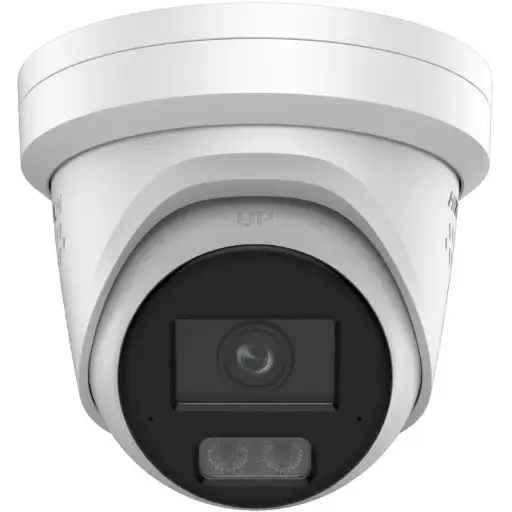
Hikvision DS-2CD2367G3 6MP 2.8mm ColorVu Turret Camera
Compact 6MP ColorVu turret for the front door, porch or side gate — tidy at eye level with 24/7 colour imaging and weatherproof housing.
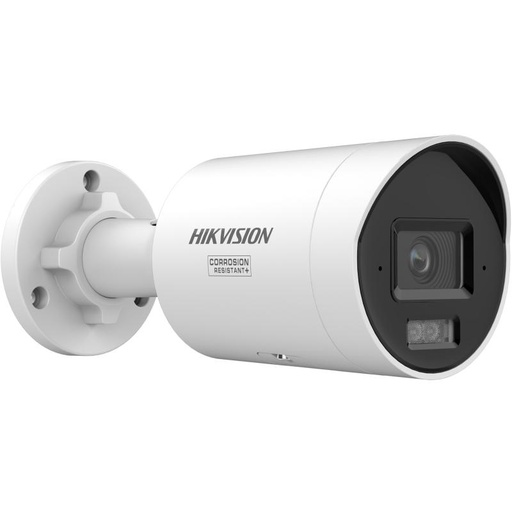
Hikvision DS-2CD2067G3 6MP 2.8mm ColorVu Bullet Camera
6MP ColorVu bullet for the driveway and longer approaches — the visible ‘watched’ look plus colour footage of vehicles and number plates after dark.
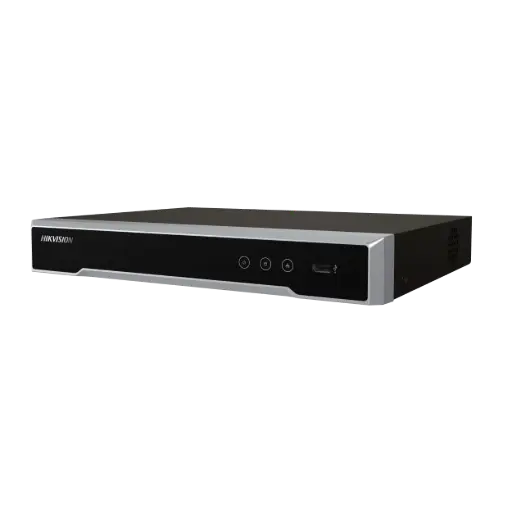
Hikvision DS-7604NI-M1/4P 4-Ch PoE 8K NVR (2TB)
Small 4-channel PoE NVR that powers and records up to four cameras over one cable each — tucks into a cupboard and links straight to Hik-Connect.
Ready to buy?
Shop genuine Hikvision at ARC IP Networks

Authorised Hikvision reseller
Hikvision at ARC IP Networks
AcuSense, ColorVu and DeepinView cameras, NVRs and complete systems. Genuine Australian stock with the full manufacturer's warranty, competitive prices and price match available.
Frequently asked questions
Last updated: 2026-07-14 · Written by the ARC IP Networks team, an authorised Hikvision reseller in Australia.
Who we are
About ARC IP Networks
ARC IP Networks is an Australian supplier of security cameras and CCTV systems, based in Blackburn, Melbourne, Victoria. We work with homeowners, installers, integrators and businesses across Australia, supplying Hikvision, Ubiquiti UniFi Protect, Dahua and Jovision CCTV.
We are an authorised reseller for every brand we sell, and the national distributor of Jovision in Australia, so you get genuine Australian stock with the full manufacturer's warranty, never grey imports, at competitive prices. Our team can help you choose the right equipment, and trade customers get trade accounts and project pricing on larger jobs.
- Genuine Australian stock with the full manufacturer's warranty
- Competitive prices, price match available
- Trade accounts for installers, integrators and MSPs
- Australia-wide delivery; showroom in Blackburn, Mon–Fri 9–5 (demos by appointment)
Need help choosing?
Tell the ARC IP Networks team what you are trying to achieve and we will recommend the right equipment and quote it as one order.