For a permanent home or business system, wired PoE cameras are better: one Cat6 cable carries power and data, so recording is reliable and continuous 24/7 with no batteries or Wi-Fi drop-outs. Choose Wi-Fi, battery or solar/4G cameras only for spots you genuinely cannot cable. ARC IP Networks is an authorised Hikvision reseller in Australia.
What is the difference between wired and wireless cameras?
The words "wired" and "wireless" describe two different things: how a camera gets power and how it sends video. It helps to split cameras into three real-world groups.
- Wired PoE: a single network cable (Cat5e/Cat6) delivers both power and data using Power over Ethernet. The camera plugs straight into a PoE NVR or switch — no power point at the camera and nothing to charge.
- Wi-Fi (wireless data, wired power): video travels over your Wi-Fi, but the camera still needs a nearby power point or plug-pack.
- Battery, solar and 4G: genuinely cable-free — a rechargeable or solar-charged battery for power and Wi-Fi or a 4G SIM for data. Ideal where no cabling is possible.
So a “wireless” camera is rarely 100% wire-free unless it is battery or solar powered. That distinction matters when you plan a system.
Reliability and power: which type stays recording?
Reliability is where wired PoE pulls ahead. Power comes down the same cable from the recorder, so as long as the NVR has power the cameras keep running — there is nothing to charge, no batteries to fade in the cold, and no wireless signal to drop. That makes PoE the natural choice for continuous 24/7 recording to a local PoE NVR.
Wi-Fi cameras depend on signal strength: thick brick walls, distance from the router and interference from neighbouring networks can cause stutter or dropped clips at the worst moment. They also still need a power point nearby. Battery and solar cameras remove the power run entirely, but usually record on motion rather than around the clock to conserve charge, and solar panels need enough Australian sun to stay topped up. For the front door of a permanent install, wired wins; for a shed with no power, solar or 4G earns its place.
Video quality: is wired sharper than Wi-Fi?
The image sensor sets the resolution, and you can buy 4K/8 MP in wired, Wi-Fi and battery models alike. The difference is in sustained quality. A wired connection carries a high-bitrate stream without compressing it to survive a weak Wi-Fi link, so fast movement, number plates and faces stay crisp. Low-light performance depends on the camera, not the cable — technologies like ColorVu full-colour night vision are available on wired models for clear footage after dark.
Wireless cameras can look just as good in a strong-signal spot, but on a congested Wi-Fi network they may drop resolution or frame rate to keep the stream alive. Battery cameras sometimes trade a little quality or add a short record delay to save power. For evidence-grade footage you can rely on, a wired PoE camera is the safer bet.
Install effort: which is easier to set up?
This is where wireless shines. A Wi-Fi or battery camera can be mounted in minutes — screw it up, connect it to the app, done. No cable pulling and no recorder to configure, which is why they are popular for renters and quick single-camera jobs.
Wired PoE takes more planning: you run a cable from each camera back to the NVR or PoE switch. The payoff is a tidy, permanent system with every camera powered and recording from one box. Running Cat6 through a single-storey Australian home with roof-space access is very achievable as a DIY job — see our DIY Hikvision install guide. If you would rather not climb into the roof, a licensed installer can cable a typical home in a day.

Shopping for Hikvision Wi-Fi cameras?
Authorised Hikvision reseller: genuine Australian stock, full warranty, competitive prices and price match available.
Wired PoE vs Wi-Fi vs battery/solar/4G
Here is the fair side-by-side. There is no single “best” — it depends on whether a spot can be cabled and whether you want continuous recording.
| Factor | Wired PoE | Wi-Fi | Battery / Solar / 4G |
|---|---|---|---|
| Power source | PoE cable from NVR/switch | Nearby power point | Battery or solar panel |
| Video link | Wired Ethernet | Home Wi-Fi | Wi-Fi or 4G SIM |
| Reliability | Highest | Depends on signal | Depends on charge/signal |
| 24/7 recording | Yes, ideal | Possible | Usually motion-based |
| Install effort | Cable run needed | Low | Lowest |
| Best for | Permanent home/business | Single spots near power | Sheds, gates, off-grid |
Notice that wired PoE leads on everything except install effort — and that one-off effort buys years of trouble-free recording.
Which is best for my home or business?
Choose wired PoE when the cameras have a permanent home and you want dependable 24/7 coverage — most houses, retail shops, warehouses and offices. Pair PoE cameras with a PoE NVR and you get one neat box that powers, records and lets you view remotely.
Choose Wi-Fi for a single camera near a power point where cabling is awkward — a nursery, a rented flat or a garage.
Choose battery, solar or 4G for places with no power and no cable at all: a rural gate, a paddock, a building site or a shed. Many owners run a wired PoE core for the main property and add one solar or 4G camera for the far corner — the best of both. Not sure how many you need? Read how many cameras do I need.
How to choose the right setup
Work through it in order: (1) list each spot you want covered; (2) for each, decide if a cable can reach the recorder — if yes, use wired PoE; (3) for the few spots that can’t be cabled but have power, use Wi-Fi; (4) for spots with neither, use battery, solar or 4G. Then size a PoE NVR with enough channels and PoE ports for your wired cameras, plus storage for how long you want to keep footage. Our best Hikvision cameras for home security guide is a good next step, and the ARC IP Networks team can spec a kit for your site.
Build a reliable wired PoE system
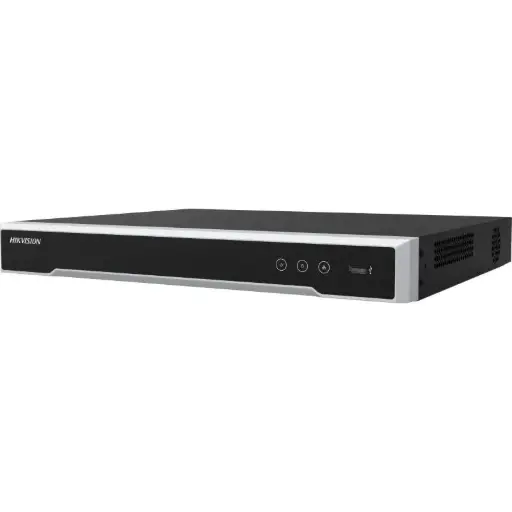
Hikvision DS-7608NI-M2/8P 8-Ch PoE 8K NVR
The wired core: an 8-channel NVR with 8 built-in PoE ports. Each camera runs on a single cable straight to this recorder for continuous local 24/7 recording and remote viewing.
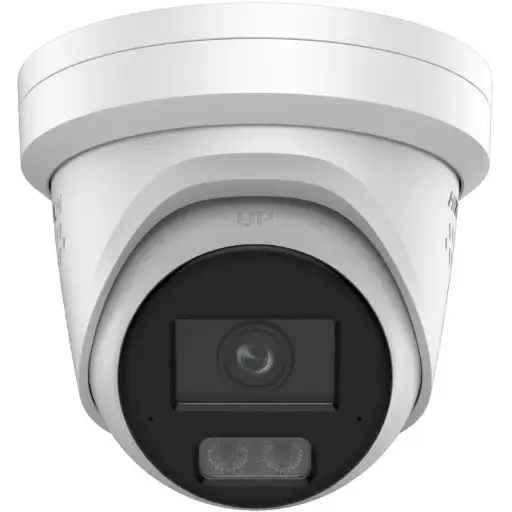
Hikvision DS-2CD2367G3 6MP 2.8mm ColorVu Turret Camera
6MP ColorVu PoE turret with full-colour night vision. One PoE cable for power and video makes it the ideal always-on camera for entries, driveways and shopfronts.
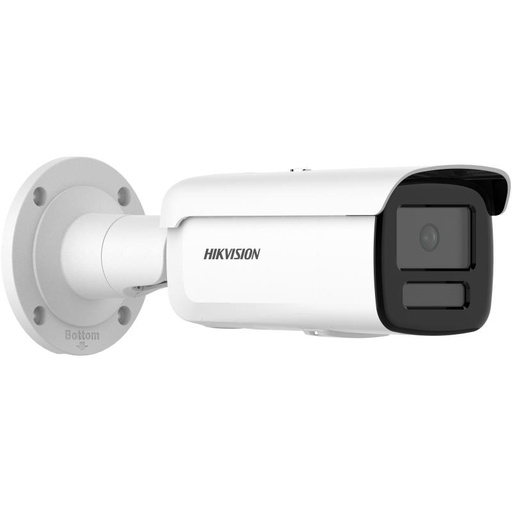
Hikvision DS-2CD2T66G2H 6MP 2.8mm Bullet IP Camera 80m IR
6MP PoE bullet with long-range infrared night vision for perimeters and car parks. Powered and recorded over one cable to the NVR — no batteries, no Wi-Fi to drop.
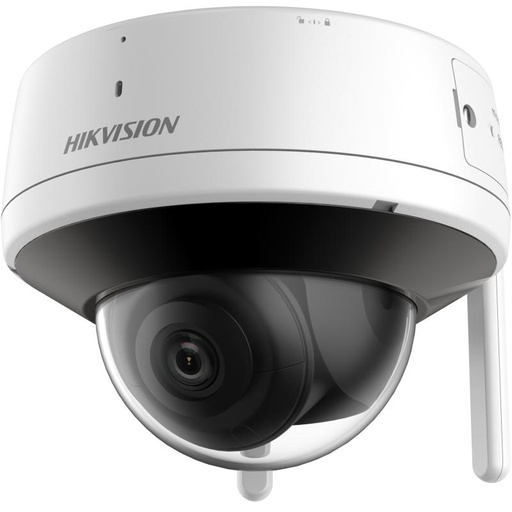
Hikvision DS-2CV2141G2-IDW 4MP Wi-Fi Turret Camera (4mm)
4MP Wi-Fi turret for the hard-to-cable spot. Where a run to the NVR isn’t practical but a power point is close, this wireless-data option keeps install quick.
Related Hikvision guides
- Farm security cameras: best picks for rural Australia
- What Is a PoE NVR? The Secret to Simple Installation
- PoE for CCTV: 802.3af / at / bt Explained
- How to Install Hikvision CCTV Yourself (DIY Guide)
- Best Hikvision Cameras for Home Security in Australia
- 2MP vs 4MP vs 8MP: What Security Camera Resolution Do You Need?
- Turret vs Dome vs Bullet Cameras: Which Should You Choose?
Ready to buy?
Shop genuine Hikvision at ARC IP Networks


Authorised Hikvision reseller
Hikvision at ARC IP Networks
AcuSense, ColorVu and DeepinView cameras, NVRs and complete systems. Genuine Australian stock with the full manufacturer's warranty, competitive prices and price match available.
Frequently asked questions
Last updated: 2026-07-14 · Written by the ARC IP Networks team, an authorised Hikvision reseller in Australia.
Compare the options
Browse the ranges that go with this guide at ARC IP Networks:
- Security cameras without a subscription: cameras that record locally with no monthly fees, including options that work without Wi-Fi
- Security camera systems: complete systems from 2 to 16 cameras with a PoE NVR
- Solar and 4G security cameras: cameras for sites with no mains power or internet
- Read next: Security cameras without a subscription: how local recording works
- Read next: Home security camera system buying guide: 2, 4, 6 or 8 cameras?
Who we are
About ARC IP Networks
ARC IP Networks is an Australian supplier of security cameras and CCTV systems, based in Blackburn, Melbourne, Victoria. We work with homeowners, installers, integrators and businesses across Australia, supplying Hikvision, Ubiquiti UniFi Protect, Dahua and Jovision CCTV.
We are an authorised reseller for every brand we sell, and the national distributor of Jovision in Australia, so you get genuine Australian stock with the full manufacturer's warranty, never grey imports, at competitive prices. Our team can help you choose the right equipment, and trade customers get trade accounts and project pricing on larger jobs.
- Genuine Australian stock with the full manufacturer's warranty
- Competitive prices, price match available
- Trade accounts for installers, integrators and MSPs
- Australia-wide delivery; showroom in Blackburn, Mon–Fri 9–5 (demos by appointment)
Need help choosing?
Tell the ARC IP Networks team what you are trying to achieve and we will recommend the right equipment and quote it as one order.