Yes - security cameras can record 24/7, but you choose how. A recorder can capture continuous footage (a rolling loop that overwrites the oldest video), motion-triggered clips, or AcuSense human/vehicle event recording that saves the most space while still catching what matters. ARC IP Networks is an authorised Hikvision reseller in Australia and can set your NVR to the right mode.
Do security cameras record all the time?
They can - and out of the box most CCTV recorders are set to record continuously, 24 hours a day, 7 days a week. But 24/7 is a choice, not a rule. The recording happens on the recorder (an NVR or DVR), and you decide the recording mode per camera and per time-of-day.
There are three practical ways to record: continuous (everything, all the time), motion detection (only when the scene changes), and event / AcuSense (only when a person or vehicle is detected). Each captures a different amount of footage and uses a very different amount of storage. The rest of this guide breaks them down so you can pick the right one.
Continuous (24/7) recording and the loop
Continuous recording writes video to the hard drive every second, whether anything is happening or not. Nothing is missed - if a car number plate passes at 3am or someone lingers at your fence, it's on the timeline. This is the safest, most complete option and the one most installers leave enabled.
Because the drive is a fixed size, continuous recording uses loop (cyclic) recording: once the disk is full, the recorder automatically overwrites the oldest footage first. That is why storage capacity sets your retention - how many days you can look back before old video is recycled. Want more days? Add a bigger drive or a recorder with more bays. Our NVR channels and storage guide shows how to size it.
Continuous vs motion vs event recording
Here is how the three modes compare on storage and on what you actually capture. Many people run a hybrid: continuous as the base layer, with AcuSense events flagged so alerts and searching are fast.
| Recording mode | Storage used | What you capture |
|---|---|---|
| Continuous (24/7 loop) | Highest - fills the disk fastest | Everything, every second; nothing missed. Oldest footage overwrites when full. |
| Motion detection | Medium - only records on movement | Anything that moves - including trees, rain, shadows and insects (more false clips). |
| Event / AcuSense | Lowest - records human & vehicle events | People and vehicles only; ignores swaying branches and weather, so you keep the clips that matter. |
Prefer fewer nuisance clips without giving up coverage? See ColorVu vs AcuSense for how the smart detection layer fits in.
How AcuSense event recording saves space
AcuSense uses on-device AI to tell the difference between a person or vehicle and harmless movement like foliage, rain, headlights sweeping past or a passing cat. Instead of recording every wobble of a tree (classic motion detection) or every single second (continuous), it can trigger recording only on genuine human and vehicle events.
The result: far less junk footage, a smaller storage footprint, longer retention on the same drive, and alerts you can actually trust. Our AcuSense explained guide covers the detection targets in detail. Many AcuSense cameras also add a strobe light and audible warning that fire on a real event - a helpful active-deterrent layer on top of the recording.

Shopping for Hikvision?
Authorised Hikvision reseller: genuine Australian stock, full warranty, competitive prices and price match available.
Which recording mode should you choose?
There is no single right answer - it depends on the scene and how far back you need to look:
- Continuous (24/7): best for entrances, tills, driveways and anywhere you may need to prove exactly what happened at a given time. Pair with enough storage for your target retention.
- Motion detection: a middle ground for low-traffic areas; expect some false clips from weather and vegetation. See our motion detection setup guide.
- Event / AcuSense: best for busy outdoor scenes where you only care about people and vehicles, and for stretching storage as far as possible.
Our tip: run continuous recording as the base and enable AcuSense events on top. You get a complete timeline plus smart flags that make review and playback fast.
Can I record 24/7 on some cameras and not others?
Yes. Recording mode is set per camera and per time slot on the recorder, so you can mix and match. A common setup: continuous on the front door and till all day, AcuSense events on the side yard, and a schedule that switches the back fence to event-only overnight.
You control this in the NVR's storage/recording schedule - see how to set a recording schedule on a Hikvision NVR. This is also how you balance storage: give the important cameras 24/7 and let the quieter ones record on events only.
AcuSense recorders & cameras for smart 24/7 coverage
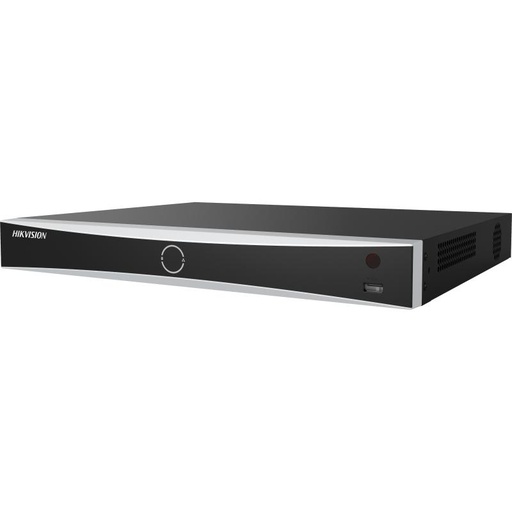
Hikvision DS-7608NXI-I2/8P/VPro 8-Ch AcuSense NVR
8-channel AcuSense NVR with built-in PoE - record 8 cameras continuously or on human/vehicle events, with fast event playback.
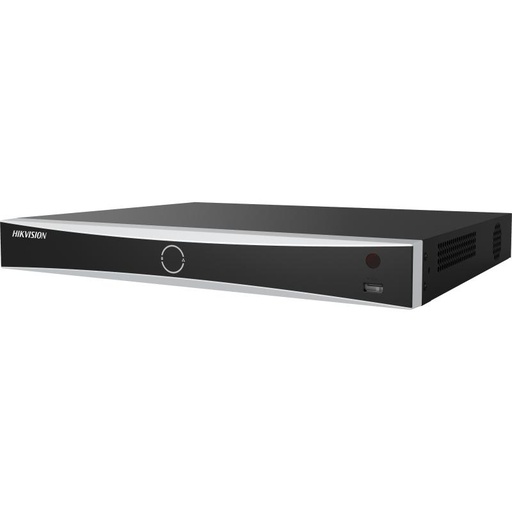
Hikvision DS-7616NXI-I2/16P/VPro 16-Ch AcuSense NVR
16-channel AcuSense NVR for larger sites - mix 24/7 and event recording across cameras and add high-capacity drives for longer retention.
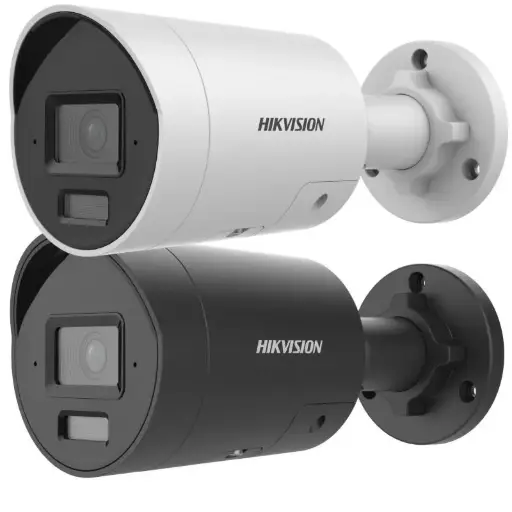
Hikvision DS-2CD2066G2H-I2U/SL 6MP 4mm AcuSense Strobe Light and Audible Warning Fixed Bullet Network Camera
6MP AcuSense bullet camera with strobe light and audible warning - triggers recording and deterrence on genuine human and vehicle events.
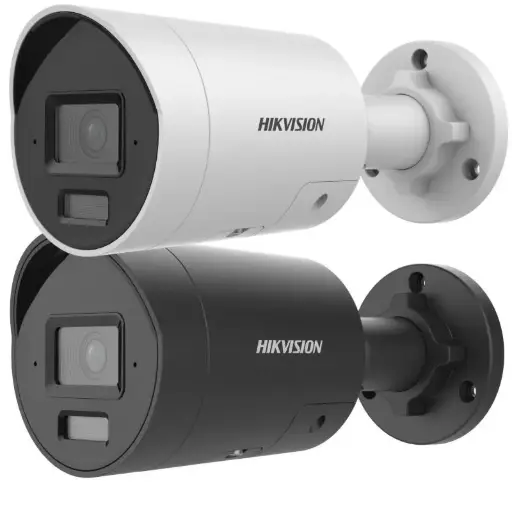
Hikvision DS-2CD2086G2H 8MP 2.8mm AcuSense Strobe Light and Audible Warning Fixed Bullet Network Camera
8MP AcuSense bullet camera with strobe and audio warning - high-resolution detail plus AI filtering to cut nuisance clips.
Ready to buy?
Shop genuine Hikvision at ARC IP Networks


Authorised Hikvision reseller
Hikvision at ARC IP Networks
AcuSense, ColorVu and DeepinView cameras, NVRs and complete systems. Genuine Australian stock with the full manufacturer's warranty, competitive prices and price match available.
Frequently asked questions
Last updated: 2026-07-14 · Written by the ARC IP Networks team, an authorised Hikvision reseller in Australia.
Who we are
About ARC IP Networks
ARC IP Networks is an Australian supplier of security cameras and CCTV systems, based in Blackburn, Melbourne, Victoria. We work with homeowners, installers, integrators and businesses across Australia, supplying Hikvision, Ubiquiti UniFi Protect, Dahua and Jovision CCTV.
We are an authorised reseller for every brand we sell, and the national distributor of Jovision in Australia, so you get genuine Australian stock with the full manufacturer's warranty, never grey imports, at competitive prices. Our team can help you choose the right equipment, and trade customers get trade accounts and project pricing on larger jobs.
- Genuine Australian stock with the full manufacturer's warranty
- Competitive prices, price match available
- Trade accounts for installers, integrators and MSPs
- Australia-wide delivery; showroom in Blackburn, Mon–Fri 9–5 (demos by appointment)
Need help choosing?
Tell the ARC IP Networks team what you are trying to achieve and we will recommend the right equipment and quote it as one order.